

Unlock the power of SEO for your videos! Learn essential tips to rank higher on YouTube and Google, boosting visibility and engagement.
Video SEO is the practice of structuring video content, metadata, and on-page signals so search engines and AI systems can find, retrieve, and cite the exact moment that answers a query. Here’s your highest-leverage starting checklist:
- Clean transcript: Upload a human-corrected, punctuated SRT or WEBVTT file, not the auto-generated version.
- Front-load the answer: Speak the explicit answer and the query phrase within the first 30–60 seconds.
- Add chapters: Write chapter titles that mirror the sub-questions viewers are actually searching.
- Embed with VideoObject schema: Place the video on a canonical page with JSON-LD VideoObject markup.
- Publish a 20–40s single-question clip: Short, self-contained clips are the format AI citation pipelines favor most.
Get those five things right and you’re already ahead of most creators. The payoff: appearances in Google AI Overviews with timestamped deep links, stronger YouTube search and Suggest visibility, and higher click-through rates from video rich snippets.
Key Takeaways
A properly structured transcript, chaptered video, and VideoObject schema on a canonical host page are the three non-negotiable foundations of a video SEO strategy that earns AI citations and YouTube search rankings.
| Point | Details |
|---|---|
| Transcript quality is the retrieval surface | Upload a human-corrected SRT file; auto-captions break AI citation chunking. |
| Answer in the first 30–60 seconds | Speak the query phrase and answer early so AI systems can pull a clean quote. |
| Chapters multiply citation opportunities | Descriptive chapter titles let one video get cited for multiple sub-questions. |
| VideoObject schema unlocks rich results | Add all four required fields plus hasPart Clip entries and validate with Rich Results Test. |
| Measure CTR and retention first | These two metrics tell you faster than anything else whether your metadata and pacing are working. |
How do you find video keywords that drive YouTube traffic and AI citations?
Start with intent, not volume. Video queries fall into four buckets: how-to, what-is, troubleshooting, and product-demo. How-to and show-me queries win the most AI citations because AI systems are built to retrieve demonstrations, not opinions. Prioritize those first.
Step-by-step keyword research workflow
- Open YouTube and type your seed topic. Watch the Autocomplete suggestions. Each one is a real query with real search volume. Screenshot the top 10.
- Run a Google search for
site:youtube.com [your topic]. The titles that rank on page one tell you exactly what Google considers the best video match for that query. - Check Google Trends. Compare two or three of your candidate phrases. Trending upward beats high-volume-but-flat every time.
- Pull one paid tool check. Semrush, VidIQ, or TubeBuddy each surface search volume estimates and competition scores for YouTube queries. You don’t need all three. Pick one and use it consistently.
- Filter to mid-tail and long-tail phrases. A phrase with 3–5 words and moderate competition is the sweet spot for creators who aren’t already channel authorities. Broad single-word terms are a losing bet early on.
- Reverse-engineer the top-cited videos. Open the top three results for your target query. Note what words appear in the title, the first chapter label, and the first two sentences of the description. Those are your signal fields.
Translate a keyword into a video brief
Once you have a phrase, convert it into a one-line angle and a 30–40 second clip idea. Here’s how that looks in practice:
- Query: “how to add chapters to YouTube video”
- One-line angle: “Show the exact steps to add timestamps in the description box so chapters appear automatically.”
- Clip idea: A 35-second screen recording: open YouTube Studio, paste three timestamps, hit save, show the chapter bar appearing.
That brief is enough to script, record, and upload. Keep it that tight.
Pro Tip: Use YouTube Studio’s built-in analytics to find videos you already publish that rank on page two or three. Those are your fastest wins. Optimize their transcripts, chapters, and descriptions before you produce anything new.
How do you script and structure videos so search systems can retrieve precise moments?
The answer goes in first. Not after the intro music, not after you introduce yourself. The explicit answer to the query question belongs in the first 30–60 seconds, spoken clearly, with the keyphrase in the sentence. AI-driven answer systems retrieve short, timestamped moments from videos, and a clean transcript plus chapter markers significantly increases the chance your video gets cited.
Answer-first scripting
Write your opening line as a complete, standalone answer. If someone searched “how to add chapters to a YouTube video,” your first spoken sentence should be something like: “To add chapters to a YouTube video, paste timestamps in the description box starting at 0:00.” That sentence, pulled verbatim from your transcript, is what an AI system quotes.
Then expand. The next 60–90 seconds can cover why it matters, what the format looks like, and common mistakes. But the answer comes first, always.
The chunkable scripting pattern
Each chapter in your video should follow the same structure:
- State the sub-question (spoken aloud, not just on screen).
- Answer it in one sentence.
- Show or demonstrate for 15–25 seconds.
- Transition to the next chapter.
That pattern makes every chapter a self-contained answer. Chapters multiply a video’s citation surface: videos with descriptive chapter markers get cited multiple times for different sub-questions far more often than non-chaptered videos.
Transcript best practices
Auto-captions are a starting point, not a finish line. Run them through a human review pass or use a service like 3Play Media to get corrected, punctuated SRT files. Align timestamps to sentence boundaries, not mid-phrase. Remove filler language (“um,” “you know,” “like”) that breaks chunking. A cleaned, human-reviewed transcript is the primary retrieval surface for AI engines; the visual frames serve as confirming evidence, not the main signal.
Formats that win
Short single-purpose clips (20–40 seconds, one question, one answer) are the format AI citation pipelines favor. Longer videos still get cited, but only when they contain clean, cueable chunks with precise chapter markers. Use short clips for high-intent, narrow queries. Use long-form with dense chaptering for broad topics where you want to capture multiple sub-questions in one upload.
Production checklist
- Write script with answer in line one.
- Mark chapter breaks in the script before recording.
- Record with clear audio (lapel mic or condenser, not built-in laptop mic).
- Add burn-in captions during editing for accessibility and retention.
- Export corrected SRT file alongside the video file.
- Upload video, then upload SRT separately in YouTube Studio.
- Add chapter timestamps to the description.
- QA: watch the first 60 seconds and confirm the answer is spoken clearly and early.
Pro Tip: Write each chapter’s opening sentence so it reads as a complete answer when quoted out of context. Include the keyphrase verbatim in that sentence. That’s the line AI systems pull.
What YouTube metadata moves rankings and AI citation odds?
Metadata is where most creators leave points on the table. Titles, descriptions, thumbnails, and captions each send distinct signals to YouTube’s ranking models and to Google’s indexing pipeline. Get them right and you’re optimizing for both YouTube search and Google discoverability at the same time.
Title strategy
Front-load the keyword. The first three words of your title carry the most weight in YouTube’s search index. State the specific outcome, not a vague teaser. “How to Add YouTube Chapters (Step by Step)” outperforms “You Won’t Believe How Easy This Is” every time.
Test title variants after 7–14 days using YouTube Studio’s A/B title experiment feature. Watch CTR as your primary signal. If CTR drops below your channel average, swap the title.
Description structure
Open with a 1–2 sentence answer to the query. This text appears in Google’s search snippet and in YouTube’s search results. After that:
- Add chapter timestamps (0:00 format).
- Write a 200–300 word summary using semantic keyword variations, not exact-match repetition.
- Include relevant links (your site, related videos, tools mentioned).
The description is also where accurate transcripts and description structure that mirrors spoken content correlate with higher AI citation rates.
Thumbnail best practices
Thumbnails drive CTR, and CTR is a satisfaction signal YouTube’s algorithm weighs heavily. Avoid cluttered thumbnails with three faces and five text blocks.
A/B test thumbnails every 30 days on your top-performing videos. YouTube Studio now supports thumbnail experiments natively. Run each variant for at least two weeks before calling a winner.
For more on visual optimization, the principles in practical image SEO tips apply directly to thumbnail design.
Tags and hidden metadata
YouTube states tags are primarily for disambiguation and are not a primary ranking signal. Use 5–10 tags to clarify synonyms and common misspellings of your topic. Don’t stuff 30 tags hoping one sticks. Focus your energy on CTR, retention, and satisfaction signals instead.
Captions and transcript upload
Replace auto-captions with your corrected SRT file. Go to YouTube Studio > Subtitles > Upload file. Timestamp precision matters: captions that drift more than one second from the spoken word reduce the accuracy of AI retrieval.
End screens, playlists, and cards
End screens keep viewers in your content ecosystem. Add them at the 20-second mark before the video ends. Cards mid-video surface related content at the moment of highest relevance. Playlists group related videos into a pillar-cluster structure that signals topical authority to YouTube’s recommendation engine.
Upload asset checklist
- [ ] Title: keyword in first three words, specific outcome stated
- [ ] Description: 1–2 sentence answer opener, chapters, 200–300 word summary
- [ ] Thumbnail: high contrast, single subject, readable text
- [ ] Tags: 5–10 disambiguation tags only
- [ ] Captions: corrected SRT uploaded, not auto-generated
- [ ] End screen: at least one related video linked
- [ ] Playlist: video added to the relevant topical playlist
Dos and don’ts:
- Do: write descriptions that mirror your spoken script.
- Don’t: use clickbait titles that don’t match the video content (YouTube’s satisfaction signals will punish the mismatch).
- Do: upload a custom thumbnail for every video.
- Don’t: rely on tags as a visibility strategy.
How do you implement VideoObject schema so Google shows rich results?
VideoObject schema is what tells Google your page contains a video, what that video is about, and where to find specific moments. Without it, Google has to guess. With it, your video becomes eligible for video rich results, timestamped deep links, and AI Overview citations.
Required and recommended properties
Google’s documentation lists four required fields and several recommended additions:
| Property | Required? | Notes |
|---|---|---|
name |
Yes | Video title, matches your YouTube title |
description |
Yes | 300 characters, mirrors description opener |
thumbnailUrl |
Yes | Direct URL to a high-resolution thumbnail image |
uploadDate |
Yes | Date in standard format (e.g., 2026-03-15) |
duration |
Recommended | Duration formatted as PT4M30S |
contentUrl |
Recommended | Direct URL to the video file |
embedUrl |
Recommended | YouTube embed URL |
hasPart (Clip) |
Recommended | Chapter markers with startOffset and endOffset |
Schema defines the full VideoObject type including interactionStatistic and hasPart, which are the authoritative field names for JSON-LD implementations.
JSON-LD example
{
  "@context": "https://schema.org",
  "@type": "VideoObject",
  "name": "How to Add Chapters to a YouTube Video",
  "description": "Add chapters to any YouTube video by pasting timestamps in the description box starting at 0:00.",
  "thumbnailUrl": "https://example.com/thumbnails/youtube-chapters.jpg",
  "uploadDate": "2026-03-15",
  "duration": "PT4M30S",
  "embedUrl": "https://www.youtube.com/embed/VIDEO_ID",
  "hasPart": [
    {
      "@type": "Clip",
      "name": "What are YouTube chapters?",
      "startOffset": 0,
      "endOffset": 45,
      "url": "https://www.youtube.com/watch?v=VIDEO_ID&t=0s"
    },
    {
      "@type": "Clip",
      "name": "How to add timestamps in the description",
      "startOffset": 46,
      "endOffset": 120,
      "url": "https://www.youtube.com/watch?v=VIDEO_ID&t=46s"
    }
  ]
}
Place this in a <script type="application/ld+json"> tag in the <head> of your host page. For broader schema strategy, semantic search guidance covers how structured data fits into a full site architecture.
Hosting best practices
Schema only works when the video is actually watchable on the page. Embed the video prominently near the top of the page, not buried below 2,000 words of text. Make the transcript visible in the page content, either as a collapsible section or inline below the video. A page with schema but no watchable video, or a video behind a login wall, gets no rich result benefit.
Use a stable canonical URL for the host page. If you move the page, update the schema and redirect the old URL.
Technical QA checklist
- [ ] Validate with Google’s Rich Results Test
- [ ] Confirm video loads on mobile without horizontal scroll
- [ ] Check page load time with video embedded (target under 3 seconds)
- [ ] Lazy-load the video player if it’s below the fold
- [ ] Verify
hasPartClip entries match actual chapter timestamps
Pro Tip: Embed your YouTube video on a canonical host page AND keep it on YouTube. You get YouTube’s distribution network plus your own page’s schema eligibility. The two don’t compete. They compound.
How do you promote videos and build channel authority that lasts?
Publishing is the starting line, not the finish. Distribution and channel authority are what separate videos that rank for six months from videos that spike and disappear. The pillar-cluster model applies to video just as well as it does to written content.
Pillar-cluster model for video
Produce 3–5 pillar videos that cover a broad topic end-to-end (10–20 minutes, dense chapters). Then produce cluster clips (20–40 seconds each) that answer the granular sub-questions your pillar videos raise. Link between them: mention cluster clips in pillar descriptions, add cards at the relevant timestamp, and group them in a dedicated playlist.
This structure signals topical authority to YouTube’s recommendation engine. A viewer who watches your pillar video and then clicks a cluster clip sends a strong session-time signal.
30/60/90-day promotion calendar
Week 1 (immediate):
- Email your list with a direct link and a one-sentence reason to watch.
- Post to your community tab on YouTube with a clip preview.
- Cross-post a 30-second teaser to Instagram Reels, LinkedIn, and X.
- Embed the video on the most relevant page of your site.
- Reply to every comment in the first 48 hours. Early engagement signals matter.
Month 1 (momentum):
- Implement VideoObject schema on the host page.
- A/B test the thumbnail (run for two weeks minimum).
- Pitch the video as a resource to two or three newsletters or communities in your niche.
- Add the video to an existing blog post where it answers a question the post raises.
Quarter 1 (scale):
- Publish your next two pillar videos.
- Produce 5–10 cluster clips from existing long-form content.
- Acquire contextual backlinks to the host page by getting the video embedded in third-party articles.
- Review YouTube Analytics and Google Search Console for ranking and citation gains.
For cross-posting tactics that drive early engagement, social media visibility strategies cover the distribution mechanics in detail.
Shorts vs. long-form: distinct strategies
YouTube’s ranking architecture runs separate models for Shorts and long-form content. A viral Short can attract viewers who don’t engage with your long-form content unless the formats and topics are tightly aligned. Don’t assume a Short will funnel viewers to your 15-minute deep dive automatically.
Use Shorts for: single-tip clips, trending audio hooks, and top-of-funnel awareness. Use long-form for: comprehensive tutorials, product demos, and content you want to rank in YouTube search. When you repurpose a clip as a Short, add a text overlay that names the full video and directs viewers to it.
Promotion channel priorities (limited budget)
- Email list: highest conversion, lowest cost. Always first.
- YouTube community posts: free, reaches existing subscribers.
- Embedding on site pages: compounds SEO value over time.
- Social cross-posting: reach new audiences, but tailor the format per platform.
- Backlink outreach: highest effort, highest long-term payoff for Google ranking.
What metrics tell you if your video SEO is actually working?
Numbers without context are noise. Here’s what to watch, what each metric actually tells you, and when to act on it.
Primary YouTube metrics
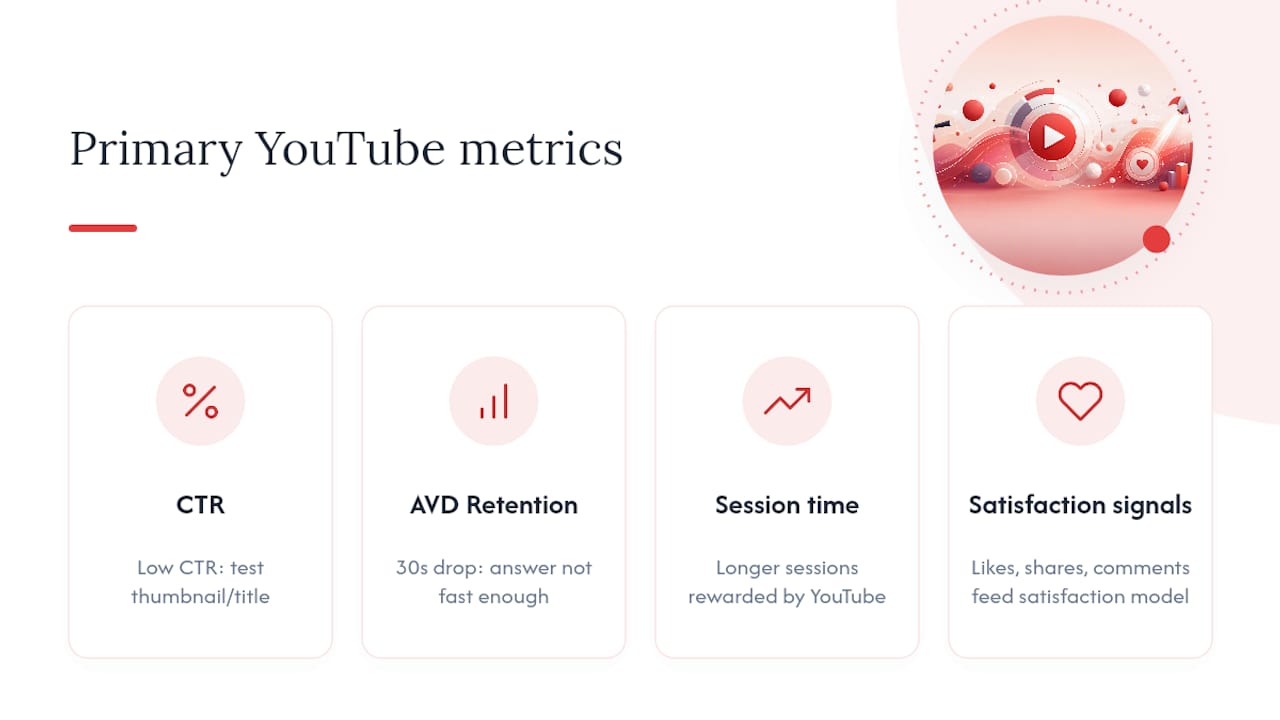
CTR (click-through rate): The percentage of impressions that become views. Low CTR usually means the thumbnail or title isn’t matching viewer intent. A/B test immediately if CTR falls below your channel average.
Average view duration (AVD) and audience retention curve: AVD tells you how long people stay. The retention curve shows exactly where they leave. A sharp drop at the 30-second mark means your answer isn’t landing fast enough. A gradual decline is normal. A spike at a chapter marker means that topic is resonating.
Session time: How long a viewer stays on YouTube after watching your video. YouTube’s algorithm rewards videos that keep people on the platform, not just on your channel.
Satisfaction signals: Likes, shares, and comments. These aren’t vanity metrics. They’re direct inputs into YouTube’s satisfaction model.
Hosted-video signals
Open Google Search Console and filter by your host page URL. Check impressions and clicks from search. If Google is showing a video rich result for your page, you’ll see it in the “Search appearance” filter. If impressions are high but clicks are low, your title or thumbnail needs work.
For a deeper look at AI-driven content visibility, monitoring whether your video appears in AI Overviews requires manual spot-checking for your target queries.
Metrics reference table
| Metric | What it measures | Target or action |
|---|---|---|
| CTR | Title + thumbnail appeal | Below channel average: A/B test title or thumbnail within 7 days |
| Average view duration | Answer quality and pacing | Aim for 50%+ of video length; investigate drops at chapter breaks |
| Audience retention at 30s | Answer-first effectiveness | Below 60%: move the answer earlier in the script |
| Session time | Platform satisfaction signal | Rising session time correlates with increased Suggested placement |
| Search Console impressions | Google indexing and rich result eligibility | Zero impressions after 14 days: check schema validation |
| Search Console clicks | Organic traffic from Google video results | Low clicks with high impressions: revise page title and meta description |
Testing cadence and realistic timelines
- Thumbnails and titles: test for 7–14 days, then decide.
- Description and chapter changes: allow 30 days for Google to re-index and for YouTube’s algorithm to re-evaluate.
- Content-level changes (re-recording or re-editing): allow 30–60 days for full signal recalibration.
Expect citation or ranking changes anywhere from 24 hours (for a video Google indexes quickly) to 60 days (for a new channel with limited authority). New channels take longer. Channels with existing authority see faster movement after optimization.
What tools and templates do you need for SEO-ready video publishing?
You don’t need every tool. You need the right one for each task. Here’s the short list.
Tools by task
Keyword research:
- YouTube Studio: free, built-in analytics show what queries already drive traffic to your channel. Start here.
- VidIQ: browser extension that surfaces keyword scores, competition data, and tag suggestions directly on YouTube pages. Good for creators who want fast, on-platform research.
- TubeBuddy: similar to VidIQ with A/B testing for thumbnails and titles built in. Stronger for testing workflows.
- Semrush: broader keyword data including Google search volume for video queries. Better for marketers who run both written and video content.
Transcripts and captioning:
- 3Play Media: professional captioning with high accuracy and fast turnaround. Best for teams that publish frequently and need reliable SRT files.
- Otter.ai: AI-assisted transcription with a human-review editor. Good for solo creators on a tighter budget who can spend 20–30 minutes cleaning a transcript.
- YouTube Studio’s built-in editor: free, but auto-captions need significant correction. Use it as a starting draft, not a final product.
Schema validation:
- Google Rich Results Test: paste your page URL or your JSON-LD code directly. It tells you which fields are valid, which are missing, and whether your page is eligible for rich results. Always validate before publishing.
AI citation monitoring:
- Spot-check your target queries manually in ChatGPT, Perplexity, and Google AI Overviews weekly. There’s no fully automated tool for this yet. Manual checks take five minutes and tell you exactly whether your video is being cited.
Printable upload checklist
Use this at every upload:
- File name: descriptive, keyword-included (e.g.,
how-to-add-youtube-chapters.mp4), no spaces. - Title: keyword in first three words, specific outcome, under 60 characters.
- Description opener: 1–2 sentence answer to the query, written before the chapter list.
- Chapters: timestamps starting at 0:00, chapter titles that mirror sub-questions.
- Captions: corrected SRT uploaded, auto-captions replaced.
- Thumbnail: exported at 1280x720, under 2MB, high contrast.
- Tags: 5–10 disambiguation tags, no stuffing.
- VideoObject schema: added to host page JSON-LD, validated with Rich Results Test.
- Embed placement: video embedded near the top of the host page, transcript visible on page.
- Cross-posting: teaser posted to email list, community tab, and at least one social platform.
Sample description opener template
[Query phrase answered directly in one sentence.] In this video, you’ll see [specific outcome] in [time or steps]. Chapters below.
Example: “To add chapters to a YouTube video, paste timestamps in the description box starting at 0:00. In this video, you’ll see the exact format and a live demo in under four minutes. Chapters below.”
Sample chapter list template
0:00 What are YouTube chapters?
0:45 How to format timestamps in the description
1:30 Common mistakes that break chapters
2:45 How to verify chapters are working
3:30 Quick recap
Each chapter title is a sub-question or a clear topic label. No vague titles like “Part 2” or “More tips.”
Captioning service evaluation
48-hour turnaround, and cost per minute of audio. 3Play Media sits at the premium end. Otter.ai with manual cleanup sits at the budget end. For most creators publishing two to four videos per month, Otter.ai plus a 20-minute review pass is the practical choice.
What I’ve learned building systems that improve AI retrieval and search visibility
Most creators treat video SEO as a checklist they run once at upload. The ones who compound their results treat it as a system: a repeatable workflow where every video feeds into a structured content architecture, every transcript gets cleaned before the video goes live, and every chapter title is written with a specific sub-query in mind.
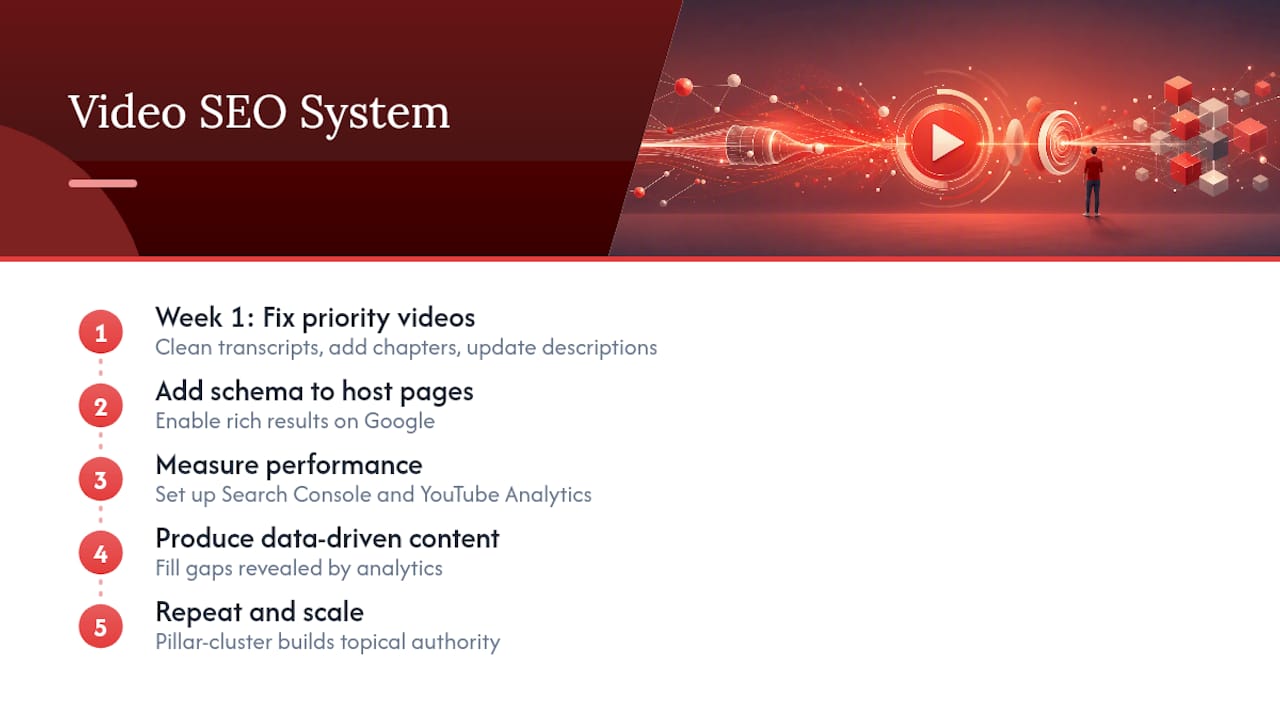
The pattern I see repeatedly with clients who improve their AI citation rates isn’t a single clever tactic. It’s process discipline applied consistently. They pick 5–10 priority videos, fix the transcripts, add chapters, and update the descriptions in week one. Then they implement schema on the host pages. Then they measure. Then they produce new content that fills the gaps the data reveals.
What compounds fastest is the pillar-cluster model applied to video. When a pillar video ranks and its cluster clips answer the follow-up questions, the channel builds topical authority that YouTube’s recommendation engine rewards with Suggested placement. That’s where the real traffic lives, not just in search. The transcript quality is what unlocks AI citations. The schema is what unlocks Google rich results. None of it works in isolation, and all of it is measurable within 30–60 days if you set up Search Console and YouTube Analytics correctly before you start.
Sources
The references below are the most practical starting points for implementation:

About the Author
Josh AndersonCo-Founder & CEO at Rule27 Design
Operations leader and full-stack developer with 15 years of experience disrupting traditional business models. I don't just strategize, I build. From architecting operational transformations to coding the platforms that enable them, I deliver end-to-end solutions that drive real impact. My rare combination of technical expertise and strategic vision allows me to identify inefficiencies, design streamlined processes, and personally develop the technology that brings innovation to life.
View Profile

