

Discover how to do Google SEO effectively with our comprehensive small business guide. Attract more customers and enhance your online presence.
TL;DR:
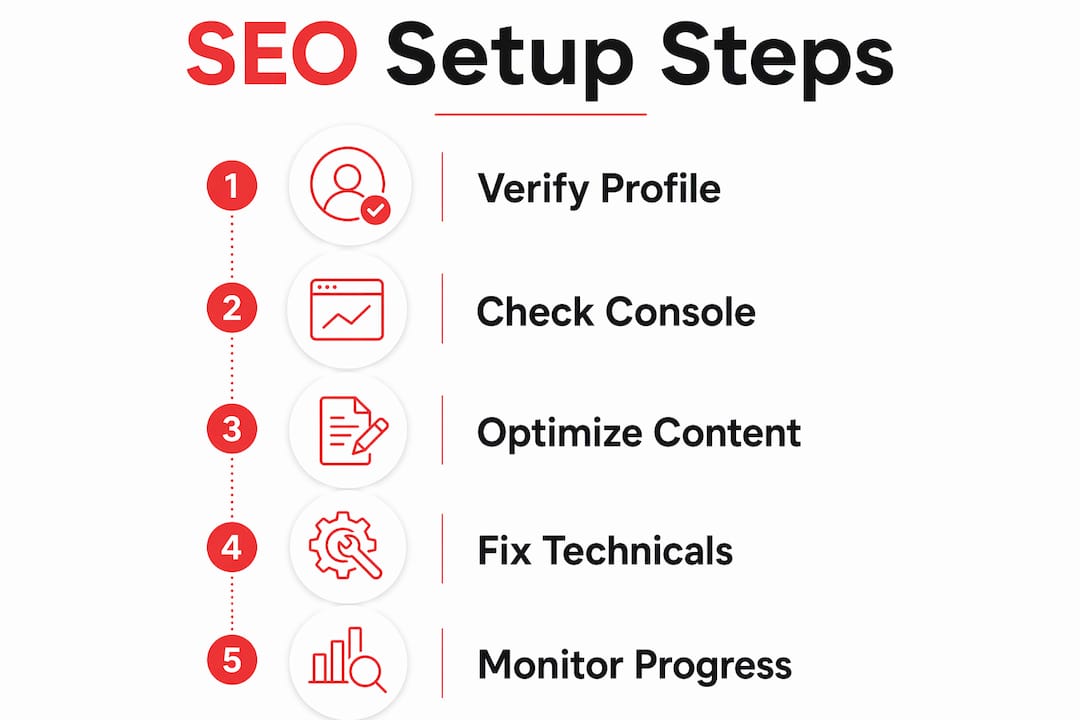
- Google SEO involves optimizing your website to rank higher in search results and attract relevant visitors. Success depends on verifying tools like Google Business Profile, Search Console, and ensuring website security with HTTPS; creating helpful, human-focused content; fixing technical issues; and monitoring progress over several months. Patience and consistent effort are key to long-term growth and improved search visibility.
Google SEO is the process of optimizing your website and online presence to rank higher in Google’s search results, attracting more relevant visitors and potential customers. The industry term for this practice is search engine optimization, and it combines technical setup, content quality, and user experience into one ongoing effort. You do not need a big budget or a technical background to get started. What you need is a clear process, the right tools, and patience. This guide covers exactly how to do Google SEO in 2026, from first setup through long-term monitoring.
What tools and setup do you need to start Google SEO?
Before writing a single word of content, you need three foundational tools in place. Skip this step and your SEO work builds on sand.
Google Business Profile is the starting point for local SEO. It puts your business on Google Maps and in local search results. Verification takes 1–2 weeks and can happen via postcard, phone, or email. That wait is worth it. A verified profile signals legitimacy to Google and gives you a direct channel to manage your business information.
Google Search Console is your window into how Google sees your site. Domain verification takes only minutes, though performance data can take 1–3 days to populate. Once it is active, submit your XML sitemap through the Search Console interface. This tells Google which pages exist and speeds up indexing.
HTTPS (SSL) is non-negotiable. Google treats HTTPS as a ranking signal, and browsers flag non-secure sites with a warning that kills visitor trust. Your hosting provider can install an SSL certificate, often for free.
| Tool | Function | Priority |
|---|---|---|
| Google Business Profile | Local search visibility and Maps presence | High |
| Google Search Console | Indexing, performance data, error alerts | High |
| HTTPS / SSL | Security signal and ranking factor | High |
| XML Sitemap | Guides Google to all your pages | Medium |
| Robots.txt | Controls which pages Google can crawl | Medium |
- Claim and verify your Google Business Profile before anything else.
- Submit your sitemap at Search Console under the “Sitemaps” tab.
- Check your robots.txt file to confirm you are not accidentally blocking pages.
- Confirm your site loads over HTTPS, not HTTP.
Pro Tip: Run your homepage URL through Google’s URL Inspection tool in Search Console right after setup. It tells you instantly whether Google can access and index your page.
How do you find the right keywords for your business?
Keywords are the phrases your potential customers type into Google. Choosing the right ones is the difference between traffic that converts and traffic that bounces.
Start with purchase-intent keywords. These are phrases that signal a buyer is ready to act, such as “plumber in Austin” or “custom wedding cakes near me.” Informational keywords like “how to fix a leaky faucet” attract readers, not buyers. Both have value, but purchase-intent keywords drive revenue faster.
Google gives you free keyword research tools built right into the search bar. Here is a simple process:
- Type your main service into Google and watch the autocomplete suggestions. Those are real searches from real people.
- Scroll to the “People Also Ask” box on the results page. Each question is a keyword opportunity.
- Scroll to the bottom of the page for “Related Searches.” These are variations worth targeting.
- Use Google Trends to check whether a keyword is growing or declining in your area.
- Check your own email inbox and social media comments. Customer questions are keyword gold.
Avoid keyword stuffing. Google’s algorithms recognize when a page repeats a phrase unnaturally, and it reads as low quality. Write the way you speak. One clear mention of a keyword in a heading and a few natural uses in the body text is enough.
Pro Tip: Your best keywords are already in your inbox. Search your email for the most common questions customers ask before they buy. Those exact phrases often match what people type into Google.
How do you create content that ranks on Google?
Content is where most small business owners either win or waste their time. Google’s AI era requires unique, helpful content that fulfills specific audience needs. Generic content, even if well-written, does not compete.

Write for humans first. Natural language and direct answers to questions outperform keyword-stuffed copy. Modern search favors clear answers over pages that seem written for bots. A good test: read your content out loud. If it sounds awkward, rewrite it.
Structure your content with semantic headings. Use H1 for the page title, H2 for major sections, and H3 for subsections. Place your primary keyword naturally in the H1 and at least one H2. Include it in the first paragraph. This structure helps both Google and readers understand what the page covers.
Real, first-hand content is a ranking advantage that AI cannot replicate. Share your actual results, client outcomes, and specific processes. A case study from your own business outranks a generic explainer every time.
Key content practices that support good rankings:
- Write a unique meta title and meta description for every page.
- Answer the main question within the first two paragraphs.
- Use structured data markup (Schema.org) for local business, FAQs, and reviews.
- Keep paragraphs short. Three to five sentences is the target.
- Update older content when facts change or rankings drop.
Scaled content abuse triggers penalties ranging from ranking drops to complete de-indexing. Publishing hundreds of thin AI-generated pages is a fast path to getting removed from Google’s index. Quality beats quantity every time.
Pro Tip: Add a “Last Updated” date to your content and refresh it every 6–12 months. Google favors fresh, accurate content, especially for topics that change over time.
For more on writing content that ranks, the SEO writing tips guide at Rule27design covers 2026-specific techniques in detail.
What technical SEO does Google require to index your site?
Technical SEO is not optional. Googlebot must receive HTTP 200 status codes and access your CSS, JavaScript, and images. Block any of those resources and your pages will not be indexed, regardless of how good your content is. This is a binary pass-or-fail requirement.
Technical failures immediately disqualify pages from indexing, making baseline checks the first priority before any content work. Run a crawl of your site using a free tool like Screaming Frog’s free tier to find broken links, redirect chains, and missing meta tags.
Internal linking is a powerful SEO tool that guides Google and users to your most important pages. Most small business sites underuse it. Link from high-traffic blog posts to your service pages. Link from your homepage to your top content. Each internal link passes authority and helps Google understand your site structure. For a deeper look at this, the internal linking strategies guide covers proven tactics for small business sites.
Site speed and mobile friendliness are direct ranking factors. Google uses mobile-first indexing, meaning it evaluates your mobile site before your desktop version. Use Google’s PageSpeed Insights to check your load time and get specific fixes.
| Technical Factor | What to Check | Tool |
|---|---|---|
| HTTP status codes | All pages return 200, not 404 or 500 | Screaming Frog, Search Console |
| Mobile friendliness | Site passes mobile usability test | Google Mobile-Friendly Test |
| Page speed | Core Web Vitals pass on mobile | PageSpeed Insights |
| Internal links | Key pages receive links from other pages | Screaming Frog, Ahrefs |
| Crawlability | CSS, JS, and images are not blocked | Search Console URL Inspection |
Pro Tip: In Google Search Console, go to “Pages” under Indexing and look for the “Not indexed” tab. It lists every page Google cannot access and tells you exactly why.
For a broader look at how technical SEO fits into your digital marketing plan, the SEO in digital marketing guide at Rule27design is a solid next read.
How do you track and improve your Google SEO over time?
Tracking is where most small business owners fall short. They set up their site, publish content, and then wait without knowing what is working.
Google Search Console gives you the data you need. Focus on these four metrics:
- Queries: The exact phrases people use to find your site. Look for queries where you rank in positions 5–20. Those pages are close to page one and worth improving.
- Impressions: How often your pages appear in search results. Rising impressions with flat clicks means your titles and descriptions need work.
- CTR (click-through rate): The percentage of impressions that result in a click. A low CTR on a high-impression page signals a weak meta title or description.
- Average position: Your average ranking for a given query. Track this weekly for your most important pages.
Search Console data on queries, CTR, and position helps identify pages that need attention and lets you verify fixes through the URL Inspection tool. When you update a page, request indexing through URL Inspection so Google re-crawls it quickly.
Track your Google Business Profile separately. Monitor views, calls, and direction requests monthly. These local signals tell you whether your local SEO is working.
SEO results take 3–6 months to become significant. That timeline frustrates beginners who expect immediate spikes. Persistence is the actual competitive advantage for small businesses. Most competitors give up. You should not.
Key Takeaways
Effective Google SEO requires verified tools, quality content, clean technical setup, and consistent monitoring over a minimum of 3–6 months before results become significant.
| Point | Details |
|---|---|
| Set up foundational tools first | Verify Google Business Profile, Search Console, and HTTPS before any content work. |
| Target purchase-intent keywords | Use Google Autocomplete and People Also Ask to find phrases buyers actually search. |
| Write for humans, not bots | Natural language and direct answers outperform keyword-stuffed copy in 2026. |
| Fix technical issues before publishing | HTTP errors and blocked resources prevent indexing regardless of content quality. |
| Monitor and iterate monthly | Use Search Console queries and CTR data to find and improve underperforming pages. |
The part most guides skip
Here is what I have seen working with small business owners on their SEO: the biggest mistake is not a technical one. It is impatience dressed up as strategy.
Business owners publish five blog posts, check their rankings after two weeks, see nothing move, and conclude that SEO does not work for them. Then they pivot to paid ads, spend money they did not need to spend, and come back to SEO six months later having lost ground to a competitor who stayed consistent.
Small business SEO success depends heavily on persistence and treating SEO as a long-term investment. That is not a motivational statement. It is a practical one. Google rewards sites that build authority over time, not sites that sprint and stop.
The other thing I push hard on is real data. Your actual client results, your specific process, your genuine expertise. First-hand, case-study-driven content holds a ranking advantage that no AI-generated page can match. A paragraph about a real project you completed beats ten paragraphs of generic advice every time. Use what you know. It is your strongest SEO asset.
— Josh
What Rule27design builds for growing businesses
Rule27design works with growth-stage companies that need more than a basic website but are not ready for enterprise software. The team builds custom content systems and digital infrastructure designed to improve search visibility and operational efficiency at the same time.
If your SEO efforts feel scattered or your content is not gaining traction, Rule27design can help you build a system that actually tracks what is working. Clients typically see measurable gains in content performance after implementing a structured approach. Visit Rule27design to see how the team approaches SEO infrastructure for businesses ready to grow.
FAQ
What is the first step to doing Google SEO?
Set up and verify Google Search Console and a Google Business Profile before anything else. These two tools give Google access to your site data and establish your local presence.
How long does Google SEO take to work?
SEO results typically take 3–6 months to become significant. Consistency over that period matters more than any single tactic.
What happens if I use too many keywords?
Keyword stuffing triggers Google’s quality filters and can lower your rankings. Write naturally and use your primary keyword once in the title, once in a heading, and a few times in the body.
Does Google penalize AI-generated content?
Google penalizes scaled content abuse, which includes bulk AI pages with no original value. AI-assisted content that is reviewed, accurate, and genuinely helpful is not penalized.
How do I know which pages to improve first?
Open Google Search Console and filter pages by impressions. Pages ranking in positions 5–20 with high impressions but low CTR are your best opportunities for quick ranking gains.

About the Author
Josh AndersonCo-Founder & CEO at Rule27 Design
Operations leader and full-stack developer with 15 years of experience disrupting traditional business models. I don't just strategize, I build. From architecting operational transformations to coding the platforms that enable them, I deliver end-to-end solutions that drive real impact. My rare combination of technical expertise and strategic vision allows me to identify inefficiencies, design streamlined processes, and personally develop the technology that brings innovation to life.
View Profile

