

Learn how to become a search engine optimizer in 2026. Master essential skills, tools, and strategies to boost website visibility and grow your career.
TL;DR:
- An SEO specialist improves website visibility through technical, content, and link strategies. Building hands-on experience involves creating a practice website, optimizing content, and documenting progress over time. Mastering free tools like Google Search Console and GA4 is essential before advancing to paid platforms.
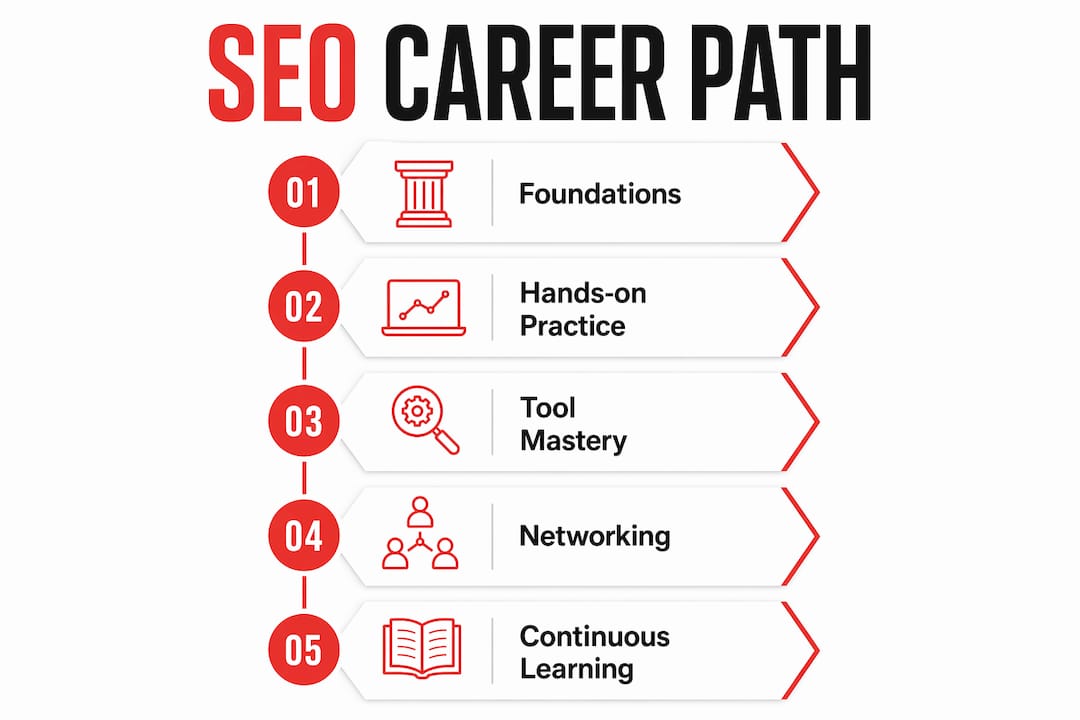
A search engine optimizer, known in the industry as an SEO specialist, is a digital marketing professional who improves website visibility in search engine results through technical, content, and link-based strategies. Learning how to become a search engine optimizer takes real commitment, but the path is clear. You need foundational knowledge, hands-on practice, and the right tools. This guide covers every step, from understanding how Google crawls pages to building a portfolio that gets you hired. Tools like Google Search Console, GA4, and Screaming Frog SEO Spider are part of the job from day one.
What foundational SEO knowledge do you need first?
SEO rests on four core pillars: keyword research, on-page SEO, technical SEO, and content strategy. Mastering these four areas is the baseline requirement before you touch a live website. Skip any one of them and your results will be inconsistent.
Search engines like Google follow a three-step process: crawl, index, and rank. Crawling means a bot visits your pages. Indexing means Google stores those pages in its database. Ranking means Google decides where your page appears for a given search query. Technical SEO is foundational to all three steps. Without it, even great content stays invisible.
Here are the core knowledge areas every aspiring SEO specialist needs to cover:
- Keyword research: Understand search volume, user intent, and keyword difficulty. Tools like Google Keyword Planner and Ubersuggest make this concrete.
- On-page SEO: Title tags, meta descriptions, header structure (H1 through H3), internal linking, and image alt text all fall here. Check out this on-page SEO guide for a practical breakdown.
- Technical SEO: Page speed, mobile optimization, crawlability, site architecture, and HTTPS security. Google’s AI search guidance confirms that pages must return an HTTP 200 status and not be blocked by robots.txt to be eligible for ranking.
- Content strategy: Writing people-first content that satisfies user intent. Google rewards content that genuinely answers what searchers need.
- Off-page SEO: Backlinks, brand mentions, and authority signals from other websites.
User intent is the concept most beginners underestimate. A page targeting “best running shoes” needs to match what someone searching that phrase actually wants to see. Getting that match right is what separates average SEO from effective SEO. Understanding content ranking factors helps you make those calls with confidence.
How do you build hands-on SEO experience?
Reading about SEO is not the same as doing it. The fastest way to learn is to build a practice website, apply techniques, and measure what happens. A 6–8 month roadmap at roughly 10–15 hours per week can take you from beginner to job-ready. That timeline assumes you are actively practicing, not just consuming tutorials.
Follow these steps to build real experience:
- Start a practice website. Pick a niche you know. Use WordPress or a similar CMS. The goal is a live site you control completely.
- Set up Google Search Console and GA4. Connect both tools before you publish anything. You need baseline data from the start.
- Publish and optimize content. Write at least 10 articles targeting specific keywords. Apply on-page SEO to every post: title tag, meta description, headers, and internal links.
- Fix technical issues. Run your site through Screaming Frog SEO Spider. Fix broken links, missing alt text, slow-loading pages, and duplicate title tags.
- Conduct keyword research. Use Google Keyword Planner or Ubersuggest to find terms with real search volume. Target a mix of competitive and low-competition keywords.
- Document everything. Record your baseline metrics, the changes you made, and the results after 30, 60, and 90 days.
- Build case studies. Documented workflows with before/after metrics impress hiring managers far more than vague claims about “improving rankings.”
Pro Tip: Set up a simple spreadsheet tracking each page’s keyword target, publish date, and monthly impressions from Search Console. After 90 days, you have a real performance story to show employers.
Your portfolio does not need to be a Fortune 500 client. A practice site with measurable growth tells the same story. What matters is that you can show the process: what you changed, why you changed it, and what the data showed afterward.

Which SEO tools should you master first?
Tool fluency separates job-ready SEO specialists from hobbyists. Start with free tools and add paid ones as your needs grow. Here is a comparison of the tools every beginner should know:
| Tool | Primary use | Cost |
|---|---|---|
| Google Search Console | Monitor rankings, indexing, and keyword performance data | Free |
| GA4 | Track on-site user behavior and traffic sources | Free |
| Google Keyword Planner | Keyword research and search volume estimates | Free |
| Ubersuggest | Keyword ideas, competitor analysis, site audit | Free/Paid |
| Screaming Frog SEO Spider | Technical site crawl, broken links, duplicate content | Free up to 500 URLs |
Google Search Console is the most important tool on this list. It shows you exactly which search terms drive clicks to your site, your average ranking position, and which pages have indexing errors. Combining Search Console with GA4 gives you a complete picture: what brings people to your site and what they do once they arrive.
Pro Tip: Learn to find keywords with Search Console by filtering the Performance report for queries where your average position is between 8 and 20. Those are your best quick-win opportunities.
Paid tools like Ahrefs and Semrush add depth, especially for backlink analysis and competitor research. Wait until you have a client or a real project before paying for them. Free tools cover everything you need to learn the fundamentals and build your first portfolio pieces.
How do you enter the SEO job market?
Multiple entry paths exist for becoming a professional SEO specialist: university courses, apprenticeships, and direct application with demonstrated experience. A degree is not always required. What matters most is proof that you can produce results.
Here are the main routes into an SEO career:
- University or college courses: Degrees in marketing, communications, or computer science provide a strong base. Some programs now include dedicated digital marketing modules.
- Apprenticeships: Structured programs that combine on-the-job training with formal learning. The Chartered Institute of Marketing offers certifications that carry real weight with employers.
- Direct application: If you have related marketing experience and a portfolio showing SEO results, many agencies will hire you without a formal degree. Entry routes confirm that certifications from recognized marketing bodies strengthen your application significantly.
- Freelancing: Taking on small clients while you build your skills is one of the fastest ways to gain diverse experience. It also builds your portfolio faster than a practice site alone.
- Specialization: SEO breaks into sub-disciplines. Technical SEO, content SEO, and local SEO are all distinct career tracks. Picking a specialty early helps you stand out.
Staying current is not optional. Google updates its algorithm hundreds of times per year. SEO professionals must stay current with evolving search features and algorithm changes to keep their skills relevant. Follow Google Search Central, Search Engine Land, and Coursera’s SEO resources to stay ahead.
Networking matters too. Join SEO communities on LinkedIn, attend digital marketing meetups, and connect with practitioners who are a few years ahead of you. Real relationships accelerate learning faster than any course.
What mistakes do beginners make in SEO practice?
Most early SEO mistakes fall into two categories: ignoring technical fundamentals and chasing rankings without understanding data. Both are fixable once you know what to watch for.
- Skipping crawlability checks. Beginners often overlook indexing eligibility, which limits SEO effectiveness before any ranking effort begins. Check that your pages return HTTP 200 and are not accidentally blocked by robots.txt.
- Keyword stuffing. Repeating a keyword 20 times on a page does not help rankings. Google’s systems recognize intent, not density. Write for the reader first.
- Ignoring data. Publishing content without checking Search Console is like driving without looking at the road. Set a weekly review habit from the start.
- Vague documentation. “I improved the site’s SEO” means nothing to a hiring manager. Document specific changes, specific pages, and specific metric shifts.
- Treating SEO as a one-time task. SEO is ongoing. Pages need refreshing, links need auditing, and content needs updating as search behavior shifts.
“Technical SEO is not optional polish. It is foundational to enabling search engines to crawl, index, and rank content properly.” — Search Engine Land
The biggest mindset shift for beginners is accepting that SEO results take time. Changes you make today often show up in Search Console data 4–12 weeks later. Patience and consistent documentation are what separate people who give up from people who build real careers.
Key Takeaways
Becoming a proficient SEO specialist requires mastering technical fundamentals, building a data-backed portfolio, and staying current with Google’s evolving search systems.
| Point | Details |
|---|---|
| Learn the four core pillars | Keyword research, on-page SEO, technical SEO, and content strategy are all required before practicing on live sites. |
| Build a practice site | Create and optimize a real website to generate portfolio-ready performance data from Google Search Console. |
| Master free tools first | Google Search Console, GA4, and Screaming Frog SEO Spider cover everything a beginner needs before investing in paid platforms. |
| Document workflows clearly | Record baseline metrics, changes made, and results achieved. Hiring managers want proof, not promises. |
| Stay current with Google | Algorithm updates change SEO priorities constantly. Follow Search Engine Land and Google Search Central weekly. |
Why most SEO beginners plateau after three months
The first three months of learning SEO feel productive. You set up Search Console, publish content, fix a few technical issues, and watch your impressions tick upward. Then things slow down. Rankings stall. Traffic plateaus. Most beginners assume they are doing something wrong. Usually, they are just impatient.
What I have seen work, consistently, is treating your practice site like a real client engagement. That means weekly reporting, monthly audits, and quarterly content refreshes. The people who build careers in SEO are not necessarily the most technically gifted. They are the ones who stay methodical when results are slow.
The other thing worth saying: balancing technical skills with content creativity is genuinely hard. Technical SEO is learnable from documentation. Content strategy requires judgment. You develop that judgment by reading widely, studying what ranks, and asking why. Tools like Google Search Console give you the data. Your job is to interpret it correctly.
One more thing. Do not wait until your portfolio is perfect before applying for roles. A portfolio showing three months of real data, honest analysis, and clear documentation beats a polished case study with no substance behind it. Get your work in front of people early.
— Josh
Rule27design builds the systems that make SEO work at scale
SEO skills get you in the door. The right infrastructure keeps you there. Rule27design builds custom content management systems, analytics dashboards, and internal tools that help marketing teams track performance, manage content workflows, and surface the data that drives better decisions.

If you are building an SEO practice or scaling a digital marketing operation, the tools you use matter as much as the skills you bring. Rule27design’s SEO-focused digital systems are built for teams that have outgrown spreadsheets but do not need enterprise software. See what a purpose-built content system looks like for your workflow.
FAQ
How long does it take to become an SEO specialist?
A focused learner spending 10–15 hours per week can reach job-ready proficiency in 6–8 months. That timeline assumes active practice on a real website, not just coursework.
Do you need a degree to get an SEO job?
A degree is not always required. Many employers hire candidates who can demonstrate SEO results through a portfolio and relevant certifications from bodies like the Chartered Institute of Marketing.
What is the best SEO certification for beginners?
Google’s free SEO Starter Guide is the best starting point. Certifications from the Chartered Institute of Marketing and courses on Coursera add credibility when applying for professional roles.
What tools do SEO specialists use daily?
Google Search Console and GA4 are the core daily tools. Screaming Frog SEO Spider handles technical audits, while Google Keyword Planner and Ubersuggest support keyword research.
What is the difference between on-page and technical SEO?
On-page SEO covers content elements like title tags, headers, and keyword placement. Technical SEO covers site infrastructure: crawlability, page speed, mobile optimization, and indexing eligibility.

About the Author
Josh AndersonCo-Founder & CEO at Rule27 Design
Operations leader and full-stack developer with 15 years of experience disrupting traditional business models. I don't just strategize, I build. From architecting operational transformations to coding the platforms that enable them, I deliver end-to-end solutions that drive real impact. My rare combination of technical expertise and strategic vision allows me to identify inefficiencies, design streamlined processes, and personally develop the technology that brings innovation to life.
View Profile

