

Discover how to securely send a file in admin panels with a five-part pipeline that safeguards against threats and ensures safety.
The most secure way to handle file uploads in an admin panel is a five-part pipeline: a strict allowlist of file types, server-side signature checks that verify what a file actually is, malware scanning before anything touches permanent storage, and isolated storage served through signed URLs or a download controller. Every one of those five pieces has to survive contact with a hostile file, not just a well-behaved one.
That pipeline is where the file upload decision gets made, not in a code review three sprints later. If you’re specifying requirements for a custom admin panel, a CMS, or an internal tool that lets users send files, this is the pattern to write into your acceptance criteria before a single line of code ships.
The minimum viable secure implementation needs:
- A defined allowlist of accepted file types, checked against the file’s actual contents, not its name.
- Server-side validation that never trusts the client, the filename, or the browser-reported content type.
- A scanning step (antivirus or ML-based) that runs before a file becomes visible to other users.
- Storage that sits outside the web root or inside private object storage, with no direct public URL.
- A serving mechanism (signed URLs or a download controller) that enforces authorization and safe headers every time a file goes back out.
Pro Tip: If you can only fix one thing this quarter, fix storage location. Files kept outside the web root or in a private bucket cannot be executed as server-side code even if every other check somehow fails. It’s the single defense that turns a bad day into a non-event.
Key Takeaways
A secure file upload pattern combines a strict type allowlist, server-side signature validation, malware scanning, and isolated storage served through signed URLs or a download controller.
| Point | Details |
|---|---|
| Allowlist over blocklist | Define exactly which file types are permitted and validate against magic bytes, not filenames. |
| Storage isolation is the strongest defense | Keep files outside the web root or in private object storage with no public bucket access. |
| Scan before serving | Run malware scanning on every file and test the pipeline regularly with an EICAR file. |
| Archives need extra checks | Validate uncompressed size, file count, and reject symlinks or path traversal attempts before extraction. |
| Rule27design builds this in from the start | Rule27design designs custom admin panels with allowlist validation, scanning, and signed URL serving built into the architecture, not added later. |
What Should Be on a Secure File Upload Checklist?
Product and engineering leads rarely have time to read a full OWASP guide before a planning meeting. This is the condensed version you can walk through in two minutes and use as a go/no-go gate.
Product acceptance criteria:
- Allowed file types are named explicitly (not “images” but “JPEG, PNG, WEBP”).
- Maximum file size and per-user quota are documented, not left to defaults.
- Error messages for rejected uploads are specific enough for support to triage without escalating.
Engineering controls:
- MIME type and file extension are cross-checked against actual file signature bytes, not just the
Content-Typeheader. - Files are renamed internally to a UUID or hash before storage; the original filename is preserved only as metadata.
- Uploaded files are scanned before they’re marked available, with a documented quarantine state for anything flagged.
Ops and configuration:
- Storage lives outside the web root or in a private bucket with no public read access.
- Signed URLs expire after a short period to minimize exposure, generally on the order of minutes rather than hours.
- Upload endpoints are rate-limited per user and per IP.
Pro Tip: Add an EICAR test file to your CI suite. It’s a harmless string that every antivirus engine recognizes as a “virus” for testing purposes. If your scanning step doesn’t quarantine it, your scanning step doesn’t work, and you want to find that out in CI, not in production.
How Should the Upload Flow Move Through Your System?
Think of a file upload as a relay race with four legs, and each leg has a specific job that the others shouldn’t try to do.
The client collects the file and does light validation, mostly for user experience (rejecting an obviously wrong file type before the user waits for an upload to fail). That check is a convenience, never a security control, because anyone can bypass client-side JavaScript with a direct API call.
The acceptance endpoint on your app server is where real validation starts: size limits, extension allowlist checks, and initial MIME detection. From there, the file lands in temporary storage, not permanent storage. That temp location gets scanned for malware. Only after a clean scan does the file move to permanent storage, whether that’s private object storage or a database-referenced disk path outside the web root. If you’re using a presigned upload flow where the client uploads directly to storage, the authorization and size/type checks have to happen before you mint that signed URL, since you lose the ability to inspect the file mid-flight.
- Client: cosmetic validation, upload progress, nothing security-critical.
- App server: authentication, authorization, allowlist enforcement, initiating the scan.
- Storage service: enforcing private access, versioning, retention.
- CDN or edge layer: serving scanned, approved files only, never raw uploads.
Direct-to-cloud presigned uploads cut server load and speed up large file transfers, which matters if your admin panel handles video or bulk document uploads. The trade-off is that you’re validating intent (file type and size limits) before the upload happens, not the actual bytes. Server-mediated uploads give you a chance to inspect every byte but add latency and server cost. Growth-stage teams often land on a hybrid: presigned uploads for size, with an asynchronous scan-and-promote step before the file is marked available. Prateeksha Web Design’s write-up on securing a Laravel admin file manager lays out a similar pattern with separate public and private storage disks tied to role-based permissions.
Why Do Allowlists Beat Blacklists for File Types?
Blocklisting bad extensions sounds reasonable until you remember how many ways there are to execute code on a server. Block .php and someone uploads .phtml, .php5, or a polyglot file that’s valid as both a JPEG and a PHP script. The OWASP File Upload Cheat Sheet states plainly that blacklisting is inherently flawed because attackers exploit obscure alternative executable extensions your list never anticipated. An allowlist flips the logic: nothing gets through unless it’s explicitly permitted, which mitigates risks from extensions nobody thought to block.
An allowlist alone isn’t enough, though. A file renamed from .exe to .jpg still passes an extension check. That’s why server-side MIME detection matters: tools like finfo in PHP or file-type detection libraries read the file’s actual magic bytes, the binary signature at the start of the file that identifies its real format, and cross-reference that against both the extension and the declared Content-Type. Shakil Tech’s breakdown of a seven-step Laravel validation middleware walks through exactly this kind of layered check, because no single validation step catches everything on its own.
Filenames need the same skepticism. Never use a user-supplied filename as a storage path. Sanitize it, cap its length, and generate an internal key, typically a UUID or a content hash, so path traversal characters and null bytes never reach your file system.
- Reject files where the extension and detected MIME type disagree.
- Re-encode uploaded images server-side to strip embedded scripts or metadata.
- Run malware scanning (AV or ML-based) on every file before it’s marked available, and quarantine anything flagged rather than deleting it silently, so you can review false positives.
- Test the scanning pipeline with an EICAR file regularly, not just at launch.
The OWASP Web Security Testing Guide lists the evasion techniques your tests should specifically try: double extensions like invoice.pdf.exe, capitalized extensions, altered magic bytes, and trailing null characters. Upload-related vulnerabilities show up often enough in penetration tests that no single check is treated as sufficient. Independent, layered validation is the expectation, not a nice-to-have.
Pro Tip: Treat SVG files as a special risk category. SVGs are XML and can carry embedded JavaScript. It’s recommended to handle SVG uploads cautiously in an admin context—either by rejecting them or converting to a raster format like PNG—and to serve user-uploaded images as attachments rather than inline.
Where Should Uploaded Files Live and How Should You Serve Them?
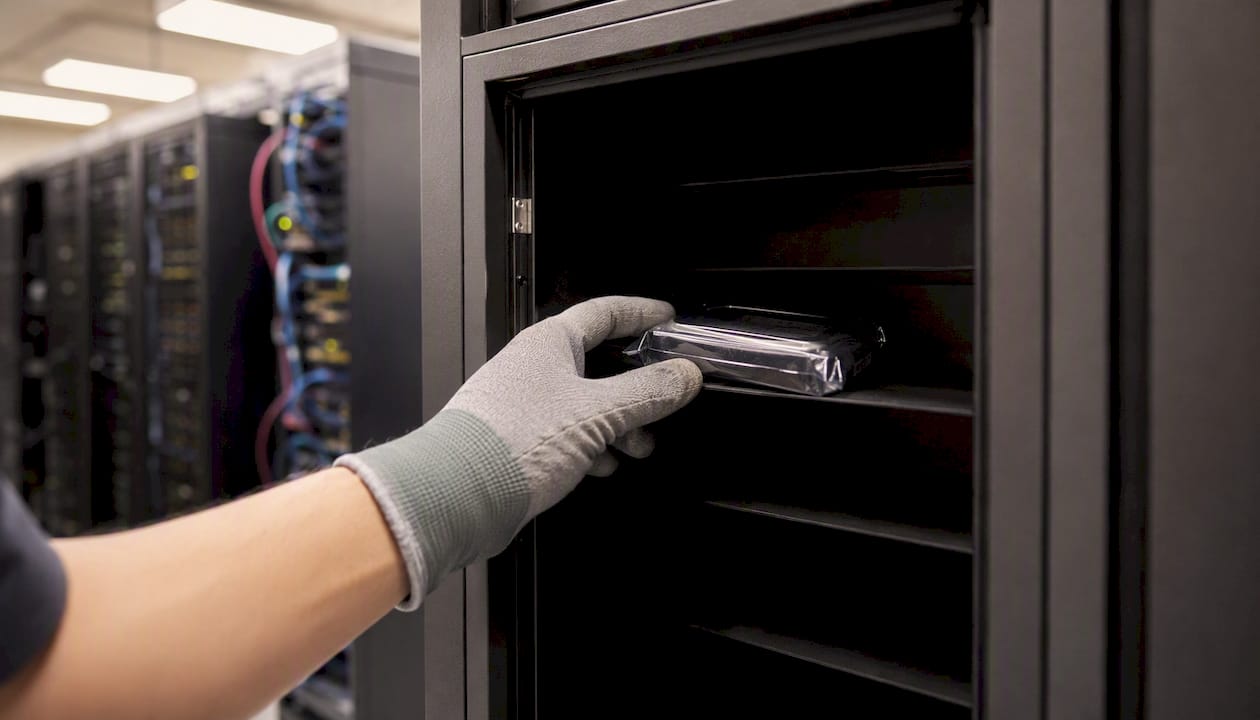
Storage location is the decision that determines whether a bad file is a nuisance or a breach. If uploads land in a folder your web server executes, a single missed check can lead to remote code execution. Storing files outside the web root, or in private object storage with no public bucket access, removes that risk structurally rather than relying on validation to catch everything, a point itrpoka’s file upload security guide makes as the single strongest defense available.
Serving files back out needs the same discipline. A signed URL should only be minted after your app confirms the requester is authorized, should expire in minutes, and should pin the content type and disposition into the signature itself so the URL can’t be repurposed. A download controller pattern works similarly: authorize the request, stream the file, and force headers like Content-Disposition: attachment and X-Content-Type-Options: nosniff so browsers can’t be tricked into executing or rendering something they shouldn’t.
Server and bucket configuration close the remaining gaps. Remove execute permissions from upload directories, disable script execution in Nginx or Apache configs for those paths, and never leave a storage bucket world-readable. PHPpot’s production file upload guide recommends exactly this kind of server-level hardening as a backstop for cases where uploads still need to be web-accessible.
| Storage approach | Security | Scalability | Operational complexity |
|---|---|---|---|
| Local disk outside webroot | Strong if permissions are correct | Limited by server capacity | Low, but manual backups required |
| Private object storage + signed URLs | Strong by design; no direct execution path | High, scales independently of app servers | Moderate, requires signing infrastructure |
| Hybrid (presigned upload, server-mediated scan) | Strong with async scanning discipline | High | Higher, needs orchestration between upload and promotion steps |
How Do You Handle Archives, Symlinks, and Path Traversal?
Compressed uploads deserve extra suspicion because the danger isn’t in the archive itself, it’s in what happens when you extract it. Check the uncompressed size and file count before extraction ever starts, since a small ZIP can decompress into gigabytes and exhaust disk space, a scenario known as a zip bomb.
- Reject archives containing symlinks unless your use case genuinely requires them, and if it does, resolve and validate every symlink target before extraction.
- Sanitize every path inside the archive and ignore any path that tries to escape the target directory, the classic ZIP Slip attack the OWASP testing guide specifically calls out for testing.
- Watch for double extensions (
resume.pdf.exe) and trailing characters designed to fool naive extension checks; always validate the final extension against magic bytes, not the filename string. - Build QA test cases around a crafted ZIP Slip archive and a symlinked tar file, and run both through your pipeline before every release that touches upload code.
What API Patterns Work Best for Secure Uploads?
A direct-to-server multipart POST is the simplest pattern: the client sends the file, your endpoint validates it, and you return a clear status. Return specific error codes for specific failures (file too large, type not allowed, scan pending) rather than a generic 400, because vague errors push confused users straight to your support queue.
Presigned direct-to-storage uploads shift the heavy lifting to your object storage provider. Your server authorizes the request, enforces size and type preconditions in the signed request itself, and records metadata (original filename, stored key, MIME type, hash, uploader ID) only after the storage service confirms the upload completed. Chunked and resumable uploads need per-chunk validation and a running total against the user’s quota, plus a final scan of the fully assembled file once all chunks arrive, since scanning fragments individually doesn’t catch threats that only appear in the completed file.
- Generate internal filenames with UUIDs or content hashes; never trust or reuse the client-supplied name.
- Move files atomically from temp to permanent storage only after a scan passes.
- Apply upload middleware exclusively on upload routes to avoid unnecessary overhead elsewhere.
- Verify your temp-file handling functions (
move_uploaded_fileor your framework’s equivalent) and confirm the server denies execution in temp and upload directories alike.
What Should You Test and Monitor After Launch?
Shipping the feature is the easy part. Keeping it safe as usage grows requires a real test matrix and someone watching the metrics.
- Automate CI tests for oversized files, magic-byte mismatches, EICAR detection, ZIP Slip exploitation, and high file-count archives.
- Monitor upload rate per user and alert on spikes that suggest automated abuse or credential compromise.
- Track failed-scan counts and quota exhaustion as operational metrics, not just security metrics.
- Log rejected uploads with metadata (user ID, file type, rejection reason) but never store the raw malicious sample itself in your logs.
- Run periodic fuzz tests and red-team checks that specifically try content-type spoofing, double extensions, and path-traversal payloads.
- Forward critical scan-failure events to a SIEM or log aggregation tool so security teams see patterns across users, not just isolated incidents.
- Set per-user quotas and maximum file counts, and alert when a single account approaches either limit repeatedly.
- If a scan flags a file post-launch, isolate and quarantine it immediately, snapshot the evidence for review, and rotate signed URL secrets if there’s any chance the file was already shared.
What Policies Should Product and Ops Define?
Engineering can build the pipeline, but someone has to own the rules it enforces. Document the exact permitted file types and size limits per use case; a document upload feature and a profile photo feature don’t need the same allowlist.
- Retention and deletion: how long files persist after a record is deleted, and whether deletion is soft or hard.
- Backup and recovery: whether uploaded files are included in standard backup cycles and how quickly they can be restored.
- Overwrite and versioning: whether replacing a file keeps prior versions or destroys them permanently.
- Access control: who can upload, replace, or delete files, and who can generate signed URLs, ideally enforced through role-based permissions rather than ad hoc checks.
- Compliance mapping: if the panel touches personal data, uploaded files fall under GDPR or HIPAA retention and access rules just like any other stored record.
Someone needs to own allowlist changes, review AV detection logs, and run a quarterly test of the entire pipeline, including a fresh EICAR run and a ZIP Slip attempt. If Rule27design’s work on collaborative CMS permissioning is any indication, the teams that get this right treat upload permissions as part of their broader role-based access model, not a bolt-on feature.
What Rule27design Has Learned Building These Systems
The tension every growth-stage team feels is time-to-market against defense-in-depth, and most teams resolve it by skipping the parts that don’t show up in a demo. Malware scanning, signed URL expiry, and archive validation are invisible until the day they’re not, and by then the cost of skipping them has multiplied.
For a minimum viable secure pattern in an MVP admin panel, we don’t recommend cutting corners on the four structural pieces: allowlist, server-side signature checks, isolated storage, and controlled serving. What can wait is the sophistication layer, ML-based scanning versus a simpler AV integration, or a fully automated quarantine review workflow versus a manual one. Start simple on sophistication, never simple on structure.
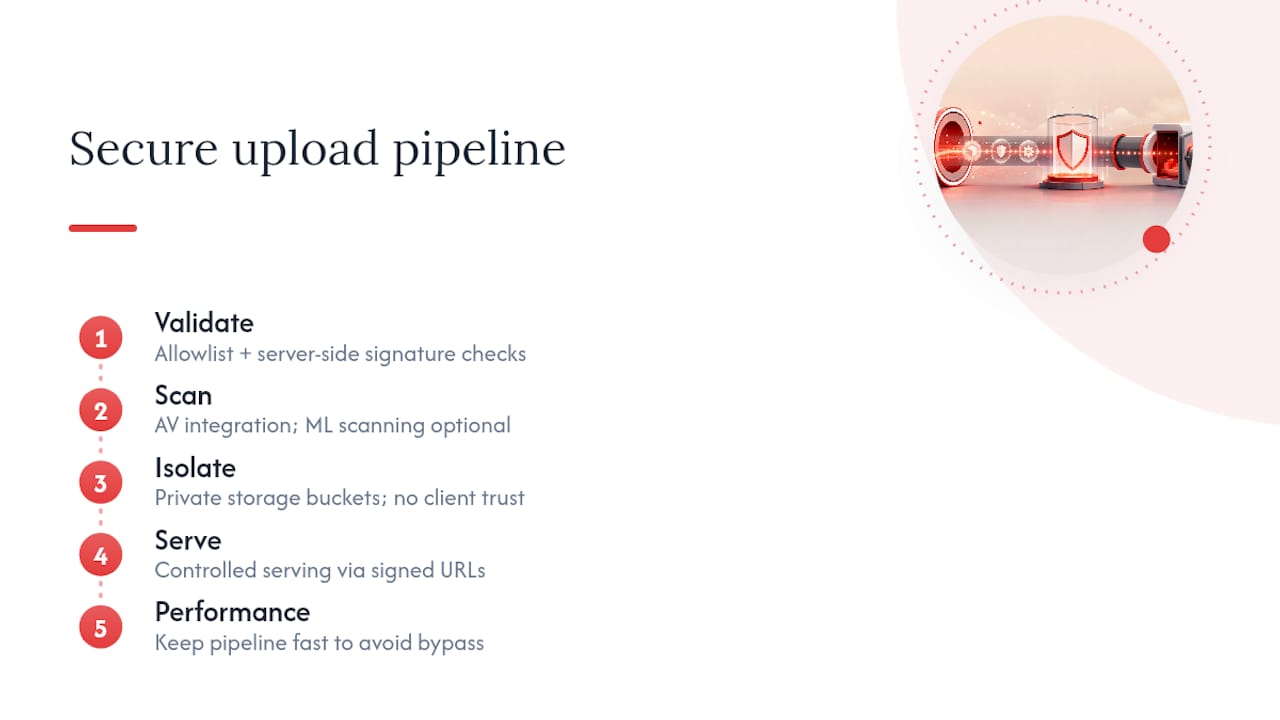
Working across React front ends, Node.js APIs, and Supabase for storage and auth, the pattern maps cleanly: Supabase’s storage buckets support private access and signed URLs natively, Node.js middleware handles the layered validation checks before anything touches storage, and React manages the upload experience without ever being trusted for anything security-relevant. The stack changes project to project, but the sequence, validate, scan, isolate, serve, does not.
Performance and developer ergonomics matter too. A validation pipeline that adds three seconds to every upload will get “temporarily” disabled by a frustrated engineer under deadline pressure, and temporary disables have a way of becoming permanent. The pipelines that last are the ones built to be fast enough that nobody’s tempted to bypass them.
Need Help Building This Into Your Admin Panel?
If your team is weighing whether to bolt file upload onto an existing internal tool or build it right from the start, that decision shapes everything downstream, from your storage bill to your next security review. Rule27design builds custom admin panels with secure upload workflows designed in from day one: allowlist validation, malware scanning, isolated storage, and signed URL serving, all wired into the same audit logging your compliance team will eventually ask for anyway as part of their SEO, Web Design & Website Management Services.
We work in React, Node.js, and Supabase, but we choose the stack that fits your existing system rather than forcing a rebuild around ours. That means secure media workflows and signed URL integration that slot into what your team already has, not a rip-and-replace project. If you’re scoping a new admin panel or auditing an existing upload feature, talk to Rule27design about your project and we’ll walk through what a secure pattern looks like for your specific stack.
Where to Go Deeper
Engineers implementing this pattern should keep these references close during build and review.
- The OWASP File Upload Cheat Sheet covers allowlist rationale and the specific pitfalls of blacklisting.
- The OWASP Web Security Testing Guide’s malicious file upload section lists the exact bypass techniques your QA suite should attempt.
- OWASP ASVS V5 documents formal file-handling requirements you can lift directly into acceptance criteria.
- The Laravel secure upload middleware guide is a practical, framework-specific walkthrough of layered validation.
Include an EICAR-based test in your CI pipeline from day one, and revisit your ASVS compliance every time you add a new file type to the allowlist.
Frequently Asked Questions
What’s the fastest way to sed a file securely in a custom admin panel? The fastest safe path is a presigned upload flow paired with server-side validation before the signed URL is issued: confirm the user’s authorization, enforce type and size limits, then let the file go directly to private storage before a background scan promotes it to available status.
Do I need malware scanning if I already validate file types? Yes. Type validation confirms what a file claims to be; scanning confirms what’s actually inside it. A perfectly valid PDF can still carry an embedded exploit, which is why the OWASP ASVS file-handling requirements treat content validation and malware scanning as separate, both-required controls.
Can I serve uploaded files directly from my storage bucket? Only if the bucket is private and every request goes through a signed URL or download controller that checks authorization first. A world-readable bucket bypasses every validation step you built, since anyone with the URL can access the file regardless of what your app enforces.
How long should signed URLs stay valid? Minutes, not hours. Short expiry limits the damage if a URL leaks through logs, browser history, or a shared link, and regenerating a URL on demand is a trivial request compared to the exposure window a long-lived link creates.
Sources

About the Author
Josh AndersonCo-Founder & CEO at Rule27 Design
Operations leader and full-stack developer with 15 years of experience disrupting traditional business models. I don't just strategize, I build. From architecting operational transformations to coding the platforms that enable them, I deliver end-to-end solutions that drive real impact. My rare combination of technical expertise and strategic vision allows me to identify inefficiencies, design streamlined processes, and personally develop the technology that brings innovation to life.
View Profile

