

Discover how to create effective location pages for SEO to connect with local customers. Optimize for visibility and boost rankings today!
TL;DR:
- Location pages for SEO connect local customers to businesses and signal search engines about presence in specific areas. They must include unique, locally grounded content, proper technical structure, and regular updates to maintain high rankings and relevance.
Location pages for SEO are dedicated webpages built to connect local customers with your business and signal search engines about your presence in a specific geographic area. They are not generic service pages with a city name swapped in. They are purpose-built, locally grounded pages that prove your business belongs in a community. AI overviews now appear in more than 68% of local searches, which means your location pages must answer questions directly and clearly. Get this right, and you rank in traditional search and show up in AI-generated responses. Get it wrong, and you are invisible to nearby customers who are ready to buy.
What are the must-have elements of a high-performing location page?

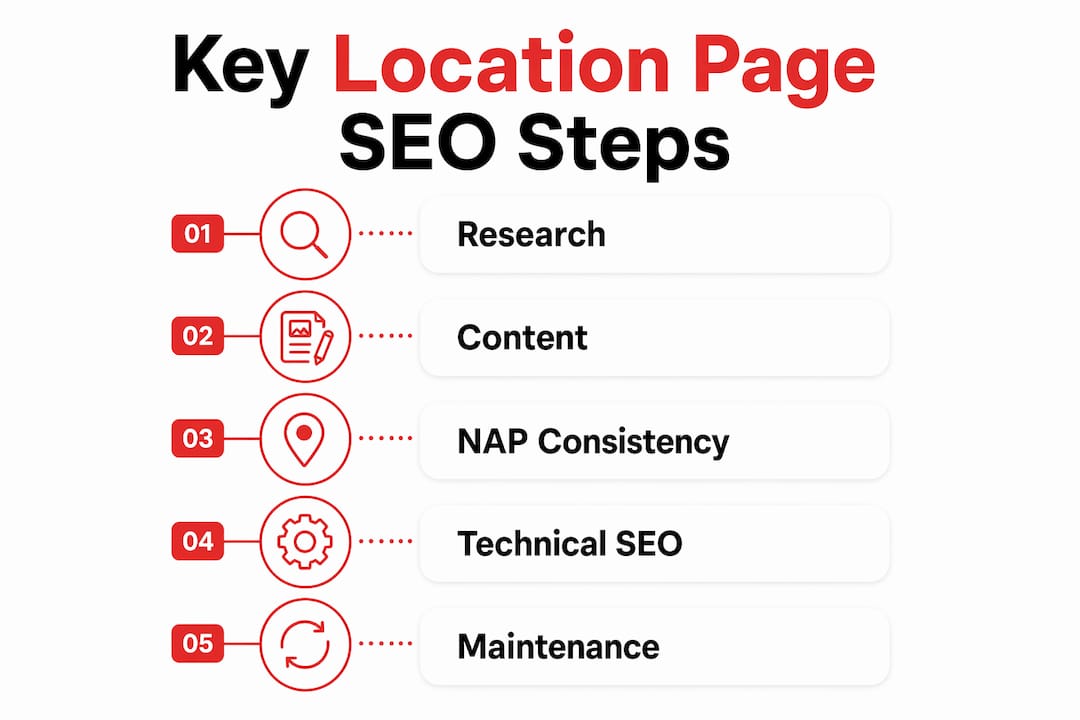
A location page earns its ranking by satisfying both search engines and real visitors. Four core elements establish local relevance on every page: NAP consistency, LocalBusiness structured data, a Google Maps embed, and localized testimonials. Miss any one of these, and the page signals weakness to Google.
NAP consistency means your business Name, Address, and Phone number appear identically on every location page, your Google Business Profile, and every directory listing. A single variation, like “St.” versus “Street,” creates a mismatch that erodes trust signals. Search engines cross-reference these details constantly.
LocalBusiness structured data tells search engines exactly what your business is and where it operates. Using specific businessType subtypes within the LocalBusiness schema, such as PlumbingService or DentalClinic, improves search engine understanding and increases your eligibility for rich results in Google Search. Generic schema markup leaves ranking potential on the table.
Here is what every strong location page needs:
- NAP block with consistent name, address, and local phone number
- LocalBusiness schema using the most specific business type subtype available
- Embedded Google Map showing the exact service location or storefront
- Local testimonials from customers in that specific city or neighborhood
- Localized page title and URL such as
/plumber-austin-tx/rather than/services/ - Hours of operation specific to that location, not a generic company-wide schedule
- Location-specific calls to action that reference the city or area by name
Pro Tip: Use a local phone number on each location page rather than a national toll-free number. Local numbers reinforce geographic relevance to both visitors and search engines.
How do you create unique content that avoids duplicate content penalties?
Duplicate or near-identical location pages with swapped city names are penalized by search engines and consistently underperform. This is the number one cause of location page failure for multi-location businesses. The fix is not complicated, but it does require real effort.
Google expects each location page to prove the business operates meaningfully in that area, including local staff, services, or neighborhood-specific details. A page that reads like a template with “Austin” dropped in where “Dallas” used to be does not meet that standard.
Here is a practical process for building genuinely unique location pages:
- Start with local proof. Name actual staff members at that location, list certifications specific to that branch, or describe the physical space. Real details create real differentiation.
- Reference neighborhood landmarks. Mention that your HVAC company serves the Hyde Park neighborhood or that your dental office is two blocks from Zilker Park. Targeting specific local landmarks produces stronger relevance signals than generic city-wide content.
- Address local customer questions. Research what people in that city actually ask. A roofing company in Phoenix should address flat roof repair. The same company in Seattle should address moss removal. Different cities, different problems.
- Pull in locally sourced reviews. Embed or quote reviews that mention the city, neighborhood, or a local landmark. These details reinforce geographic relevance without any extra writing.
- Vary your service descriptions by location. If you offer slightly different packages or pricing by region, say so. If local regulations affect your service, explain that too.
Pro Tip: Build a simple content brief for each location that lists three to five local facts, one neighborhood landmark, and two common customer questions specific to that area. Fill in the brief before writing a single word of the page.
Thinking about your local marketing budget while building these pages? Solid local marketing budget planning helps you decide how many location pages to build and how much content investment each one deserves.
What technical SEO best practices support location pages?
Technical structure determines whether your location pages get indexed, ranked, and cited by AI systems. Good content on a poorly structured page still loses. These are the technical priorities that matter most in 2026.
Internal linking from primary service pages and a Locations hub signals page importance and reduces orphaned status. An orphaned location page, one with no internal links pointing to it, performs poorly regardless of content quality. Every location page needs at least two internal links: one from the main Locations hub and one from a relevant service page.
Google Business Profile should link each location listing directly to that location’s specific page, not to your homepage. This alignment creates mutually reinforcing local SEO signals between your website and your Google listing. Many businesses skip this step and lose a significant ranking advantage.
Structured FAQ sections with direct questions and answers increase your chances of AI citation and featured snippets. AI models favor Q&A format when extracting local content. Adding location-specific questions like “Do you offer same-day service in North Austin?” gives AI systems a clean, citable answer to pull.
| Technical element | Why it matters | Priority |
|---|---|---|
| Internal links from hub and service pages | Prevents orphaned pages, signals importance | High |
| Google Business Profile URL alignment | Reinforces local relevance across platforms | High |
| LocalBusiness schema with specific subtype | Enables rich results and better indexing | High |
| Location-specific FAQ section | Supports AI citation and featured snippets | Medium |
| Mobile page speed under 3 seconds | Reduces bounce rate from local mobile searches | Medium |
For a broader look at how AI-driven search is reshaping content strategy, the technical principles apply directly to location page structure.
How should you maintain location pages to sustain local SEO performance?
Monthly or quarterly location page maintenance prevents performance decay and keeps information accurate for both visitors and search engines. A location page is not a “publish and forget” asset. It degrades over time as hours change, staff turns over, and local conditions shift.
A quarterly review cycle should cover these areas:
- Hours and contact details. Holiday hours, seasonal changes, and new phone numbers must be updated on the page and on Google Business Profile simultaneously.
- Staff and team mentions. If a named employee leaves, update the page. Outdated staff references undermine trust.
- Local reviews. Add new testimonials from that location every quarter. Fresh social proof keeps the page feeling current.
- Service updates. If you added a new service or stopped offering one in a specific area, the location page must reflect that.
- Analytics review. Check which location pages are losing organic traffic or seeing high bounce rates. Those pages need a content refresh or a technical audit.
Use a content visibility checklist approach to audit each page systematically rather than relying on memory. Structured audits catch problems that casual reviews miss. Local events and seasonal shifts also create content opportunities. A landscaping company can update its Austin location page every spring with content about local drought conditions or city water restrictions.
What are the common mistakes when building location pages for SEO?
Most location page failures trace back to a short list of repeatable mistakes. Knowing them in advance saves months of wasted effort.
- Copy-pasted content. Swapping a city name into a template page triggers thin content penalties. Each page needs original, locally grounded writing.
- Orphaned pages. A location page with no internal links is invisible to search engines. Always connect new pages to the Locations hub and at least one service page.
- Inconsistent NAP data. If your Google Business Profile says “Suite 100” and your website says “Ste. 100,” that inconsistency weakens your local signals. Audit all listings together.
- Building pages for unsupported locations. Creating a location page for a city where you have no real presence or cannot serve customers is a doorway page pattern. Google penalizes it.
- Keyword stuffing. Repeating the city name and service keyword in every sentence reads as spam to both visitors and search engines. Write naturally and let the local details carry the relevance.
Ranking is not the finish line. A location page that ranks but does not convert is just an expensive traffic report. Every element on the page, from the headline to the call to action, should move a local visitor toward contacting your business. Conversion is the metric that pays the bills.
For a deeper look at how SEO consulting helps small businesses avoid these pitfalls, the principles of expert guidance apply directly to location page strategy.
Key Takeaways
Well-built location pages require unique local content, correct technical structure, and consistent maintenance to rank in both traditional and AI-driven local search.
| Point | Details |
|---|---|
| NAP consistency is non-negotiable | Match your name, address, and phone number exactly across your website and Google Business Profile. |
| Unique content prevents penalties | Each location page needs original, locally grounded content, not a city-name swap on a template. |
| Internal links prevent orphaned pages | Link every location page from your Locations hub and at least one relevant service page. |
| Google Business Profile alignment matters | Point each Google listing directly to its matching location page, not your homepage. |
| Quarterly maintenance sustains performance | Review hours, staff, reviews, and services every quarter to prevent content decay. |
Why rankings alone won’t grow your local business
Location page SEO gets treated as a ranking problem. It is actually a conversion problem with a ranking component. I have seen businesses with strong local rankings that generate almost no calls or form submissions because the page itself gives visitors no reason to act. The NAP is buried, the testimonials are generic, and the call to action says “Contact Us” with no local context.
The businesses that win locally treat each location page as a dedicated sales tool for that specific community. They name the neighborhoods they serve. They quote real customers by first name and city. They answer the exact questions their local customers ask before picking up the phone. That specificity is what converts a visitor into a lead.
The AI search shift makes this even more urgent. When an AI system summarizes local options for a user, it pulls from pages that answer questions directly and clearly. A page full of marketing language gets skipped. A page that says “We offer same-day HVAC repair in South Austin, including the 78704 and 78745 zip codes” gets cited. Write for the human first, and the AI will follow.
— Josh
How Rule27design helps you build location pages that work
Rule27design builds the digital infrastructure that makes location page SEO manageable at scale. Whether you need a custom content management system to maintain dozens of location pages or a structured workflow that keeps NAP data consistent across every listing, the team at Rule27design designs systems that fit how your business actually operates.

Local businesses working with Rule27design see real gains in content performance and operational efficiency because the systems are built around their specific needs, not generic templates. If your location pages are underperforming or you are building a multi-location presence from scratch, get in touch with Rule27design to talk through a custom approach that covers both the technical and content sides of local SEO.
FAQ
What are location pages for SEO?
Location pages for SEO are dedicated webpages built to rank for local search queries and connect nearby customers with a specific business location. Each page targets a distinct geographic area with unique, locally relevant content.
How many location pages does a business need?
A business needs one location page per physical location or distinct service area it actively serves. Creating pages for areas where you have no real presence triggers doorway page penalties.
What is the biggest mistake on location pages?
Duplicate or near-identical content with only the city name changed is the leading cause of underperforming location pages. Each page must include original, locally grounded details.
How do location pages help with AI search results?
AI overviews appear in more than 68% of local searches, and they favor pages with direct Q&A content, specific local details, and clear structured data. A well-built location page increases your chances of being cited in AI-generated responses.
How often should location pages be updated?
Location pages should be reviewed and updated on a quarterly basis at minimum. Updates should cover hours, staff, services, and fresh local testimonials to prevent content decay and maintain search performance.

About the Author
Josh AndersonCo-Founder & CEO at Rule27 Design
Operations leader and full-stack developer with 15 years of experience disrupting traditional business models. I don't just strategize, I build. From architecting operational transformations to coding the platforms that enable them, I deliver end-to-end solutions that drive real impact. My rare combination of technical expertise and strategic vision allows me to identify inefficiencies, design streamlined processes, and personally develop the technology that brings innovation to life.
View Profile

