

Learn how to do SEO on your own with this small business guide. Unlock tools and strategies to boost your website's visibility today!
TL;DR:
- DIY SEO requires setting up free tools and fixing technical issues to improve search visibility. Consistently creating targeted content and building internal links can lead to faster traffic growth without a big budget. Most SEO results appear within three to six months, emphasizing patience and steady effort.
Doing SEO on your own means setting up the right tools, matching your content to what people actually search for, and fixing technical issues that hold your site back. Search engine optimization, commonly called SEO, is the practice of making your website more visible in Google and other search engines without paying for ads. You do not need an agency or a big budget to get results. With free tools, a clear process, and consistent effort, small business owners can grow their organic traffic on their own.
How to do SEO on your own: the essential starting point
Before writing a single word of content, you need two free tools running on your site. Google Search Console and Google Analytics 4 take less than 60 minutes to set up. That small time investment gives you real data on what pages Google indexes, which queries bring visitors, and where traffic drops off.
Beyond tracking, your site needs to pass three basic technical checks. First, your site must run on HTTPS. Google treats non-secure sites as a trust signal failure. Second, you need a sitemap submitted to Google Search Console so crawlers can find all your pages. Third, your site must load fast and work well on phones. Over 60% of all searches happen on mobile devices. A slow, hard-to-read mobile site loses rankings before you write a single blog post.
Pro Tip: After installing Google Search Console, go to the Coverage report. Any pages marked “Excluded” or “Error” need your attention first. Fix indexing problems before creating new content.
Here is a quick reference for the tools every DIY SEO setup needs:
| Tool | Purpose | Setup time |
|---|---|---|
| Google Search Console | Track indexing, clicks, and search queries | 20–30 minutes |
| Google Analytics 4 | Monitor traffic, user behavior, and conversions | 20–30 minutes |
| Google PageSpeed Insights | Identify speed and mobile issues | 5 minutes |
| Google Keyword Planner | Research keyword volume and competition | 10 minutes |
How do you find the right keywords to target?
Keyword research is the step most beginners skip or rush. The goal is not to find the most popular keywords. The goal is to find keywords you can actually rank for, that match what your visitors want.
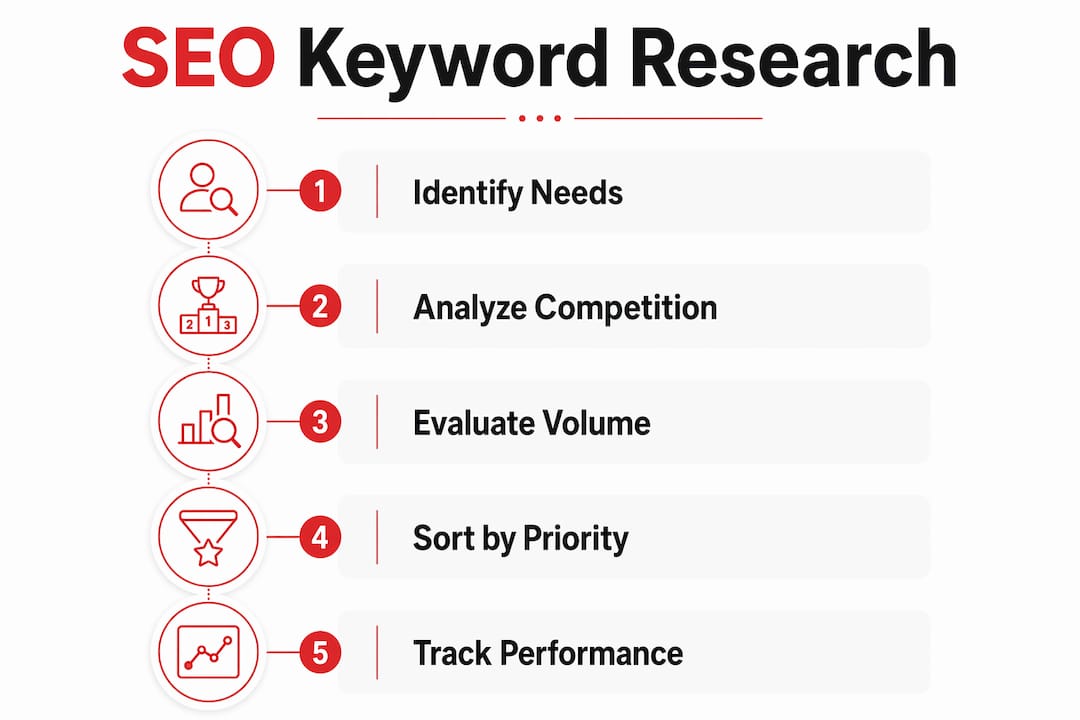
Search intent is the reason behind a query. A person searching “best running shoes” wants a list to compare. A person searching “buy Nike Air Zoom size 10” is ready to purchase. Matching content to precise search intent is the single factor that separates pages that rank from pages that do not. Get the intent wrong and even a perfectly written page will struggle.
Here is a practical process for building your keyword list:
- Start with Google Autocomplete. Type your main topic into Google and note every suggestion that appears.
- Check the “People also ask” box on the results page. These are real questions your audience types.
- Use Google Keyword Planner to check monthly search volume and competition level for each term.
- Focus on long-tail keywords, phrases of three or more words, because they have lower competition and clearer intent.
- Pull your existing data from Google Search Console and look for pages already ranking in positions 5–20.
That last point is a big one. Updating pages that already rank in positions 5–20 produces faster traffic gains than building new pages from scratch. Google already trusts those pages a little. A stronger title, a clearer answer, and a few added details can push them to page one.
Pro Tip: Build a simple spreadsheet with three columns: keyword, monthly volume, and current ranking position. Sort by position 5–20 first. Those are your fastest wins.
What does effective content creation look like for SEO?
Content is where most of your SEO time goes. The good news is that 80% of SEO success comes from quality content that solves real user problems. You do not need to be a professional writer. You need to answer questions clearly and completely.

Start every page with a direct answer to the query in the first two sentences. Search engines and AI tools both pull answers from the top of pages. If your introduction buries the answer under three paragraphs of background, you lose the citation and the click. Check out these SEO writing tips for more on structuring content that ranks.
Structure your content with clear H2 and H3 headings that reflect real search queries. Use keyword variations naturally throughout the text rather than repeating the exact same phrase. Avoid stuffing a keyword into every sentence. Google recognizes synonyms and related terms, so write for the reader first.
Here are the on-page content practices that move the needle:
- Write introductions that answer the query in the first 30–50 words.
- Use H2 headings that mirror the questions your audience asks.
- Add internal links to related pages on your site so visitors stay longer and crawlers map your content.
- Publish at least two articles weekly and keep every important page within three clicks of your homepage.
- Include FAQ sections at the bottom of key pages. AI search engines like GPTBot and PerplexityBot prefer well-structured FAQ content for extracting concise answers.
Pro Tip: Add a short FAQ section to every service or product page. AI-powered search engines favor pages with clear question-and-answer formatting. Ignoring AI crawlers today reduces your visibility in the search results of tomorrow.
Consistency beats perfection. A steady publishing schedule signals to Google that your site is active and growing. Two solid articles per week outperform one perfect article per month.
What technical SEO aspects do DIYers need to check regularly?
Technical SEO sounds intimidating. For beginners, it comes down to four practical habits. Master these and you cover the majority of what matters.
-
Compress your images. Large image files are the most common cause of slow page loads. Use a free tool like Squoosh or your CMS’s built-in compression before uploading. Image compression and basic caching deliver significant speed improvements without touching a single line of code.
-
Enable caching. Caching stores a version of your page so repeat visitors load it faster. Most website platforms offer a caching plugin or built-in setting. Turn it on.
-
Check mobile usability in Google Search Console. The Mobile Usability report flags text that is too small, buttons that are too close together, and content wider than the screen. Fix every flagged issue.
-
Review your crawl coverage monthly. Open Google Search Console and check the Pages report. Any page marked as “Crawled, currently not indexed” needs a content review. Thin pages with little value drag down your whole site.
Pro Tip: Run your site through Google PageSpeed Insights once a month. Focus on the “Opportunities” section. Each suggestion is a specific fix, not a vague warning.
One area beginners consistently overlook is AI crawler access. Structuring pages for FAQs and citations increases visibility to AI bots such as GPTBot and PerplexityBot. Check your robots.txt file to make sure you have not accidentally blocked these crawlers. Blocking them today means missing traffic from AI-powered search tomorrow. For a deeper look at this, the Rule27design guide on AI-driven search visibility covers the full picture.
How do you build backlinks without a PR budget?
Backlinks are links from other websites pointing to yours. They tell Google that other sites consider your content worth referencing. You do not need a PR firm to get them.
Simple backlink building starts with outreach to local businesses, suppliers, and non-competing companies in your industry. Ask a supplier to link to your site from their “partners” or “where to buy” page. Submit your business to local directories like your city’s Chamber of Commerce website. These links are easy to get and genuinely useful for local SEO.
Here are the most practical link-building moves for beginners:
- List your business in free local and industry directories.
- Ask suppliers and partners to add a link to your site.
- Write a guest post for a non-competing blog in your niche.
- Find a competitor’s backlinks using a free backlink checker and reach out to the same sites with your own content.
- Build strong internal linking between related pages on your own site.
That last point matters more than most people realize. Internal linking is a critical ranking signal that helps search engines understand which pages on your site are most important. You control it completely, it costs nothing, and most small business sites underuse it badly. Link every new article to at least two existing pages and link existing pages back to new content.
Key Takeaways
DIY SEO works when you combine the right tools, clear content, and consistent technical maintenance into a repeatable weekly habit.
| Point | Details |
|---|---|
| Set up tracking first | Install Google Search Console and Google Analytics 4 before creating any content. |
| Match search intent | Write content that answers the exact reason behind each query, not just the keyword. |
| Update before you create | Pages ranking in positions 5–20 produce faster wins than brand-new content. |
| Fix speed and mobile issues | Image compression and caching deliver the biggest technical gains for non-developers. |
| Build links from your network | Suppliers, local directories, and internal links grow authority without a PR budget. |
Why most DIY SEO fails in the first 90 days
Here is what I see over and over. Someone reads a guide, sets up their tools, writes three blog posts, and then checks their rankings two weeks later. Nothing moved. They conclude SEO does not work and stop.
SEO is a compounding process. The first 60–90 days are almost always quiet. Pages need time to get crawled, indexed, and evaluated. The sites that win are the ones still publishing and fixing issues at month six, not the ones that sprinted for three weeks.
The other trap I see is over-complicating the technical side. Beginners spend hours on schema markup and canonical tags while their site loads in six seconds on mobile. Fix the basics first. Mobile speed and clear content structure deliver more ranking improvement than any advanced technical tweak for a site under two years old.
The one thing that actually separates successful DIY SEO from failed attempts is consistency with search intent. Every page you publish should answer one specific question better than the current top result. That is the whole game. Tools, tactics, and link building all support that central goal.
— Josh
What Rule27design offers small businesses doing their own SEO
Getting the strategy right is one thing. Having the right systems to track, publish, and measure your progress is another.

Rule27design builds content management and analytics systems that give small business owners a real view of what is working. From tracking keyword performance to organizing your publishing schedule, the right infrastructure makes your SEO effort measurable and repeatable. If you are ready to move beyond spreadsheets and guesswork, explore the SEO resources and guides at Rule27design, or visit the main site to see how custom systems can support your growth.
FAQ
How long does DIY SEO take to show results?
Most sites see measurable ranking improvements within 3–6 months of consistent effort. Pages targeting low-competition, long-tail keywords can move faster, sometimes within 4–8 weeks.
What free tools do I need to start doing SEO myself?
Google Search Console and Google Analytics 4 are the two non-negotiable starting points. Both are free and take under 60 minutes to set up.
How do I know if my content matches search intent?
Search the keyword you are targeting and study the top three results. If they are all listicles and you wrote a long essay, your format does not match intent. Mirror the structure of what already ranks.
Do I need backlinks to rank on my own?
Not always. For local and long-tail keywords, strong content and solid internal linking often rank without external backlinks. Backlinks become more important as you target broader, more competitive terms.
Is technical SEO too hard for beginners?
The basics are not. Compressing images, enabling caching, and fixing mobile usability issues cover the majority of what matters for a new site and require no coding knowledge.

About the Author
Josh AndersonCo-Founder & CEO at Rule27 Design
Operations leader and full-stack developer with 15 years of experience disrupting traditional business models. I don't just strategize, I build. From architecting operational transformations to coding the platforms that enable them, I deliver end-to-end solutions that drive real impact. My rare combination of technical expertise and strategic vision allows me to identify inefficiencies, design streamlined processes, and personally develop the technology that brings innovation to life.
View Profile

