

Discover top bmtagency.com alternatives for growth-stage SaaS teams. Learn how AI-ready in-house solutions boost efficiency and ownership.
TL;DR:
- Growth-stage U.S. companies benefit from an in-house hybrid approach, starting with low-code prototypes before migrating mission-critical surfaces to custom builds. Structuring content and data infrastructure from the start is essential for AI-readiness and efficiency gains. The key is to evaluate costs and complexity regularly, migrating only when the benefits outweigh the expenses.
Skip the outside agency. The best path for growth-stage U.S. companies is an AI-ready, in-house hybrid portfolio: start with low-code prototypes for speed, then promote mission-critical surfaces to custom builds using React, Node.js, and Supabase. Rule27design clients following this sequence typically see 40% improvement in operational efficiency. The architectural pattern is proven, the cost curve is predictable, and you own everything.
What are the best bmtagency.com alternatives for in-house teams?
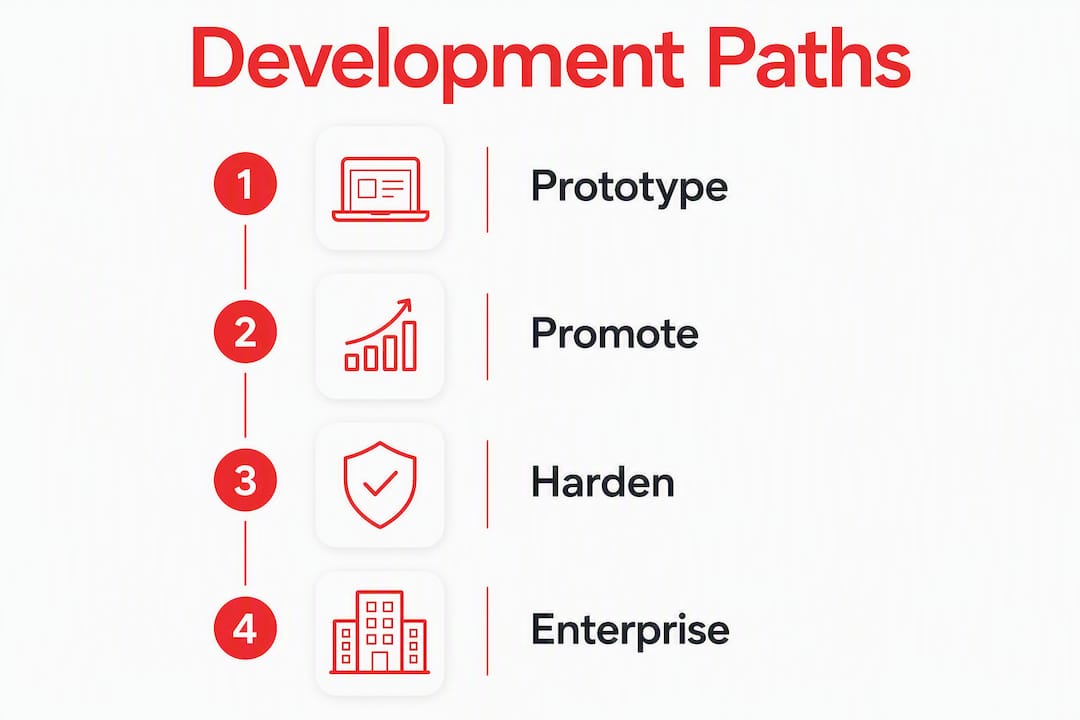
Four realistic paths exist. Each fits a different stage and budget.
1. Low-code prototypes (e.g., Retool) Best for teams that need a working admin surface in days, not months. Retool and similar platforms let you connect a Postgres database and ship a usable internal tool fast. Ownership is limited — you’re renting the builder, not the infrastructure. Crucible’s build-vs-buy analysis recommends starting here and migrating once costs or complexity cross a threshold.
2. Headless CMS + composable stack (Contentful, Sanity, Strapi) Best for content-heavy teams that need structured, API-first publishing. Contentful and Sanity give you a clean content graph. Strapi is self-hosted and open-source, so you keep full data control. Pair any of these with Next.js and Supabase for a composable stack that’s genuinely AI-ready.

3. Fully bespoke custom build (React + Node.js + Supabase) Best for mission-critical surfaces where performance, permissions, and data ownership are non-negotiable. Higher upfront cost, but the seat-cost ceiling disappears and you control every schema migration. Rule27design builds in this stack.
4. Enterprise/hosted platforms with stricter controls Best for teams with compliance requirements (SOC 2, HIPAA) that need audit logging and SSO out of the box. Heavier to configure, slower to ship, but governance is built in.
How do these four paths compare on what actually matters?
| Approach | Best For | Est. Cost | Time to Value | Ownership | AI-Readiness | Maintenance |
|---|---|---|---|---|---|---|
| Low-code platforms | Early-stage, small admin teams | Low upfront; seat costs scale linearly | Hours to first tool | Rented infrastructure | Limited; needs custom connectors | Low initially, grows with seats |
| Headless CMS + composable | Content-heavy SaaS, structured publishing | Medium; hosting + licenses | 2–4 weeks to first publish | High on content layer | Strong with structured schemas | Medium; API versioning required |
| Bespoke custom build | Mission-critical, high-traffic surfaces | Higher upfront; low ongoing per-seat | 2–4 months to MVP | Full ownership | Excellent; you define the schema | Higher; requires engineering ownership |
| Enterprise hosted platforms | Compliance-heavy, regulated industries | High; license + implementation | 3–6 months | Partial; vendor controls core | Varies by vendor | Low ops; high vendor dependency |
A few cells deserve a note. Low-code seat costs scale linearly with your admin headcount, and audit logging and SSO often sit behind enterprise tiers — that’s the inflection point where custom starts winning on total cost.
How do you choose the right path?
Start with three questions: Is this surface mission-critical? How unusual is your data model? What are you currently spending on seats?
Evaluation criteria, in priority order:
- Data complexity. Weird joins, multi-tenant schemas, or custom permission trees push you toward custom fast.
- Concurrency and performance. If 30+ internal admins hit the tool simultaneously, low-code platforms can bottleneck.
- Permission model. Granular RBAC that maps to your org structure is hard to retrofit on rented platforms.
- Audit and logging. Compliance teams need immutable logs. Check whether your current platform gates this behind an enterprise plan.
- AI-readiness. Can the system expose structured content with source citations for retrieval pipelines? If not, AI pilots will fail or cost too much in preprocessing.
- Total cost sensitivity. Run the 18-month math: upfront build cost vs. cumulative seat fees at your projected admin count.
- Ownership needs. Who controls schema migrations when your vendor changes pricing?
Questions to ask any vendor or build team:
- How do you expose citations for AI retrieval?
- Who owns schema migrations after handover?
- What does the cost curve look like at 30+ internal admins?
- Is SSO included, or is it an enterprise add-on?
- What’s the documented migration path if we outgrow this?
Red flags to watch for:
- SSO gated behind an enterprise plan
- No documented migration or data-export path
- Pricing that blurs builder seats and end-user seats
- Audit logging described as “available on request”
What does the prototype → promote → harden path look like?
Crucible’s framework treats this as a portfolio decision, not a one-time binary. Keep the long tail of simple CRUD tools on low-code. Migrate only the high-stakes surfaces.
Phase 1: Prototype (0–8 weeks) Ship a working tool on Retool or a similar low-code platform. Connect your existing Postgres instance. Validate the workflow with real users before writing a line of custom code.
Phase 2: Promote (3–6 months) When monthly seat spend crosses a meaningful threshold, or when a tool becomes load-bearing for your ops team, scaffold a custom app. React + Node.js + Supabase is a solid starting point. Modern Next.js starter kits now include auth, DB connectors, and basic admin panels, which shortens the custom MVP timeline considerably.
Phase 3: Harden (6–18 months) Add tests, monitoring, CI/CD pipelines, and a named tool owner. This is where you define SLAs, set up feature flagging, and document the RBAC model.
Migration checklist:
- Define data contracts and API gateways before cutting over
- Implement auth/SSO from day one — don’t bolt it on later
- Version your schemas from the first migration
- Assign a permanent tool owner before launch
- Set up CI/CD and staging environments before going to production
Pro Tip: Watch two numbers: your monthly seat bill and your active internal admin count. When either crosses a threshold that makes 18-month custom build costs competitive, start the Promote phase. Waiting too long locks teams into platforms that are expensive to exit.
What must your content and data systems do to be AI-ready?
AI-ready content requires structured, permission-aware knowledge infrastructure. Retrofitting AI onto unstructured data blobs is one of the most common and expensive failure modes teams hit.
Knidal’s approach makes this concrete: content must be machine-readable and citation-friendly from the moment it’s authored, not cleaned up later at ingestion time.
Technical requirements for AI-ready systems:
- Canonical IDs on every content object
- Versioning and last-updated timestamps on all documents
- Structured metadata and taxonomy (not free-text tags)
- Embedded source citations at publish time
- Granular permissions and audit logs so retrieval respects access controls
- Embeddings and vector stores with freshness signals
The architecture looks like this: publisher CMS → content graph/knowledge store → vector index → retrieval layer → agent. Each layer must pass structured, permissioned data to the next. FlowChainLabs’ AI knowledge base pattern demonstrates this well: internal AI assistants that index SOPs, docs, and chat history return answers with source passages and freshness signals, which cuts time-to-answer dramatically.
For content teams, AI-powered workflows that integrate structured pipelines can cut research time by 60% — but only when the underlying content is structured for machine consumption from the start.
Pro Tip: Treat AI agents as first-class API consumers. Insert citation metadata at publish time, not at ingestion time. Every hour spent cleaning unstructured content at ingestion costs more than the hour it would have taken to structure it at authoring.
What do real stack blueprints look like?
Three starter scaffolds cover most growth-stage scenarios.
Blueprint A: Low-code prototype Retool + Postgres + Auth0. Hours to first working tool. Best for validating a workflow before committing engineering time. Expect to revisit when your admin count grows or when you need custom permission logic.
Blueprint B: Composable headless CMS Sanity or Contentful + Next.js + Supabase + a vector DB (pgvector works well inside Supabase). Two to four weeks to first publish. Strong AI-readiness out of the box because both Sanity and Contentful enforce structured schemas. Pair with Rule27design’s AI-ready content checklist to configure citation metadata correctly.
Blueprint C: Bespoke custom app React + Node.js + Supabase + GitHub Actions (CI/CD) + a feature-flagging layer. Two to four months to MVP. Full ownership, no seat-cost ceiling, and a schema you control entirely. This is Rule27design’s primary stack.
Rule27design case snapshot: A growth-stage SaaS client came in with a patchwork of low-code admin tools and an unstructured content setup that couldn’t feed AI retrieval pipelines. Rule27design audited the stack, prototyped replacements for two high-traffic surfaces in Retool, then migrated both to a React + Supabase custom build over four months. The handover included documented data contracts, versioned schemas, and a CI/CD pipeline. The client saw a 40% improvement in operational efficiency post-migration, plus measurable gains in content visibility in AI-driven search.
40% operational efficiency improvement is the typical outcome Rule27design clients see after migrating from fragmented low-code tools to a custom React + Supabase stack with structured content infrastructure.
What should you do in the next 30–90 days?
The recommended path is clear: run a hybrid portfolio. Keep simple CRUD tools on low-code platforms. Migrate mission-critical surfaces to custom builds when the cost or complexity math justifies it.
Three next steps:
- Audit your current seat-based spend across all internal tools. Calculate the 18-month cost at your projected admin headcount. If a custom build is competitive, start scoping it now.
- Pick one high-impact tool to prototype on a low-code platform this month. Validate the workflow with real users before writing custom code.
- Schedule an architecture review for AI-readiness. Map every content surface against the requirements above: canonical IDs, structured metadata, citation support, permission-aware retrieval.
Set measurable triggers for the Promote phase: a monthly seat spend threshold, a specific active admin count, or an SLA your current platform can’t meet.
Key Takeaways
Growth-stage U.S. companies get the best results by treating build-vs-buy as a portfolio decision: prototype on low-code, then promote mission-critical surfaces to custom React + Supabase builds when the cost or complexity math tips.
| Point | Details |
|---|---|
| Prototype first, then promote | Start on low-code platforms for speed; migrate to custom builds when seat costs or complexity cross your threshold. |
| AI-readiness requires structure at authoring | Canonical IDs, citation metadata, and structured schemas must be set at publish time, not retrofitted later. |
| Watch the seat-cost inflection | Audit logging and SSO often sit behind enterprise tiers; run the 18-month math before assuming low-code is cheaper. |
| Custom builds are faster than they used to be | Next.js + Supabase scaffolds have shortened custom MVP timelines to 2–4 months for most growth-stage teams. |
| Rule27design delivers 40% efficiency gains | Clients migrating from fragmented tools to Rule27design’s React + Supabase stack typically see 40% operational improvement. |
Why the hybrid portfolio beats the all-or-nothing call
Most teams frame this as a permanent binary: build everything custom or rent everything on SaaS. That framing is wrong, and it’s expensive. The real question is which surfaces justify the fixed engineering cost of ownership, and the answer changes as your company scales.
Low-code platforms are genuinely good for the long tail of simple internal tools. The mistake is using them for load-bearing surfaces where performance, permissions, and AI-readiness matter. At that point, you’re paying seat costs for a platform that can’t do what you need, and you’re accumulating technical debt that makes the eventual migration harder.
The prototype → promote → harden sequence works because it defers the big engineering investment until you have real usage data. You know exactly which tools are mission-critical before you spend the money to own them. That’s not a compromise. It’s the smarter sequencing.
Rule27design builds the systems growth-stage teams actually need
Growth-stage SaaS companies that have outgrown basic tools but aren’t ready for enterprise software have a clear next step: custom admin panels, AI-optimized CMS builds, and internal tool migrations, built by a team that knows the React + Node.js + Supabase stack cold.
Rule27design handles the full sequence: audit your current stack, prototype the highest-impact surfaces, then migrate mission-critical tools to custom builds you own permanently. No seat-cost ceilings. No vendor lock-in. Structured content infrastructure that feeds AI retrieval pipelines from day one. Clients see notable operational efficiency gains after migration, plus measurable improvements in AI-driven content visibility.
Ready to scope your first custom build? Start a discovery call with Rule27design and get a clear picture of where your stack stands and what it would take to own it.
Useful sources and further reading
- Build it or buy Retool? The admin panel question — Crucible: The clearest published framework for the prototype → promote decision, including the seat-cost inflection point and when custom builds become cost-competitive.
- Knidal: Covers machine-readable knowledge infrastructure and why citation-first content architecture matters for AI retrieval pipelines.
- AI Knowledge Bases: Internal AI Assistants With Source Citations — FlowChainLabs: A practical example of AI knowledge bases that index internal docs and return answers with source passages and freshness signals.
- SaaS marketing agency vs in-house: $700K math — Underboss Media: Runs the comparative cost math between agency engagements and in-house teams, useful for framing the build-vs-buy economic decision.
- Growth Agency vs In-House Team: 2026 Guide — Remarkable Agency: Covers the hybrid staffing model and the salary/retainer comparisons that show when in-house becomes cost-effective.
- AI-powered content workflow cuts research time 60% for SEO — Baby Love Growth: Evidence for structured AI content pipelines and the efficiency gains available when content is authored for machine consumption.
- Maximizing content visibility in AI-driven search — Rule27design: Tactical guidance on structuring content for discoverability in ChatGPT, Claude, and Perplexity responses.

About the Author
Josh AndersonCo-Founder & CEO at Rule27 Design
Operations leader and full-stack developer with 15 years of experience disrupting traditional business models. I don't just strategize, I build. From architecting operational transformations to coding the platforms that enable them, I deliver end-to-end solutions that drive real impact. My rare combination of technical expertise and strategic vision allows me to identify inefficiencies, design streamlined processes, and personally develop the technology that brings innovation to life.
View Profile

