

Discover why custom admin interfaces boost SaaS team efficiency. Enhance productivity and streamline workflows for better results.
TL;DR:
- Custom admin interfaces improve team productivity by automating workflows and reducing manual tasks. They generate long-term savings and operational control, especially for teams with more than 15 daily users. Proper implementation requires a focus on backend automation, user adoption, and treating internal tools as products.
A custom admin interface is a purpose-built internal tool designed to match your team’s exact workflows, automate repetitive tasks, and centralize operational controls in one place. Unlike generic off-the-shelf platforms, these systems reflect how your company actually operates. The industry term for this category is “internal developer platform” or “internal tooling,” though product managers often call them custom admin panels or custom dashboards. Understanding why custom admin interfaces matter is the first step toward making a decision that directly affects your team’s output and your company’s ability to scale.
Why custom admin interfaces deliver measurable productivity gains
The productivity case for custom admin interfaces is concrete. Well-designed internal platforms deliver a 30%–40% lift in team productivity. That is not a soft metric. It shows up in deployment times, incident recovery, and onboarding speed.

Teams using standardized developer portals reduced mean time to recovery (MTTR) from 45 minutes to 20 minutes and cut deployment times by 40% within two sprints. Two sprints is roughly four weeks. That kind of speed shift changes what a team can ship in a quarter.
The mechanism behind these gains is cognitive load reduction. Without structured workflows, developers waste 20%–30% of their time on repetitive manual tasks. A custom admin panel removes those tasks from the equation by encoding your processes directly into the interface.
Platform engineering introduces a concept called the “Golden Path.” It is a pre-approved, automated workflow that guides team members through the correct steps without requiring them to remember every detail. Custom admin interfaces are the practical expression of this idea. They make the right action the easy action.
Key productivity benefits include:
- Faster onboarding. Automated provisioning with Infrastructure as Code (IaC) and GitOps reduced onboarding delays from 15 minutes to seconds and cut rollback rates by 60%.
- Fewer errors. Shared pipeline templates and built-in guardrails prevent teams from skipping steps or misconfiguring systems.
- Lower technical debt. Unified platforms reduce the number of one-off scripts and workarounds that accumulate over time.
- Faster incident response. Centralized controls mean teams spend less time hunting across tools during outages.
Pro Tip: Measure MTTR and deployment frequency before and after launching a custom admin panel. These two metrics give you the clearest signal on whether the investment is paying off.
How does the build-vs-buy decision affect custom admin adoption?
The build-vs-buy question is where most product managers get stuck. The answer depends on your team size, stage, and time horizon.
No-code tools provide rapid value for up to about 14 months or roughly 15 daily users. Before product-market fit, speed matters more than ownership. A no-code or low-code internal tool gets you moving without committing engineering resources to a long build cycle.
The crossover happens between 14 and 22 months. Custom builds become more cost-effective than SaaS internal tools when you have 15–30 or more daily users. A company with 100 users paying $200 per month for a SaaS tool spends $240,000 per year on licenses. A custom system that costs $300,000 to build and $60,000 per year to maintain breaks even well within two years and then generates compounding savings.
| Factor | SaaS / no-code tool | Custom build |
|---|---|---|
| Upfront cost | Low | High ($150K–$400K+) |
| Time to launch | Days to weeks | Months |
| Per-user cost | Scales with seat count | Near zero at scale |
| IP ownership | Vendor-controlled | Fully owned |
| Workflow fit | Generic | Exact match |
| Long-term TCO | Grows with team | Stable or declining |
| Maintenance burden | Vendor-managed | Internal team |
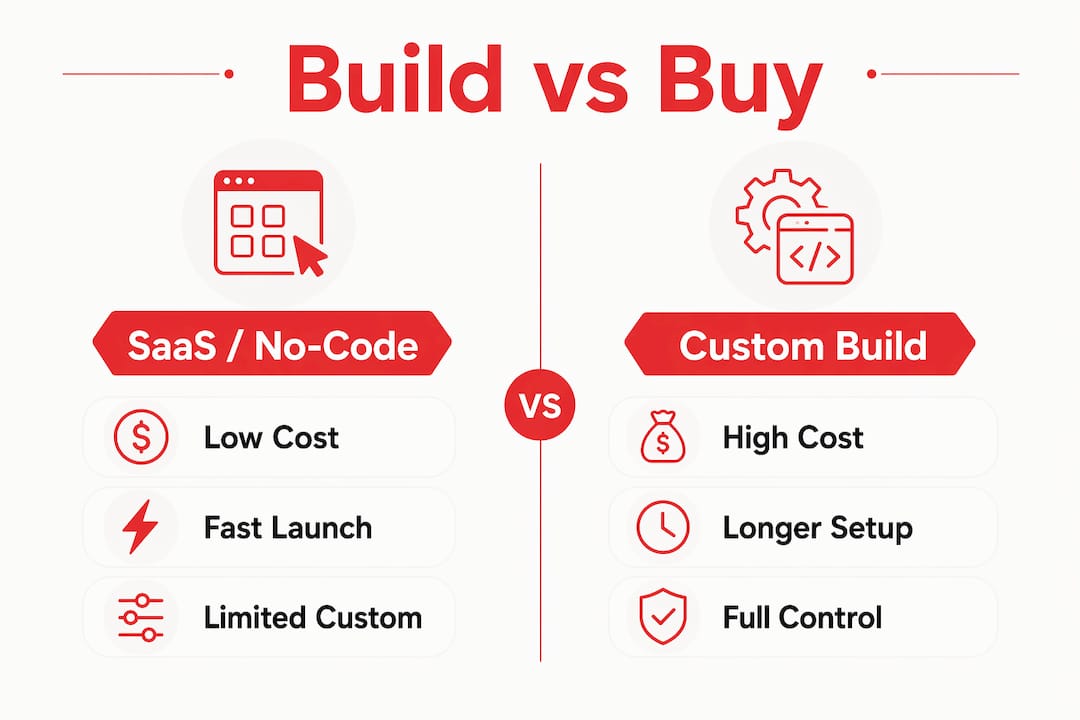
Custom tools allow you to model exact business workflows and own your data outright. That matters for compliance, for integrations, and for avoiding vendor lock-in. Ongoing maintenance runs at 20%–30% of build cost annually, so factor that into your total cost of ownership calculation.
Pro Tip: Run an annual cost audit comparing your current SaaS license spend against the projected cost of a custom build. If your license bill exceeds $15,000 per month and your team has more than 20 daily users, the math usually favors building.
What are best practices for implementing custom admin interfaces?
Most failed internal tool projects share one root cause. Teams build the UI before the backend is solid. Building UI over broken backend processes creates expensive, unmaintained wrappers that frustrate users. The interface becomes a liability instead of an asset.
A reliable implementation follows this sequence:
- Automate the process first. Before designing a single screen, confirm that the underlying API or workflow runs without manual intervention. If a human has to fix it regularly, the UI will not save you.
- Discover state automatically. High adoption requires systems that infer state without asking users to enter metadata manually. Every required field that a user has to fill in is a friction point that reduces adoption.
- Assign a product owner. Dedicated platform teams with product management drive higher adoption than ad-hoc assignments to DevOps engineers. Treat the interface like a product with a roadmap, not a side project.
- Ship iteratively. Release a working version to a small group first. Collect usage data. Fix what is broken before expanding access.
- Measure adoption explicitly. Track daily active users, task completion rates, and support tickets generated by the tool. Low adoption is a signal, not a coincidence.
Failing to treat internal users as customers leads to adoption rates as low as 20%. That is a real number from real teams who built platforms that 80% of their developers stopped using within three months. The fix is not a better UI. It is a product mindset applied to internal tooling. Resources like this marketing automation checklist show how the same automation-first thinking applies across operational functions, not just engineering.
How do custom admin interfaces support SaaS scaling?
Growth-stage SaaS companies face a specific set of operational problems that generic tools handle poorly. Custom admin panels solve these directly.
- User provisioning. A custom interface lets your support or success team provision, suspend, or modify user accounts without filing a ticket with engineering. That removes a bottleneck that slows customer onboarding.
- Billing management. Custom dashboards surface subscription status, failed payments, and plan changes in one view. Teams act faster when the data is already organized for their workflow.
- Feature toggling. Rolling out features to specific customer segments requires precise control. A custom admin panel gives non-technical teams that control without touching code.
- Role-based permissions. Custom interfaces let you define exactly who sees what. That matters for compliance with standards like SOC 2 and for limiting data exposure across teams.
- Multi-team coordination. As your company grows, different teams need different views of the same data. A custom system serves each team’s context without forcing everyone into the same generic screen.
Internal tooling is often undervalued until it becomes a bottleneck. By the time a growth-stage SaaS team feels the pain, they have already lost weeks of productivity to workarounds. The companies that invest in custom workflows early tend to scale with far less operational friction. A well-built admin panel also supports governance by creating an audit trail for every action taken inside the system.
Key Takeaways
Custom admin interfaces deliver measurable ROI when built on solid automation, treated as products with dedicated ownership, and timed correctly relative to team size and company stage.
| Point | Details |
|---|---|
| Productivity gains are real | Standardized internal platforms deliver a 30%–40% productivity lift and cut MTTR by more than half. |
| Build timing matters | Custom builds beat SaaS tools on total cost of ownership after 14–22 months with 15+ daily users. |
| Automation comes first | Build and validate backend automation before designing any user-facing interface. |
| Product mindset drives adoption | Teams without dedicated platform ownership see adoption rates as low as 20%. |
| SaaS scaling needs custom controls | User provisioning, feature toggling, and role-based permissions require precision that generic tools cannot provide. |
The uncomfortable truth about internal tooling projects
I have seen this pattern repeat more times than I can count. A team spends three months building a beautiful admin panel. It launches to mild enthusiasm. Six months later, half the team has gone back to spreadsheets and Slack threads. The interface is still there. Nobody uses it.
The problem is almost never the design. It is the sequence. Teams reach for the UI because it is visible and feels like progress. But if the underlying process is still manual, the interface just adds a layer of friction on top of friction. You end up with a wrapper around a broken workflow, and that is worse than no tool at all.
The teams that get this right treat their internal tools the same way they treat their product. They assign a product manager. They write user stories for internal users. They track adoption metrics the same way they track feature engagement. That cultural shift is harder than the technical work, and it is the part that most articles skip over.
The other thing I would push back on is the instinct to build too early. If you have fewer than 15 people using an internal tool daily, a no-code solution almost always wins on speed and cost. The custom build conversation becomes worth having when your license bill starts to sting and your workflows have outgrown what a generic tool can model. Knowing that crossover point saves you from a six-figure mistake.
The intuitive interface design question matters too. A technically sound backend with a confusing UI still fails. Both sides of the equation need attention.
— Josh
What Rule27design builds for growth-stage SaaS teams
Rule27design specializes in custom admin panels, internal tools, and content management systems built for companies that have outgrown basic tools but are not ready for enterprise software. The focus is on systems that match how your team actually works, not how a vendor assumes you work.
Rule27design clients typically see a 40% improvement in operational efficiency after implementation. If your team is hitting the limits of your current tools, the next step is a conversation about what a purpose-built system could look like for your specific workflows. Explore custom admin panel solutions or read the 2026 internal tools guide to see how other growth-stage teams have made the transition.
FAQ
What is a custom admin interface?
A custom admin interface is a purpose-built internal tool that centralizes operational controls, automates workflows, and surfaces data in a format tailored to a specific team’s needs. It differs from generic platforms by modeling your exact business processes rather than forcing your team to adapt to a vendor’s assumptions.
When does a custom admin panel make financial sense?
Custom builds become more cost-effective than SaaS internal tools between 14 and 22 months when used by 15 or more daily users. Beyond that threshold, near-zero marginal user costs and full IP ownership make the custom build the better long-term investment.
Why do so many internal tool projects fail?
The most common cause is building a UI before the underlying automation is solid. Teams that skip backend validation end up with interfaces layered over broken processes, which frustrates users and drives abandonment rates as high as 80%.
What features should a custom admin panel include for SaaS companies?
The highest-value features for growth-stage SaaS teams are user provisioning controls, billing management views, feature flag toggles, role-based permissions, and audit logging. These remove engineering bottlenecks and give non-technical teams direct control over day-to-day operations.
How do you measure the success of a custom admin interface?
Track daily active users, task completion rates, MTTR, deployment frequency, and support tickets generated by the tool. A drop in support tickets and an increase in task completion rate are the clearest early signals that the interface is working.

About the Author
Josh AndersonCo-Founder & CEO at Rule27 Design
Operations leader and full-stack developer with 15 years of experience disrupting traditional business models. I don't just strategize, I build. From architecting operational transformations to coding the platforms that enable them, I deliver end-to-end solutions that drive real impact. My rare combination of technical expertise and strategic vision allows me to identify inefficiencies, design streamlined processes, and personally develop the technology that brings innovation to life.
View Profile

