

Discover what is collaborative CMS and how it transforms digital teamwork. Enhance content creation, streamline workflows, and boost efficiency.
TL;DR:
- A collaborative CMS enables multiple users to edit, review, and publish content simultaneously within a governed environment.
- Its core features include real-time co-editing, explicit review states, role-based access, and automated workflows, which surpass simple shared login functions.
A collaborative CMS is defined as a content management system that enables multiple users to simultaneously create, edit, review, and publish content within a single governed environment. Unlike a standard CMS, it builds real-time editing, role-based access control, approval workflows, and content versioning directly into the platform. These are not add-on features. They are the core architecture. For content managers and digital teams running multichannel programs, collaborative content management is the difference between a content operation that scales and one that stalls on email chains and version conflicts. True collaboration in a CMS means synchronized edits, live visibility, and auditability that scale enterprise governance across every team member, not just multiple logins on the same screen.
What is collaborative CMS and how does it differ from traditional CMS?
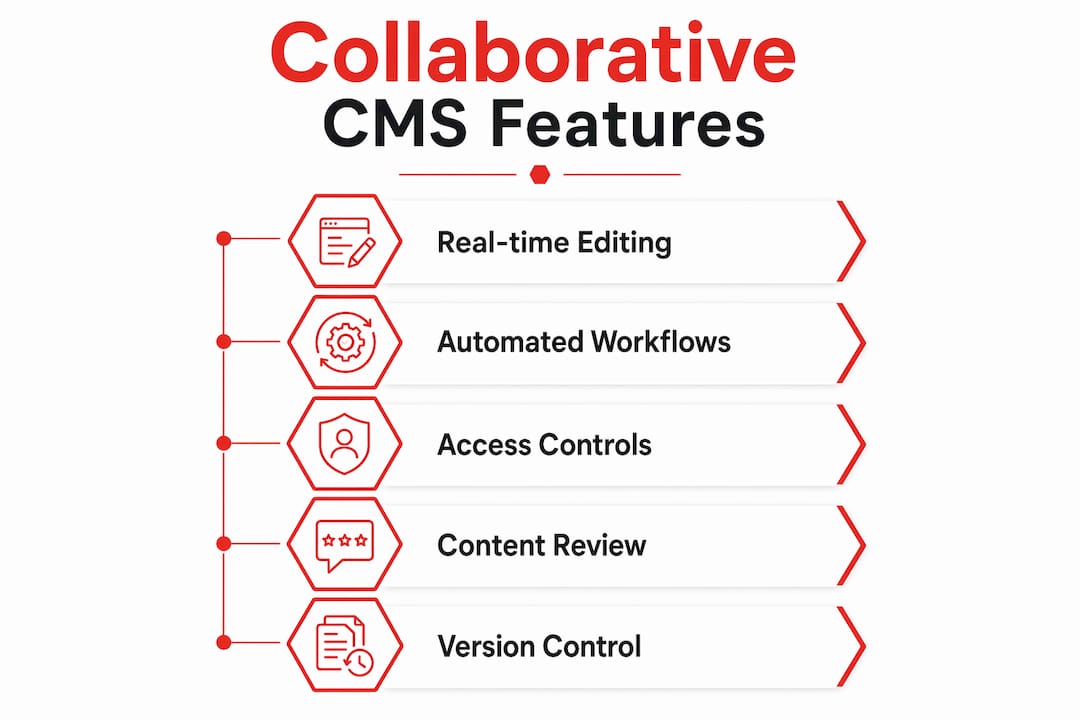
Traditional CMS platforms were built for one editor at a time. One person logs in, makes changes, saves, and logs out. The next person picks up from there. That linear model creates bottlenecks fast. A writer finishes a draft, emails a link to a reviewer, the reviewer edits a downloaded copy, and suddenly three versions exist with no clear winner.
A collaborative CMS replaces that chain with a live, shared workspace. Real-time collaboration and role-based workflows eliminate traditional editorial delays, enabling fast content cycles without sacrificing control. That means a writer, editor, and legal reviewer can all work on the same asset at the same time, each within their defined permissions.
The structural differences go deeper than just “who can log in.” Here is what sets collaborative CMS apart:
- Simultaneous structured editing. Multiple users edit different fields of the same content entry at once, with conflict resolution built in. No page locking. No overwrites.
- Explicit review states. Content moves through defined statuses like Draft, In Review, Approved, and Published. Each state is a data field, not a sticky note.
- Role-based access control. Writers, editors, brand managers, and admins each see and do only what their role allows. This protects content integrity across teams.
- Integrated approval workflows. Reviews route automatically to the right person based on content type, market, or brand. No manual chasing.
- Centralized governance. One source of truth for all content, across all markets and brands, with a full audit trail.
True enterprise CMS collaboration requires all five of these elements working together. A platform that offers only shared logins and a comment box is not a collaborative CMS. It is a traditional CMS with a chat feature bolted on.
What are the main features of a collaborative CMS?
The best collaborative CMS platforms share a consistent feature set. Knowing what to look for helps you evaluate options and avoid buying a system that looks collaborative on the surface but breaks down under real team pressure.
- Real-time co-editing with conflict resolution. Multiple editors work on the same entry simultaneously. The system tracks who changed what and when, and surfaces conflicts before they cause data loss.
- Content version control and audit trails. Every save creates a version. Teams can roll back to any prior state. Compliance teams get a full log of who approved what and when.
- Role-based workspaces. Large organizations with multiple brands or regional markets can segment content environments while sharing a single platform foundation.
- Automated task and approval routing. When a writer marks content as “Ready for Review,” the system notifies the assigned editor automatically. No manual handoff required.
- Context-aware previews. Editors see exactly how content will render in the live environment, including personalized or localized variations, before publishing.
- Content scheduling and bundled releases. Teams coordinate multi-asset campaigns by scheduling content to publish together, reducing the risk of a landing page going live before its supporting blog post.
Pro Tip: Treat your content’s review status as a structured data field, not a label or tag. When status is queryable, you can build dashboards, automate notifications, and run compliance checks without any manual reporting.
The features of collaborative CMS that matter most depend on your team’s size and workflow complexity. A five-person team may need co-editing and basic approvals. A global brand team needs multi-market workspaces, localization workflows, and granular permissions on top of that.

What benefits do organizations gain from collaborative content management?
The advantages of collaborative CMS go well beyond “everyone can edit at the same time.” The organizational impact shows up in speed, quality, and how teams are managed.
Content velocity increases. Manual handoffs are the single biggest drag on content production. When approval routing is automated and review states are explicit, content moves faster through the pipeline. Integrated workflows eliminate editorial delays that would otherwise stack up across email, Slack, and spreadsheets.
Errors drop. When every team member works from the same live version, the risk of publishing outdated or conflicting content drops sharply. A single source of truth means the approved copy is always the copy that ships.
Management overhead decreases. Research on collaborative work management technology across 3,000+ U.S. firms found that adoption reduces managerial intensity by 3% while increasing decentralization-related nonmanagerial skills by 5%–7%. That means teams become more self-directed, and managers spend less time chasing status updates.
Knowledge sharing improves. Platform-based collaboration using agile mindsets and participative design enables employees to share resources and ideas without waiting for a manager to broker the connection. Content teams that use a shared CMS environment naturally build institutional knowledge into the platform itself.
“Managers often overestimate the infrastructure needed for collaboration. Simple platform-based processes can effectively foster engagement and resource sharing across distributed teams.”
Cognitive load drops. Tool proliferation causes context-switching fatigue. When content creation, task management, approvals, and publishing all live in one platform, teams stop losing time to tab-switching and notification overload. The gain is real and measurable in focus time per day.
How to use a collaborative CMS effectively in your organization
Buying a collaborative CMS is the easy part. Getting your team to actually use it well is where most implementations fall short. The root cause is almost always the same: teams digitize their broken manual processes instead of fixing them first.
Follow these steps to get it right:
-
Map your current workflow before touching any technology. Document every step from content request to publish. Identify where handoffs happen, where approvals stall, and where versions multiply. Workflow mapping before CMS adoption is critical because digitizing a broken process just locks in the inefficiency at scale.
-
Define your review states as explicit data fields. Do not use free-text labels or color codes. Define states like Draft, In Legal Review, Approved, Scheduled, and Published as structured fields. Making review states explicit enables automation, gating, and auditability across every content type.
-
Assign roles before you assign access. Map your team’s actual responsibilities to CMS roles. Writers get write access to drafts. Editors get approval rights. Brand managers get publish rights. This separation of duties prevents accidental publishing and keeps governance tight.
-
Adopt a platform-thinking culture. Intra-organizational platforms succeed when teams treat the CMS as a shared resource, not a personal tool. That means contributing templates, reusing approved assets, and flagging process gaps rather than working around them.
-
Reduce your tool count. Research on 232 employees confirms that task-technology fit drives decision speed more than having more tools. Pick a CMS that covers the most ground and retire the tools it replaces. Fewer platforms means less context switching and faster onboarding for new team members.
-
Build feedback loops into your process. Schedule monthly reviews of your workflow data. Which content types take longest to approve? Which roles are bottlenecks? Use that data to adjust routing rules and permissions. Continuous improvement is not optional. It is how you keep the system working as your team grows.
Pro Tip: Connect your CMS to your content marketing automation stack early. When your CMS status fields trigger downstream actions in your distribution tools, you eliminate an entire category of manual work.
Key Takeaways
A collaborative CMS delivers real organizational value only when teams redesign their workflows first, then configure the platform to match those redesigned processes.
| Point | Details |
|---|---|
| Core definition | A collaborative CMS enables simultaneous multi-user editing, approvals, and publishing in one governed platform. |
| Key differentiator | Explicit review states, role-based access, and conflict resolution separate it from a traditional CMS with shared logins. |
| Top benefit | Automated approval routing reduces manual handoffs and cuts content production time without sacrificing quality control. |
| Implementation priority | Map and redesign workflows before adoption to avoid locking in existing inefficiencies at scale. |
| Organizational impact | Collaborative work management technology reduces managerial intensity and grows decentralized skills across non-manager roles. |
Why most collaborative CMS rollouts underperform
Most teams I work with come in expecting the platform to fix their process. It never does. A CMS is a mirror. It reflects whatever workflow you feed into it. If your approval chain is chaotic before implementation, it will be chaotic inside the new system too, just with better-looking buttons.
The teams that get real results do one thing differently. They treat content status as data before they pick a platform. They sit down and ask: what are the actual states a piece of content can be in? Who needs to act on each state? What happens automatically when a state changes? Once those questions have clear answers, the CMS configuration almost writes itself.
The other thing I see consistently is tool overload. Teams add a collaborative CMS on top of Slack threads, Google Docs comments, Asana tasks, and email approvals. Nothing gets retired. The CMS becomes one more place to check. The fix is not a better CMS. The fix is a decision about what the CMS owns and what gets turned off.
Governance and speed are not opposites. The teams that move fastest are the ones with the clearest rules. When everyone knows exactly what “Approved” means and who can set it, content ships faster than any team running on informal consensus.
— Josh
How Rule27design builds collaborative CMS systems that actually work
Rule27design builds custom content management systems for growth-stage teams that have outgrown basic tools but do not need enterprise-level complexity. The focus is always on matching the system to how your team actually works, not the other way around.
If your content team is dealing with version conflicts, approval bottlenecks, or too many tools pulling in different directions, Rule27design can help you design a system that fixes the process, not just the interface. From CMS workflow architecture to role-based permission structures and AI-optimized publishing pipelines, the work is built around your specific operation. Clients typically see a 40% improvement in operational efficiency after implementation. Reach out at rule27design.com to talk through what your team needs.
FAQ
What is a collaborative CMS in simple terms?
A collaborative CMS is a content management system where multiple team members can create, edit, review, and publish content at the same time inside a single platform. It includes built-in approval workflows, role-based permissions, and version control.
How does a collaborative CMS improve team efficiency?
Automated approval routing and explicit review states eliminate manual handoffs. Research shows collaborative work management technology reduces managerial intensity by 3% and grows decentralized skills by 5%–7% across teams.
What features should I look for in a collaborative CMS?
Look for real-time co-editing with conflict resolution, structured review states, role-based access control, automated workflow routing, content versioning, and context-aware previews before publishing.
Is a collaborative CMS only for large organizations?
No. Small teams benefit from co-editing and basic approval workflows. Larger organizations need multi-market workspaces and granular permissions on top of those core features. The right fit depends on team size and content volume.
What is the biggest mistake teams make when adopting a collaborative CMS?
The most common failure is digitizing existing broken workflows without redesigning them first. Mapping and fixing your approval process before implementation prevents locking inefficiencies into the new system.

About the Author
Josh AndersonCo-Founder & CEO at Rule27 Design
Operations leader and full-stack developer with 15 years of experience disrupting traditional business models. I don't just strategize, I build. From architecting operational transformations to coding the platforms that enable them, I deliver end-to-end solutions that drive real impact. My rare combination of technical expertise and strategic vision allows me to identify inefficiencies, design streamlined processes, and personally develop the technology that brings innovation to life.
View Profile

