

Discover what is admin automation and how it can free up your team for strategic work, boosting growth-stage company efficiency.
TL;DR:
- Admin automation replaces repetitive tasks like invoicing and scheduling to free up time for strategic work. Growth-stage companies benefit most when they first assess process stability and adopt a hybrid approach combining off-the-shelf and custom tools.
Admin automation is software that replaces repetitive, rules-based administrative work — invoicing, scheduling, expense logging, approvals, data entry — so your team spends time on work that actually moves the needle. For growth-stage companies, the answer is yes, but only after a readiness check.
Quick takeaways before we dig in:
- Automation frees time for higher-value work — a 2024 McKinsey finding confirms most employees who saved time from automation redirected it to new, strategic activities.
- The biggest risk isn’t picking the wrong tool. It’s automating an unstable process and burning $55K to fix it.
- Rule27design recommends a hybrid, readiness-first approach: off-the-shelf for commodity tasks, custom builds for workflows that differentiate your operations.
What does admin automation actually cover?
Admin automation targets tasks that are high-frequency and low-judgment. If your team does it the same way every time, it’s a candidate.
Common targets:
- Invoicing and payment reminders — send, track, follow up automatically
- Purchase orders and accounts payable — route for approval, match receipts
- Expense reporting — capture, categorize, flag exceptions
- Scheduling and booking — calendar logic, confirmations, reminders
- Data entry and CRM updates — sync records across systems
- Recurring approvals — PTO, budget requests, vendor onboarding
- Report generation — weekly ops summaries, financial snapshots
- Supplier status chasing — automated follow-up sequences
The rule is simple: high frequency + low judgment = automate. High judgment work — pricing decisions, client escalations, hiring calls — stays human. Start with the first category and leave the second alone until you have clean data and stable processes underneath it.
What are the real benefits of admin automation?
The ROI case is strong, but most founders undercount it by roughly half. They price only hours saved and miss the hidden gains: fewer manual errors, faster cash collection, and recovered cognitive load.
The ROI formula is: hours recovered × loaded hourly cost + error and cash gains − run cost. That last term matters. Implementation, data migration, and ongoing maintenance often run 2–5× the software licensing cost, so factor it in before you sign anything.
Stat worth knowing: Automated payment reminders can improve invoice collection speed significantly. For a $5M revenue company carrying 45-day receivables, that’s real cash.
Key benefits of automation for growth-stage teams:
- Hours recovered from repetitive admin, reallocated to sales, product, or customer work
- Error reduction across invoicing, data entry, and approval chains
- Faster cash collection through automated follow-up
- Scalable coverage without adding headcount
- Cleaner structured data as the foundation for future AI integrations
What risks should growth-stage firms watch for?
The most damaging failure mode is automating a process that isn’t stable or documented yet. Eagle Rock CFO is direct about this: mid-market companies ($5M–$50M) fail when automation isn’t treated as a capital investment and when training and governance are underestimated.
The premature-automation mistake can result in substantial costs in tools and consultant spend, many founder hours, and several months of lost leverage from rework.
Readiness checklist before you automate anything:
- Run the process manually at least 10 times with consistent outputs
- Document every step, decision point, and exception
- Score the candidate: frequency, judgment level, integration complexity, error cost
- Assign a process owner who will monitor automated outputs
- Build a manual override and kill switch into every workflow
- Define a rollback plan before go-live
Pro Tip: If you can’t write the process as a clear flowchart in under 30 minutes, it isn’t ready to automate. Document first, automate second.
Off-the-shelf, custom, or hybrid — which fits your company?
For most growth-stage firms, the answer is hybrid: commodity functions via off-the-shelf tools, differentiating workflows via custom builds.
| Task type | Recommended approach | Timeline | Rough cost band |
|---|---|---|---|
| Standard invoicing, expense reports | Off-the-shelf (COTS) | Days to weeks | $50/month |
| Unique approval chains, custom CRM logic | Custom build | 4–10 weeks | $3K starter builds |
| Cross-system data sync, reporting | Middleware/iPaaS connector | 2–6 weeks | — |
| Proprietary ops workflows | Full custom module | 6–12 weeks | — |
Signals that justify custom investment: your workflow is a competitive differentiator, no off-the-shelf tool integrates cleanly with your existing stack, or you need deep data control for compliance. For everything else, buy before you build. Custom workflow benefits kick in when the process is genuinely unique to how you operate.
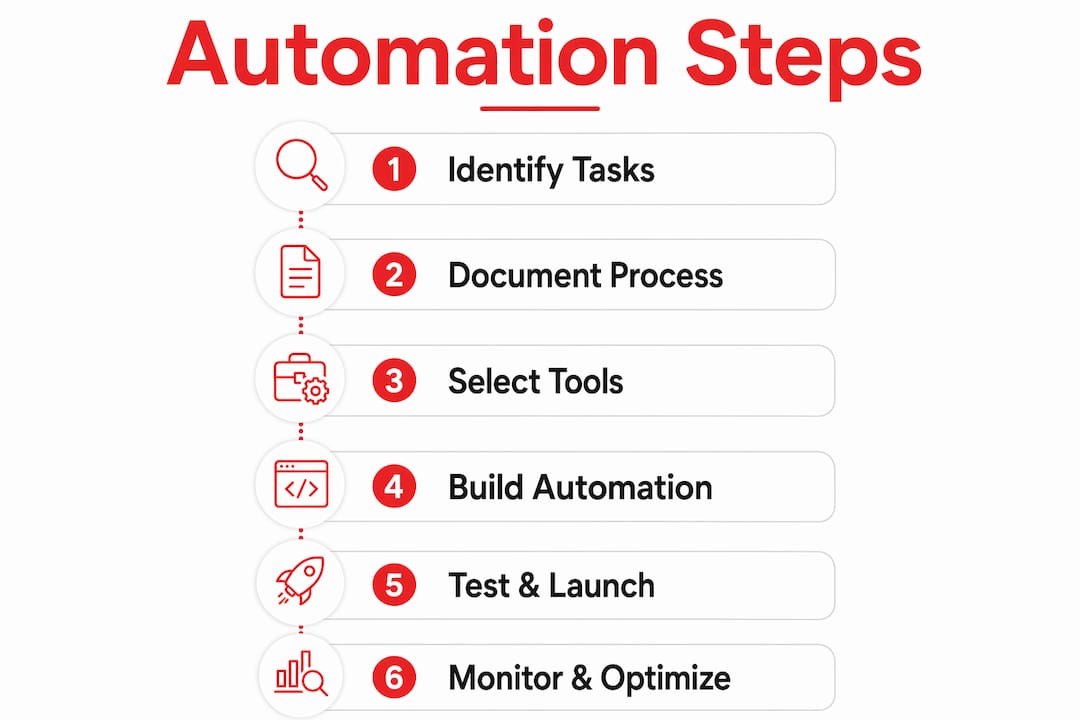
How do you implement admin automation in 6 steps?
Here’s the practical path. Budget 6–12 weeks for your first meaningful automation.
- Assess candidates — list every recurring admin task; note frequency and judgment level.
- Score by ROI and readiness — use the frequency × judgment rule plus the 10x manual check.
- Document and stabilize — write the process as a flowchart; run it manually until outputs are consistent.
- Prototype — build the simplest possible version first. TheClearedge’s readiness protocol recommends 3-week, ~$3K starter builds.
- Integrate and train — connect to existing systems; run live alongside the manual process for 2 weeks.
- Monitor and iterate — track four metrics from day one.
Metrics to track from day one:
- Hours recovered per week
- Error rate (before vs. after)
- Cycle time (e.g., invoice-to-payment days)
- Adoption rate (% of team using the automated flow vs. workarounds)
Check these weekly for the first month, then monthly. For quick wins that build momentum, start with invoice reminders or expense routing — both are low-risk and show results fast.
What technical architecture supports admin automation?
Modular, API-first architecture is the right foundation. A central workflow engine handles orchestration; a data validation layer catches bad inputs before they propagate; human-in-the-loop patterns handle exceptions without breaking the flow.

| Pattern | When to use it |
|---|---|
| iPaaS/connector (e.g., Zapier, Make) | Connecting commodity SaaS tools quickly |
| Event-driven webhooks | Real-time triggers between internal systems |
| Middleware adapters | Legacy systems with no native API |
| Direct API integration | High-volume, low-latency custom workflows |
Security and compliance non-negotiables:
- Role-based access controls on every automated workflow
- Full audit logging for approvals and data changes
- Encryption in transit (TLS) and at rest
- Least-privilege service accounts — no admin credentials in automation scripts
- Documented change-approval process for workflow modifications
Admin automation also creates the structured data layer that higher-level AI automations rely on later. Clean, consistent records from automated admin processes are what make digital ops scalable.
How does Rule27design approach admin automation projects?
Rule27design runs a discovery-first process: readiness audit, lightweight prototype, iterative build, governance handoff. No six-month contracts before you see working software.
What to expect when you work with Rule27design:
- Week 1–2: Discovery and readiness audit — process mapping, integration inventory, ROI scoring
- Week 3–5: Prototype — a working, minimal version of your highest-priority automation
- Week 6–10: Integration, training, and parallel-run testing
- Ongoing: Monitoring dashboard, governance documentation, iteration plan
Before a discovery call, prepare a list of your top 5 recurring admin tasks by time cost and a rough map of the tools those tasks touch.
How do you get your team to actually use it?
Change management is where most growth-stage automation projects quietly fail. The tool works. The team doesn’t adopt it.
At the $5M–$50M stage, you usually don’t have a dedicated change manager. That means the ops lead or founder has to own adoption explicitly.
What works at this stage:
- Involve one or two frontline users in the prototype phase — they become internal advocates.
- Run the automated and manual processes in parallel for two weeks so the team builds confidence.
- Name a process owner for each automation who monitors outputs and fields questions.
- Set a 30-day adoption target and track it as a metric alongside hours recovered.
Stakeholder buy-in at the executive level matters too. Eagle Rock CFO notes that growth-stage automation fails when leadership treats it as an IT project rather than a business investment. Frame every automation in terms of hours recovered and cash impact, not features shipped. That framing keeps finance and ops aligned and makes budget conversations easier.
Key Takeaways
Admin automation pays off fastest when you target high-frequency, low-judgment tasks, run the readiness checks first, and build a hybrid system that combines off-the-shelf tools with custom workflows for processes that actually differentiate your operations.
| Point | Details |
|---|---|
| Target high-frequency, low-judgment tasks | Invoicing, expense routing, and approvals deliver the fastest ROI with the lowest risk. |
| Run the readiness check first | Automating an unstable process can cost $55K and months of lost leverage from rework. |
| Use a hybrid approach | Off-the-shelf tools for commodity functions; custom builds for differentiating workflows. |
| Track four metrics from day one | Hours recovered, error rate, cycle time, and adoption rate tell you if it’s working. |
| Rule27design builds readiness-first | Discovery, prototype, and governance handoff in 6–10 weeks for growth-stage teams. |
The part most guides skip
Most admin automation content sells the upside and buries the failure modes. The pattern I see repeatedly: a founder hears about automation, picks a tool, and starts connecting things before the underlying process is clean. Six months later, the automation is running — and producing garbage outputs at scale instead of manual errors at human speed.
The document-first discipline isn’t glamorous. But it’s the difference between a $3K prototype that saves time each week and a $55K cleanup project that sets you back months. Hybrid builds win not because custom is always better, but because growth-stage companies have a mix of commodity needs and genuinely unique workflows. Treating them the same way is the mistake.
One more thing: the ROI math almost always looks better than expected once you include cash-flow gains from faster collections and the cognitive load recovered by the founder or ops lead. That last one is hard to put in a spreadsheet, but it’s real.
Ready to run your automation readiness check?
Rule27design gives growth-stage teams a faster path from “we should automate this” to a working system that your team actually uses.
The starting point is a discovery session where we run the Automation Readiness Protocol on your top admin candidates, score them by ROI and complexity, and scope a 3-week prototype for the highest-priority workflow. You leave with a clear build plan and realistic cost bands — no vague proposals.
Book a discovery call to scope your first automation or get a readiness audit before committing to any build.
Useful sources
- What is Business Automation? | IBM — McKinsey’s 2024 finding on time reallocation; foundational evidence for the productivity case.
- The ROI of Automating Administrative Work | Magic Teams AI — ROI formula, the 35%–50% invoice collection improvement figure, and the 60%–70% early-phase automation target.
- Workflow automation for growing businesses | Eagle Rock CFO — CFO-level perspective on governance, change management, and the 2–5× total cost of ownership reality.
- Why Automating Too Early Costs $55K | TheClearedge — The premature-automation failure pattern, the Automation Readiness Protocol, and the 3-week starter build framework.
- Custom vs. Off-the-Shelf Software | HyScaler — Decision framework for hybrid strategy at the growth stage.
- Marketing Automation Checklist for SMBs | BabyLove Growth — Practical checklist for marketing-side admin automation; useful companion reading for teams starting with marketing workflows.

About the Author
Josh AndersonCo-Founder & CEO at Rule27 Design
Operations leader and full-stack developer with 15 years of experience disrupting traditional business models. I don't just strategize, I build. From architecting operational transformations to coding the platforms that enable them, I deliver end-to-end solutions that drive real impact. My rare combination of technical expertise and strategic vision allows me to identify inefficiencies, design streamlined processes, and personally develop the technology that brings innovation to life.
View Profile

