What Is a Digital Control Panel? Your 2026 Guide
Discover what is a digital control panel in our 2026 guide. Transform your understanding of modern operations and enhance efficiency today!
TL;DR:
If you’ve ever wondered what is a digital control panel and why everyone from factory managers to building engineers seems obsessed with them, you’re in the right place. A digital control panel is an enclosure that manages equipment and processes using digital logic or software. Think PLCs and sensor networks. Not old-school switches and dials. These systems sit at the center of how modern operations run. And once you understand how they work, it’s hard to look at your facility the same way again.
Key takeaways
Point | Details
Digital control panel definition | A panel using digital logic and software to manage equipment, replacing analog-only components.
Control loop drives everything | Sensors feed data in, a controller processes it, outputs drive actuators, feedback closes the loop.
Multiple panel types exist | Industrial, DDC, timer-based, and automation panels each serve distinct use cases.
Benefits come with tradeoffs | Accuracy and flexibility are real gains, but wiring errors and integration limits are real risks.
Picking the right panel matters | Match I/O count, communication protocols, and scalability to your specific operational needs.
What is a digital control panel and how it works
A digital control panel is, at its core, a managed enclosure thatuses digital logic and softwarelike PLCs instead of purely analog components to control equipment. That’s the digital control panel definition most engineers work from. But the real story is in the architecture underneath.
Here’s how it works in four clean phases.
- Input.Sensors throughout your system measure things like temperature, pressure, flow rate, or occupancy. Those readings get converted from analog signals to digital data via analog-to-digital conversion inside thecontroller’s processing logic.
- Processing.The controller, often a PLC or a building automation controller, runs programmed logic against that incoming data. PLCs execute this logic in milliseconds, which is whyprecise automationis possible at scale.
- Output.Based on the processed decision, the panel sends commands to actuators. Actuators are the physical components that actually do something. Open a valve. Adjust a motor speed. Switch a circuit.
- Feedback.The system checks whether the output achieved the desired result. If not, the loop runs again. This continuous feedback is what separates digital panels from fixed mechanical controls.
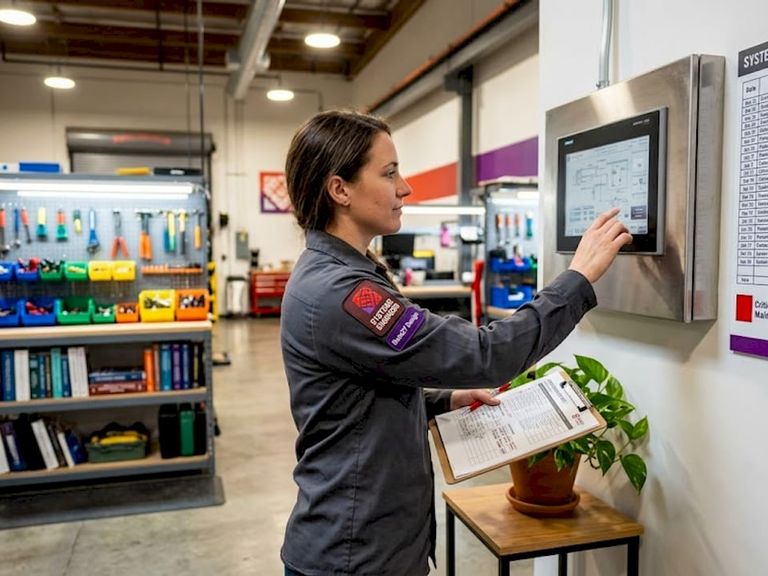
Sitting on top of this loop is the HMI, or human-machine interface.HMI shows real-time dataand accepts operator commands. It’s the screen you interact with. But here’s something most people get wrong: the HMI is not the controller. The PLC or DDC controller is doing the actual work. The HMI is just how you see and influence it.
Pro Tip:If you’re evaluating a digital control panel system, ask the vendor to show you the control loop diagram. Any legitimate system should be able to map every sensor input to a corresponding output and feedback path. If they can’t, keep shopping.
Features and types of digital control panels
Not all digital control panels are the same. The type you need depends on your application, your environment, and the complexity of what you’re trying to control. Here’s a practical breakdown.
Panel Type | Key Features | Typical Applications
PLC/Automation Panel | Programmable logic, modular I/O, multi-protocol support | Manufacturing, conveyor systems, process automation
DDC Panel (Building Automation) | Sensor inputs, BACnet/Modbus protocols, real-time HVAC control | Commercial buildings, data centers, hospitals
Motor Control Centre (MCC) | Motor starters, variable frequency drives, fault protection | Industrial motors, pumps, compressors
Timer Control Panel | Programmable 24-hr/7-day timers, 240V AC, rugged enclosures | Lighting and pump control, irrigation systems
Power Control Centre (PCC) | High-voltage distribution, protection relays, load balancing | Substations, large industrial facilities
Each type comes with its own feature set, butcommon panel typesacross the board share a few core traits:
- Programmability.You can change how the panel behaves without rewiring it. Update the logic in software.
- Communication protocols.Standards like BACnet and Modbus let panels talk to other systems.I/O count and protocolsdetermine how scalable and integrable a panel really is.
- Real-time monitoring.Data from sensors flows continuously, not in batches.
- Modularity.Input and output modules can often be added or swapped as needs change.
The DDC panel is worth special attention if you manage buildings. In building automation, DDC panels act as the brain that collects sensor data and manages HVAC, lighting, and utilities in real time. They provide optimization by adjusting operations via software rules over sensor feedback. That’s a fundamentally different operating model than a fixed thermostat or a manual switch bank.
For retail and marketing contexts, digital control panels connect todigital transformation in retailas the backbone that keeps automated systems running across locations. Think lighting schedules, environmental controls, and display systems all managed from one place.
Benefits and challenges worth knowing
The benefits of digital control panels are real. So are the pitfalls. Here’s an honest look at both.
What you gain:
- Accuracy.Digital logic processes sensor data and executes decisions far more precisely than human operators or mechanical relays.
- Flexibility.Reprogramming a PLC takes hours. Rewiring a traditional analog panel can take days and requires physical component swaps.
- Real-time visibility.Operators see live system data through the HMI, which means faster response to faults and anomalies.
- Automation.Routine tasks like daily equipment cycles, safety shutoffs, and load balancing run without human intervention.
- Efficiency.Accuracy and flexibility benefitstranslate to fewer errors, less waste, and lower operational costs over time.
What can go wrong:
- Wiring complexity.Matching sensor signal typesto the correct input channels matters. Binary sensors need binary inputs. Analog sensors need analog inputs. Mismatches cause logic faults that are genuinely difficult to trace.
- Integration limits.Older facilities may run legacy equipment that speaks different protocols. Getting a modern DDC panel to talk to a 20-year-old HVAC unit is not always plug-and-play.
- Scalability ceilings.Every panel has a fixed I/O count. When your operation grows past that ceiling, you either add expansion modules or replace the panel entirely.
- Upfront complexity.Configuration, commissioning, and training take real time. The efficiency gains show up later, not on day one.
Pro Tip:Before purchasing any digital control panel, map every sensor and actuator you need to connect and count your required I/O points. Then add 20% for growth. Panels that are maxed out at installation are a headache waiting to happen.
Practical applications and how to choose the right panel
Digital control panel applications span almost every sector. Manufacturing plants use automation panels to control conveyor belts, robotic arms, and process lines. Commercial buildings use DDC systems to cut energy costs by dynamically managing HVAC loads. Retailers use timer and automation panels to coordinate lighting across dozens of stores from a central system. And inmarketing and brand experiences, digital control panels manage audio, lighting, and display systems at live events with precision timing.
Choosing the right panel comes down to five practical steps.
- Count your I/O requirements.List every sensor input and actuator output the panel needs to handle. This single number drives most of your selection criteria.
- Identify required communication protocols.Check what protocols your existing equipment uses. BACnet is standard in building automation. Modbus is common in industrial settings. Buying a panel that doesn’t speak your protocol is an expensive mistake.
- Assess your scalability needs.If your operation is growing, choose a panel with room to add I/O modules rather than a fixed configuration.
- Define your user interface requirements.Do operators need a touchscreen HMI on-site? Remote web access? A simple LED status panel? The answer affects hardware selection and cost significantly.
- Clarify the terminology before you buy.The term “digital control panel” can mean the controller hardware, the HMI screen, or even a full SCADA supervisory system. Confusing HMI for PLC leads to buying the wrong components entirely. Get specific about what role each piece plays before writing any checks.
For growth-stage businesses looking to tie operational systems into broader digital management infrastructure, the same thinking applies. Whether you’re managing physical equipment or digital workflows, the underlying logic is identical. You need inputs, processing rules, outputs, and feedback. The technology just looks different.
My take on where digital control panels are headed
I’ve watched a lot of companies implement digital control systems over the years, and the pattern that shows up most often surprises people. The technology itself is rarely the bottleneck. The bottleneck is almost always organizational. Teams buy a sophisticated DDC panel or automation system, configure it to match exactly what they were doing manually, and then wonder why the ROI is underwhelming.
The real value comes when you start using the data. Every digital control panel generates real-time operational data that most teams completely ignore. Temperature trends, cycle counts, fault histories. That information tells you things you can’t see any other way. It predicts failures before they happen. It shows you where energy is being wasted. It reveals bottlenecks that look invisible from the outside.
The other thing I’ve seen consistently is that people underestimate how much the HMI design matters. You can have a perfectly architected control system sitting behind a confusing interface, and operators will route around it. They’ll use workarounds. They’ll disable features. Good design isn’t decoration. It’s the difference between a system that gets used and one that gets ignored.
The direction I see this going in 2026 and beyond: tighter integration between physical control systems and software-layer management. The line between “control panel” and “admin panel” is blurring. The companies that figure out how to connect their operational data to their decision-making workflows are going to move significantly faster than those treating these systems as separate domains.
— Josh
Build smarter systems with Rule27design
Operational efficiency starts with the right infrastructure.
Rule27design builds custom admin panels, digital management systems, and internal tools tailored to how your team actually works. If you’re ready to move beyond off-the-shelf tools that don’t quite fit, explore what’s possible at theRule27design Innovation Lab. From building automation integrations to full-scale digital management platforms, Rule27design helps growth-stage companies turn operational complexity into competitive advantage. Our clients typically see 40% improvement in efficiency after implementing our systems.
FAQ
What is a digital control panel in simple terms?
A digital control panel is an enclosure that uses digital logic and software, like a PLC, to control and monitor equipment. It replaces manual switches and analog controls with programmable, automated decision-making.
How does a digital control panel work?
It follows a four-phase control loop: sensors send input data, a controller processes that data against programmed rules, outputs command actuators to act, and feedback confirms the result. This loop runs continuously in real time.
What is the difference between an HMI and a digital control panel?
The digital control panel is the full system that controls equipment. The HMI is just the visual interface that lets operators see data and send commands. Without the controller behind it, an HMI cannot drive any operations on its own.
What are the main types of digital control panels?
The main types include PLC automation panels, DDC building automation panels, Motor Control Centres, timer control panels, and Power Control Centres. Each serves different applications based on I/O requirements and communication protocols.
What are the biggest benefits of digital control panels?
The top benefits are accuracy, flexibility through reprogramming, real-time monitoring, automation of routine tasks, and long-term efficiency gains from reduced errors and faster fault response.