

Discover what a digital asset pipeline is and how it can enhance your content operations. Learn key benefits for effective management.
TL;DR:
- A digital asset pipeline is a structured workflow that moves assets through defined stages with controlled transitions. It is supported by DAM systems and workflow orchestration to ensure assets meet quality and compliance standards before publication. Proper design of the pipeline enhances content scalability and prevents chaos in content operations.
A digital asset pipeline is an end-to-end structured workflow that moves digital assets through defined states, from ingestion to archiving, using controlled transitions and automation. The term “digital asset pipeline” is the common shorthand; the recognized industry concept sits under digital asset management (DAM) and workflow orchestration. For digital marketers and content managers, understanding this pipeline is the difference between a content operation that scales and one that collapses under its own weight.
Cloudinary describes these workflows as a controlled progression of states with event triggers and guards, not just isolated automations. That distinction matters. A pipeline is not a checklist. It is a living system where each asset state unlocks the next step only when specific conditions are met. Tools like Adobe Experience Manager, Microsoft SharePoint, and Cloudinary all model their DAM capabilities around this principle.
What is a digital asset pipeline and how does it work?
A digital asset pipeline is defined as a sequential, state-driven workflow that governs how a digital asset moves from raw creation to final delivery and long-term storage. Each stage has a specific function, and an asset cannot skip stages without meeting transition rules.
Cloudinary advises that operational pipelines treat “ready to use” as a state, not an assumption. Downstream systems trigger updates only after validation and approvals clear. That single design principle prevents stale or incorrect versions from reaching your audience.
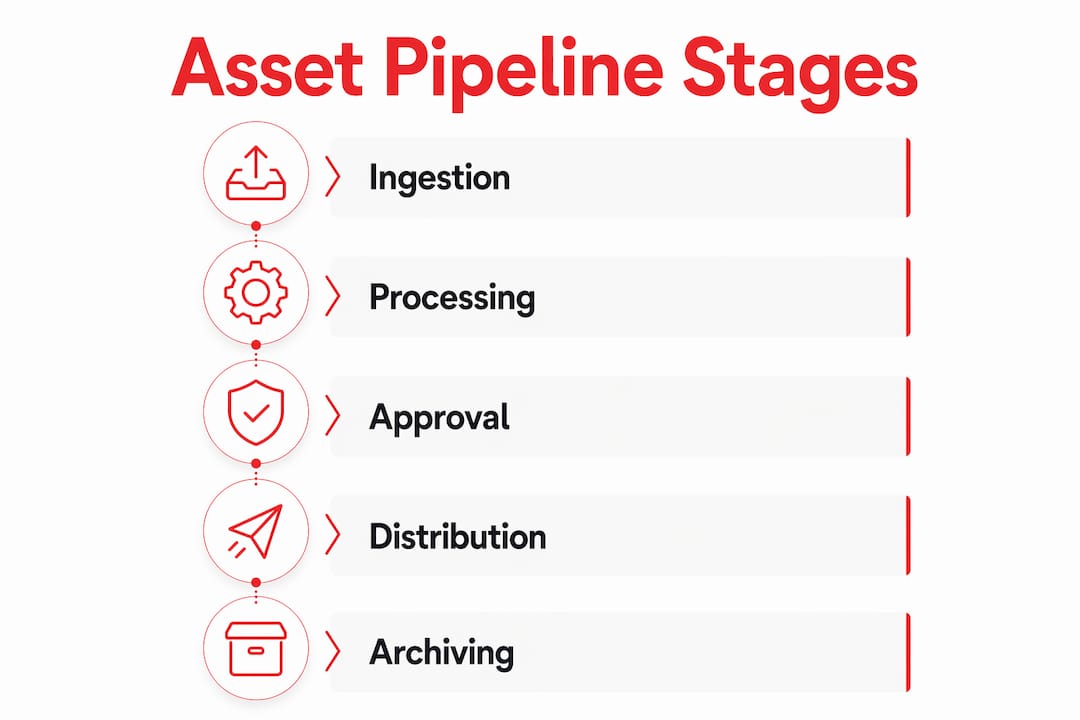
The six core stages of a standard asset pipeline workflow are:
- Ingestion: Raw files enter the system from cameras, design tools, or external vendors.
- Validation and enrichment: Metadata is applied, file formats are checked, and assets are tagged for searchability.
- Review and approval: Stakeholders approve or reject assets based on brand, legal, or quality standards.
- Transformation: Assets are resized, reformatted, or transcoded for specific channels or devices.
- Delivery and publishing: Approved assets are pushed to websites, apps, social platforms, or ad networks.
- Archiving: Assets move to long-term storage with retrieval rules attached.
| Stage | Primary Activity | Common Tools |
|---|---|---|
| Ingestion | File upload and source tracking | Cloudinary, Dropbox |
| Validation and enrichment | Metadata tagging, format checks | Adobe Bridge, DAM platforms |
| Review and approval | Stakeholder sign-off | Bynder, Widen |
| Transformation | Resizing, transcoding, format conversion | Cloudinary, FFmpeg |
| Delivery and publishing | Multi-channel distribution | CMS, CDN, social schedulers |
| Archiving | Long-term storage with access rules | AWS S3, Google Cloud Storage |
Each transition between stages is governed by event triggers and guards. A guard is a condition that must be true before an asset advances. For example, an asset cannot move from “review” to “transformation” until at least two approvers have signed off. This logic is what separates a pipeline from a simple folder structure.
How do DAM systems support the asset pipeline workflow?
Adobe and Microsoft emphasize that DAM is not just storage. It is full lifecycle management that covers metadata, permissions, version control, and workflow automation across every pipeline stage. A DAM system is the backbone that keeps the pipeline running.

Without a DAM, assets live in scattered drives, Slack threads, and email chains. With one, every file has a single source of truth. Teams can find the right version, check its approval status, and push it to the correct channel without hunting through folders.
Microsoft highlights DAM’s role in enabling content teams to work faster with compliant asset use across departments. That compliance piece is critical for regulated industries like finance, healthcare, and retail, where using an unapproved asset can carry real legal risk.
Key capabilities a DAM must provide to support a pipeline effectively:
- Centralized metadata schemas that apply consistently at ingestion
- Role-based permissions that control who can approve, edit, or publish
- Version history that tracks every change with a timestamp and author
- Workflow triggers that automatically advance assets when conditions are met
- Integration APIs that connect the DAM to your CMS, ad platforms, and delivery networks
Pro Tip: When evaluating DAM platforms, test the API first. A DAM that cannot connect to your CMS or marketing automation tool will become a silo, not a pipeline.
For teams managing media assets at scale, efficient media asset management practices show how automating pipeline stages directly improves campaign ROI.
How does workflow orchestration keep the pipeline running?
Workflow orchestration is the engine that enforces pipeline rules automatically, without requiring a human to manually move assets between stages. Kaleido’s workflow engine coordinates asset lifecycle by applying policy frameworks to enable fully auditable and secure management. That is the model every serious pipeline should follow.
A state machine is the technical model behind most workflow engines. Each asset has a current state. An event, like an approval click or a file format check passing, triggers a transition to the next state. Guards block the transition if conditions are not met. This prevents assets from jumping to “published” before they are ready.
The difference between pipeline orchestration and simple task automation is significant. Task automation runs a script when triggered. Pipeline orchestration manages state, enforces rules, handles exceptions, and logs every action for audit purposes. One is a shortcut. The other is a system.
Best practices for implementing pipeline orchestration:
- Map every asset state before writing a single automation rule.
- Define transition guards explicitly, including who can approve and what file specs must pass.
- Build branch logic for exceptions, such as assets that need legal review versus those that do not.
- Log every state change with a timestamp, user ID, and reason for the transition.
- Set up alerts for assets stuck in a state longer than your defined SLA.
- Review pipeline performance monthly and adjust guards or transitions based on bottleneck data.
Pro Tip: Treat your pipeline states as triggers for downstream systems. When an asset reaches “approved,” that state change should automatically notify your CMS, update your asset catalog, and queue the transformation job. Manual handoffs at this stage are where errors happen.
Media pipelines vs. blockchain asset pipelines: what is the difference?
Stripe defines digital assets broadly, covering everything from marketing images to cryptocurrencies and NFTs. Each asset type requires a different pipeline approach. Understanding the distinction helps you build the right system for your context.
Media pipelines focus on content lifecycle and multi-channel delivery. The assets are photos, videos, documents, and design files. The pipeline moves them from creation through approval to publication across websites, apps, and social platforms. The primary concerns are brand compliance, format consistency, and delivery speed.
Blockchain asset pipelines manage token lifecycle from issuance to redemption. Kaleido models this pipeline as a workflow engine governing lifecycle actions like mint, transfer, and burn, with auditable rules enforced by smart contracts. The primary concerns are security, auditability, and regulatory compliance.
Token lifecycle pipelines also require a two-sided architecture: a workflow engine for operational actions and an indexing engine for real-time query and state. That complexity does not exist in media pipelines, where a CDN handles delivery state.
| Component | Media Content Pipeline | Blockchain Token Pipeline |
|---|---|---|
| Asset types | Photos, videos, documents, design files | Cryptocurrencies, NFTs, tokenized assets |
| Core system | DAM platform, CMS | Blockchain node, smart contracts |
| Key stages | Ingest, enrich, approve, transform, publish | Mint, transfer, settle, redeem, burn |
| Governance layer | Role-based permissions, metadata standards | Smart contract rules, audit ledger |
| Delivery mechanism | CDN, social platforms, ad networks | Wallet transactions, exchange protocols |
| Primary risk | Stale content, brand non-compliance | Security breach, regulatory violation |
For teams building multichannel content distribution systems, the media pipeline model is the relevant one. Blockchain pipelines are a separate discipline requiring different technical expertise.
Practical tips for implementing your digital asset pipeline
Content workflow automation reduces manual work and errors, increasing ROI and content delivery speed for marketing teams. But automation without structure creates chaos faster than manual processes do. The pipeline structure must come first.
Start by mapping your current asset states on a whiteboard. Write down every status your assets currently have, even informal ones like “waiting on legal” or “needs resize.” Those informal states are your pipeline stages in disguise. Formalizing them is the first step toward a real system.
Adobe reports that centralized metadata and permissions in pipelines enable smoother review and reuse workflows, saving significant time. Metadata standards are not glamorous, but they are the foundation of every searchable, reusable asset library.
Key implementation priorities:
- Define a metadata schema before onboarding any assets into your DAM.
- Assign clear ownership for each pipeline stage, including who approves and who can override.
- Integrate your DAM with your CMS and marketing automation platform from day one.
- Automate repetitive tasks like format conversion and thumbnail generation, but keep human approval gates for brand and legal review.
- Audit your pipeline quarterly to remove bottlenecks and retire unused states.
Pro Tip: The most common pipeline failure is skipping the governance design. Teams build automation first and add rules later. That approach creates technical debt that is expensive to unwind. Design your permissions and approval logic before you write a single integration.
Key Takeaways
A well-designed digital asset pipeline moves assets through defined, governed states, and that structure is what separates scalable content operations from chaotic ones.
| Point | Details |
|---|---|
| Pipeline definition | A digital asset pipeline is a state-driven workflow with controlled transitions, not just a folder system or task list. |
| DAM as backbone | DAM platforms like Adobe and Microsoft provide the metadata, permissions, and automation that keep pipeline stages connected. |
| Orchestration over automation | Workflow engines enforce state transitions with guards and audit trails, preventing stale or non-compliant assets from publishing. |
| Two pipeline types | Media pipelines manage content lifecycle; blockchain pipelines manage token lifecycle with smart contracts and indexing engines. |
| Governance first | Define metadata schemas, approval roles, and transition rules before building any automation to avoid costly rework. |
The part most teams get wrong
Most content teams I talk to think they have a pipeline. What they actually have is a shared drive with a naming convention and a Slack channel for approvals. That is not a pipeline. It is organized chaos.
The real shift happens when you stop thinking about tasks and start thinking about states. An asset is not “in progress.” It is in the “pending legal review” state, and it cannot leave that state until a specific person with a specific role takes a specific action. That precision is what makes a pipeline a pipeline.
The trend I find most interesting right now is AI-enhanced metadata tagging at the ingestion stage. Tools are getting good enough to auto-tag assets with accurate descriptors on upload, which cuts the enrichment stage from hours to seconds. But the governance layer still needs human design. AI can tag a photo as “product shot, blue background, Q3 campaign.” It cannot decide whether that photo meets your brand standards or has cleared legal review.
The teams winning in 2026 are the ones treating their pipeline states as triggers for every downstream system. When an asset hits “approved,” that event fires automatically to the CMS, the ad platform, and the analytics dashboard. Nothing waits for a human to click a button. That is the standard worth building toward.
— Josh
How Rule27design builds pipelines that actually work
Rule27design builds custom digital infrastructure for growth-stage companies that have outgrown basic tools. If your content team is managing assets across scattered systems with manual approval processes, that is a solvable problem.
Rule27design designs and connects DAM systems, CMS platforms, and workflow engines into a single, governed pipeline. The work covers metadata schema design, approval workflow logic, and integration with your existing marketing stack. Clients typically see a 40% improvement in operational efficiency after implementation. If you are ready to replace your shared drive and Slack approvals with a real system, see what Rule27design builds and start the conversation.
FAQ
What is a digital asset pipeline in simple terms?
A digital asset pipeline is a structured workflow that moves files through defined stages, from upload to publication to archiving, with rules controlling each transition. Think of it as an assembly line for your content, where nothing advances until it meets the requirements for the next stage.
What is the difference between a DAM and a digital asset pipeline?
A DAM (digital asset management) system is the platform that stores, organizes, and manages your files. The digital asset pipeline is the workflow process that governs how those files move through stages. The DAM is the infrastructure; the pipeline is the logic running on top of it.
How does workflow automation fit into an asset pipeline?
Workflow automation handles repetitive transitions automatically, such as triggering a format conversion when an asset is approved or notifying a reviewer when a file enters the review stage. Cloudinary notes that consistent workflow transitions prevent manual errors and ensure reliable asset delivery.
Do small marketing teams need a formal digital asset pipeline?
Any team managing more than a few dozen assets across multiple channels benefits from a defined pipeline. Without one, version control breaks down and unapproved assets reach audiences. The pipeline does not need to be complex. It needs to be explicit about states and ownership.
How is a blockchain asset pipeline different from a content pipeline?
A blockchain asset pipeline manages token lifecycle operations like minting, transferring, and burning, enforced by smart contracts and auditable workflow engines. A content pipeline manages media files through creation, approval, and publication stages using DAM platforms and CMS integrations.

About the Author
Josh AndersonCo-Founder & CEO at Rule27 Design
Operations leader and full-stack developer with 15 years of experience disrupting traditional business models. I don't just strategize, I build. From architecting operational transformations to coding the platforms that enable them, I deliver end-to-end solutions that drive real impact. My rare combination of technical expertise and strategic vision allows me to identify inefficiencies, design streamlined processes, and personally develop the technology that brings innovation to life.
View Profile

