

Quickly identify problematic commits in your Git history with git bisect. Streamline your debugging process and improve efficiency.
Git bisect is the quickest way to find the commit that introduced a reproducible regression. It runs a binary search over your commit history and walks you straight to the first bad commit. Three commands get you started:
git bisect start
git bisect bad HEAD          # current commit is broken
git bisect good v1.4.0       # last known-good tag or hash
Git checks out the midpoint. You test. You mark it good or bad. Repeat until Git prints the culprit. Then:
git bisect reset # back to your original HEAD
Use bisect when:
- The bug is reproducible every time you run a specific test or check.
- You have a known-good commit (a tag, a CI green build, a release hash).
- The commit range is large enough that checking each one manually would take too long.
For 47 commits, you need roughly 6 checks instead of 47. That ratio only gets better as the range grows.
Key Takeaways
Git bisect cuts regression hunting from a linear manual search to a logarithmic automated one, and exit codes 0, 1, and 125 are the only interface your test script needs.
| Point | Details |
|---|---|
| Start with clean refs | Mark HEAD as bad and a known CI-green tag as good before anything else. |
Automate with bisect run |
Pass a deterministic test script; Git handles all checkouts and marking automatically. |
| Use exit code 125 for skips | Return 125 when a commit can’t be built or tested so Git skips it instead of failing. |
| Reset every session | Run git bisect reset when done to avoid leaving the repo in a detached HEAD state. |
Use --first-parent on merge-heavy repos |
Restricts search to the main-line chain and keeps step counts predictable. |
The author’s take on bisect in real workflows
Most developers know bisect exists. Far fewer use it consistently, and almost nobody automates it until they’ve wasted a few hours on a manual hunt. That gap is the real problem.
At Rule27design, bisect is part of the standard debugging checklist for any regression that can’t be traced to a recent commit by inspection. The workflow is always the same: write a minimal reproducing test first, anchor the good ref to the last green CI run, then hand it to git bisect run. The script does the rest. That discipline keeps debugging time short and keeps the team focused on fixing rather than hunting.
The piece most teams skip is the test script. A vague “run the app and see if it crashes” check doesn’t work in automation. The test has to be binary, deterministic, and fast. Getting that right is the actual skill. The bisect commands themselves take about ten minutes to learn.
If you’re building internal tools or admin systems where regressions in data pipelines or API integrations can be hard to trace, a saved bisect log attached to every bug report is worth making a team standard. It turns a one-time debugging session into a reusable artifact.
What does git bisect actually do?
Git bisect automates the identification of the commit that introduced a regression by using a binary-search-inspired algorithm and the good/bad marking workflow. Instead of walking commits one by one, it cuts the candidate set in half at each step.

The key word is candidate set. Your repo’s history is a Directed Acyclic Graph (DAG), not a flat list. Git scores every commit in the range and picks the one that most evenly splits the remaining candidates. That keeps the step count close to logarithmic even on branchy histories.
When does it save the most time? Three scenarios stand out. First, a regression that appeared somewhere in the last few hundred commits and you have no idea where. Second, a performance drop that a benchmark script can detect automatically. Third, any situation where you have a reliable test and two known refs. If the bug is not reproducible, bisect will give you wrong answers. If you have no known-good ref, you need to find one before starting.
How do you run a bisect session step by step?
Here is a full session from a clean working tree to a confirmed bad commit.
-
Clean your working tree. Uncommitted changes can interfere with Git’s checkouts. Stash or commit anything pending.
-
Start the session.
git bisect start -
Mark the current (broken) commit as bad.
git bisect bad HEAD -
Mark a known-good commit. Use a tag, branch name, or full hash.
git bisect good v2.1.0Git immediately checks out the midpoint and tells you how many steps remain.
-
Test the checked-out commit. Run your test suite, your script, or a manual check.
npm test # or: pytest tests/regression/test_login.py -
Mark the result.
git bisect good # tests pass — bug not here yet # or git bisect bad # tests fail — bug already present -
Repeat steps 5–6. Git checks out a new midpoint each time. The remaining-steps count drops by roughly half each round.
-
Read the verdict. When Git has enough information, it prints something like:
abc1234 is the first bad commit commit abc1234 Author: Dev Name <dev@example.com> Date: Mon Mar 10 14:22:01 2025 -0700 Refactor auth token validation -
Reset.
git bisect reset
Pathspec limiting. If the bug is clearly inside one subdirectory, pass a pathspec to git bisect start to restrict which commits Git considers:
git bisect start -- src/auth/
This trims the candidate set and speeds things up when the rest of the tree is noisy.
Commands cheat-sheet for a bisect session
Every subcommand you will reach for during a session, in plain terms:
git bisect start — Opens a new session. Optionally accepts <bad> <good> refs directly: git bisect start HEAD v1.0.
git bisect bad [<commit>] — Marks a commit as containing the bug. Defaults to HEAD if no commit is given.
git bisect good [<commit>] — Marks a commit as clean. Same default behavior.
git bisect skip [<commit>...] — Tells Git to skip a commit it cannot test. Git picks the next-best candidate. Skipping too many commits in a row can make the final result ambiguous.
git bisect next — Rarely needed manually; Git advances automatically after each mark. Useful if something interrupted the flow.
git bisect reset [<commit>] — Ends the session and returns HEAD to the original branch. Always run this when you are done.
git bisect terms — Prints the current good/bad term labels so you know what to type.
git bisect visualize — Opens gitk (or git log with --oneline --graph if gitk is absent) to show the remaining candidate commits. Handy for spotting merge tangles.
git bisect log — Prints the full session history: every mark, every skip, every checkout. Save this output for auditing.
git bisect replay <logfile> — Replays a saved log file to reconstruct a session. Useful for reproducing a bisect on a different machine or sharing with a teammate.
Alternate terms. The official git-bisect documentation supports old/new in place of good/bad when you are searching for the commit that introduced a feature rather than a regression. You can also define custom labels:
git bisect start --term-old=working --term-new=broken
--no-checkout. Passes the candidate commit hash to BISECT_HEAD without actually checking it out. Useful when checkout is expensive or when your test can run against a specific ref without a full working-tree switch.
--first-parent. Restricts the search to the first-parent chain, ignoring merged branches. Covered in depth in the next section.
How do you automate bisect with git bisect run?
Manual marking works, but automating bisect with a scripted test eliminates human error and lets the search run unattended. The command is:
git bisect run <script> [args...]
Git runs your script at every step and reads the exit code:
| Exit code | Meaning | Git action |
|---|---|---|
0 |
Commit is good | Mark good, advance |
1 (except 125) |
Commit is bad | Mark bad, advance |
125 |
Commit is untestable | Skip, pick next candidate |
| — | Script error | Abort the entire bisect |
Exit code 125 is the critical one. It tells Git to skip the current commit and continue without failing the whole run. Use it whenever a commit cannot be built or tested.
A Node.js one-liner
git bisect run npm test
npm test exits 0 on pass and nonzero on failure. That is all Git needs.
A compiled-project script with build-failure handling
#!/usr/bin/env bash
set -e

make build 2>/dev/null || exit 125   # can't build → skip
./run_tests.sh
exit $?
Save this as bisect_test.sh, make it executable, then:
git bisect run ./bisect_test.sh
Keep scripts deterministic. A flaky test that sometimes passes and sometimes fails will mark commits incorrectly and send the search in the wrong direction. Before running an automated bisect, confirm the test produces the same result on the same commit at least three times in a row. Isolate external state: seed random number generators, use a local database fixture, and set environment variables explicitly inside the script rather than relying on whatever happens to be in the shell.
Pro Tip: Add set -e to bash scripts so any unexpected error exits with a nonzero code rather than silently continuing. Pair it with an explicit exit 125 on build failures so Git skips rather than misclassifies.
How do you handle untestable commits, merges, and skips?
Real histories are messy. Here is how to handle the common problems.
Skipping untestable commits
When a commit cannot be tested (broken build, missing dependency, mid-refactor state), skip it:
git bisect skip
Or skip a range:
git bisect skip v2.3..v2.5
Skipping is safe in small doses. If the actual first-bad commit falls inside a skipped range, Git will tell you it cannot pinpoint the exact commit but will give you the boundary commits that bracket the problem. That is still useful: you know the bug landed somewhere in a small window.
Merges and --first-parent
Merge commits complicate the DAG. When Git bisects across a merge, it may check out commits from a merged feature branch that were never part of your main-line history. That can produce confusing results, especially when the feature branch had its own broken intermediate states.
--first-parent restricts the search to the direct ancestry chain:
git bisect start --first-parent HEAD v1.0
This is the right call when your team uses a merge-based workflow and the regression almost certainly landed via a merge commit on the main branch rather than inside a feature branch.
- Use
--first-parentwhen your main branch uses merge commits and you want to identify which merge introduced the bug. - Skip the flag when you need to find the exact commit inside a feature branch.
- Combine
--first-parentwith a pathspec to narrow scope even further.
Pro Tip: Before starting a bisect on a repo with heavy merge traffic, run git log --oneline --graph HEAD...v1.0 to visualize the shape of the history. A quick look tells you whether --first-parent will help or whether the bug is likely inside a branch.
How do you inspect bisect state and finish a session?
Reading the final output
When Git identifies the first bad commit, it prints the full commit details: hash, author, date, and message. That is your starting point. From there:
git show abc1234          # full diff of the bad commit
git blame src/auth.js     # line-level authorship around the change
git diff abc1234^ abc1234 # same as show, but explicit
Mid-session inspection
git bisect log            # full session transcript
git bisect visualize      # graphical view of remaining candidates
git bisect log is especially useful when something looks off. If a mark was wrong, you can edit the log file and replay it:
git bisect log > session.log
# edit session.log to remove the bad mark
git bisect replay session.log
Save session.log to your repo or a ticket for auditing. It is a complete record of every step.
Finishing cleanly
git bisect reset
Always run this when you are done. Skipping it leaves the repo in a detached HEAD state, which confuses subsequent git operations and is a common beginner mistake.
Best practices to make bisect reliable and fast
A few habits separate a bisect session that finishes in minutes from one that wastes an afternoon.
- Write a single-purpose test. The test should check exactly the behavior that regressed. A broad test suite that touches unrelated code adds noise and slows each step.
- Make the test fast. Every step runs the test. A 30-second test on a 10-step bisect costs 5 minutes. A 5-second test costs under a minute.
- Isolate external state. Databases, caches, and environment variables should be reset to a known state at the start of every test run. A test that passes because of leftover state from the previous run will corrupt the bisect.
- Anchor your good ref to CI. Use the last green CI build’s commit hash or a release tag, not a vague “I think this worked last week” guess. A wrong good ref extends the search range unnecessarily.
- Keep the working tree clean. Stash or commit everything before starting. Git’s checkouts during bisect will fail or produce wrong results if uncommitted changes conflict.
- Save the bisect log. Run
git bisect log > bisect_session.logbefore resetting. Attach it to the bug report or PR.
Pro Tip: Tie your bisect test script into your CI environment by reusing the same environment-setup script your pipeline uses. That way the test behaves identically in both contexts, and you avoid the “works in bisect, fails in CI” confusion.
For teams building digital systems for growth, reproducible test scripts are the foundation of reliable regression detection, not just a bisect convenience.
When the bug is localized to one part of the codebase, limit the search with a pathspec:
git bisect start -- src/payments/
This is especially effective in monorepos where unrelated changes dominate the commit history. Pairing pathspec limiting with marketing automation workflows that trigger regression checks on deploy gives you a fast feedback loop across both engineering and product layers.
Why does git bisect pick the commits it does?
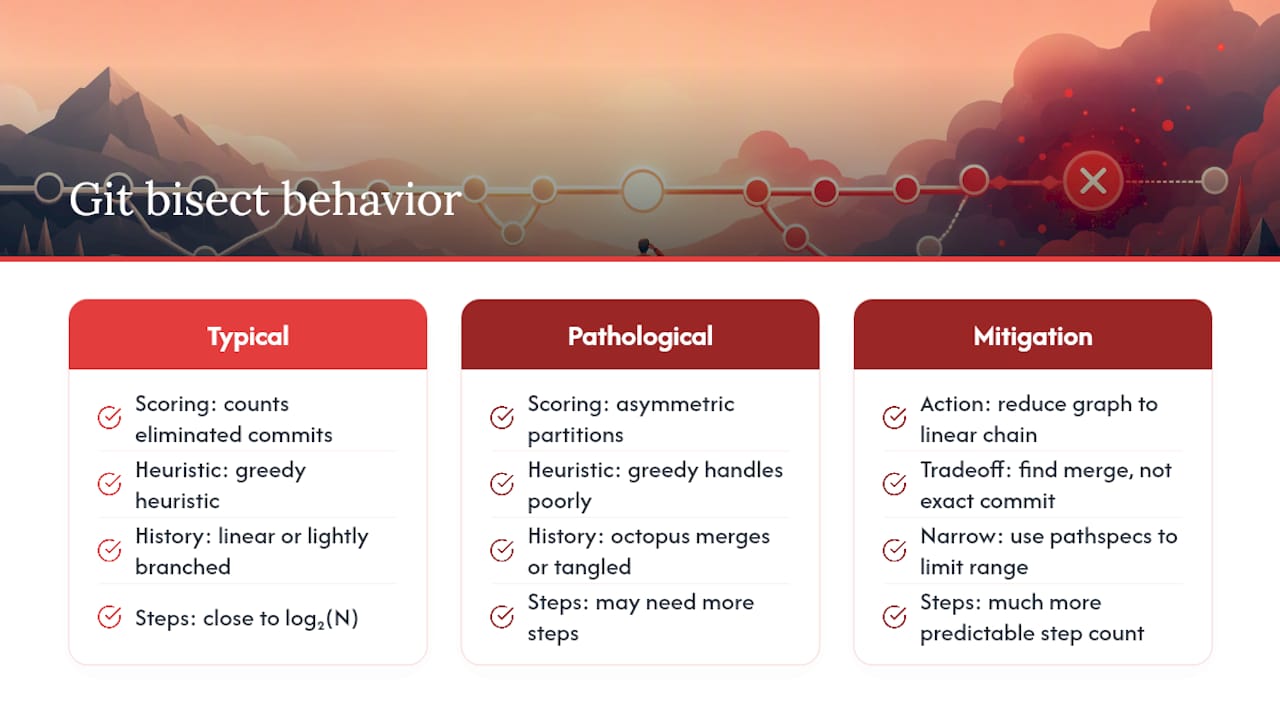
Git’s bisect algorithm works on a DAG, not a sorted list. It cannot simply take the middle index. Instead, it scores every candidate commit by computing how many commits would be eliminated from the candidate set if that commit were marked good versus bad. The commit with the most balanced split gets checked out next.
This is a greedy heuristic. It works well in typical linear or lightly branched histories, keeping step counts close to log₂(N). But it can be suboptimal in pathological graphs. Octopus merges (a single commit with three or more parents) create asymmetric partitions that the greedy scorer handles poorly. In those cases, the algorithm may need more steps than a theoretically optimal strategy would require.
The theoretical analysis of git bisect confirms this: git bisect is an approximation algorithm with provable bounds under typical constraints, but those bounds loosen when the graph structure is unusual.
Practical takeaway: if your repo has heavy octopus merges or a very tangled history, use --first-parent to reduce the graph to a linear chain before bisecting. You trade some precision (you find the merge, not the exact commit inside it) for a much more predictable step count. Narrow the range further with pathspecs and you get the best of both approaches.
Sources
- Git - git-bisect Documentation
- git-bisect(1)
- Theoretical analysis of git bisect
- Automated debugging with git | ConSol Monitoring
- Git Bisect: Find the Exact Commit That Broke Production | DevOpsil

About the Author
Josh AndersonCo-Founder & CEO at Rule27 Design
Operations leader and full-stack developer with 15 years of experience disrupting traditional business models. I don't just strategize, I build. From architecting operational transformations to coding the platforms that enable them, I deliver end-to-end solutions that drive real impact. My rare combination of technical expertise and strategic vision allows me to identify inefficiencies, design streamlined processes, and personally develop the technology that brings innovation to life.
View Profile

