

Discover how to use CoffeeScript classes with clear syntax, inheritance, and real examples. Start writing modern JavaScript effortlessly!
A CoffeeScript class is declared with class Name. Instance properties get initialized in constructor: using @ as shorthand for this. Here’s the smallest runnable example:
class Animal
  constructor: (@name) ->
  speak: -> "#{@name} says hello"

dog = new Animal("Rex")
console.log dog.speak()  # "Rex says hello"
@name in the constructor parameter list automatically assigns the argument to this.name. new Animal("Rex") creates an instance. That’s it. Copy it, run it, and you’re writing CoffeeScript object-oriented code.
CoffeeScript 2 compiles
classdirectly to ES2015classsyntax. You’re not getting a polyfill or a prototype hack. You’re getting real modern JavaScript classes.
Pro Tip: Paste any snippet into the CoffeeScript “Try CoffeeScript” panel to see the compiled JS output instantly. It’s the fastest way to verify behavior before shipping.
Key Takeaways
CoffeeScript classes compile directly to ES2015 class syntax, so the patterns you use in CoffeeScript map cleanly to modern JavaScript with no runtime shims.
| Point | Details |
|---|---|
| Init state in constructor | Always assign instance arrays and objects inside constructor:, never at the class body level. |
Use @ correctly |
@ in a method means this; @ in the class body means the class constructor itself. |
| Avoid shared prototype data | Mutable values declared outside the constructor are shared across all instances, causing hard-to-trace bugs. |
| Prefer composition | Mixins and separate objects scale better than deep inheritance chains beyond two levels. |
| Check compiled output | Run coffee --print or use source maps to verify ES2015 output matches your intent during debugging. |
How does a CoffeeScript class work?
The class keyword, a constructor, and method definitions are the three pieces you need. Here’s a slightly fuller example:
class Vehicle
  constructor: (@make, @model, @year) ->
    @mileage = 0

  drive: (miles) ->
    @mileage += miles

  describe: ->
    "#{@year} #{@make} #{@model} — #{@mileage} miles"
The compiled JavaScript for that constructor:
class Vehicle {
  constructor(make, model, year) {
    this.make = make;
    this.model = model;
    this.year = year;
    this.mileage = 0;
  }
}
Clean, direct ES2015 output. No wrapper functions, no _classCallCheck.
Quick rules and gotchas:
- No
var,let, orconstinside a class body. CoffeeScript handles scoping. @inside a method meansthis.@inside the class body (outside a method) means the class constructor itself.- Initialize mutable values like arrays and objects inside
constructor:, never at the class body level. A body-level array becomes a prototype property shared across every instance (more on this in the next section). - Method definitions use
->(regular function) or=>(fat arrow, bound to the instance). - Blank lines between method definitions are optional but recommended by community style guides.
How do you instantiate a class and call its methods?
Use new followed by the class name and any constructor arguments:
car = new Vehicle("Toyota", "Camry", 2023)
car.drive(150)
console.log car.describe()
The (@name) constructor shorthand is one of CoffeeScript’s best time-savers. Writing constructor: (@name, @age) -> is identical to writing:
constructor: (name, age) ->
  @name = name
  @age = age
Where this gets tricky. Inside a regular method (->), this is the object the method was called on. Pass that method as a callback and this becomes whatever the caller sets it to, which is usually undefined in strict mode.
class Button
  constructor: (@label) ->

  # Unbound — `this` depends on the caller
  handleClick: ->
    console.log @label

  # Bound — `this` is always this instance
  handleClickBound: =>
    console.log @label
Pro Tip: Use => (fat arrow) for any method you plan to pass as an event handler or async callback. It compiles to a JS arrow function, locking this to the instance at definition time. Use -> for everything else to avoid unnecessary closure overhead.
The difference matters in practice:
->methods: lighter, work fine when called directly on the instance.=>methods: bound at construction, safe foraddEventListener,setTimeout, Promise.then(), and similar patterns.
What’s the difference between instance, prototype, and class members?
This is where most CoffeeScript bugs come from. Three distinct places a value can live:
Instance members are set in the constructor with @property = value. Each instance gets its own copy.
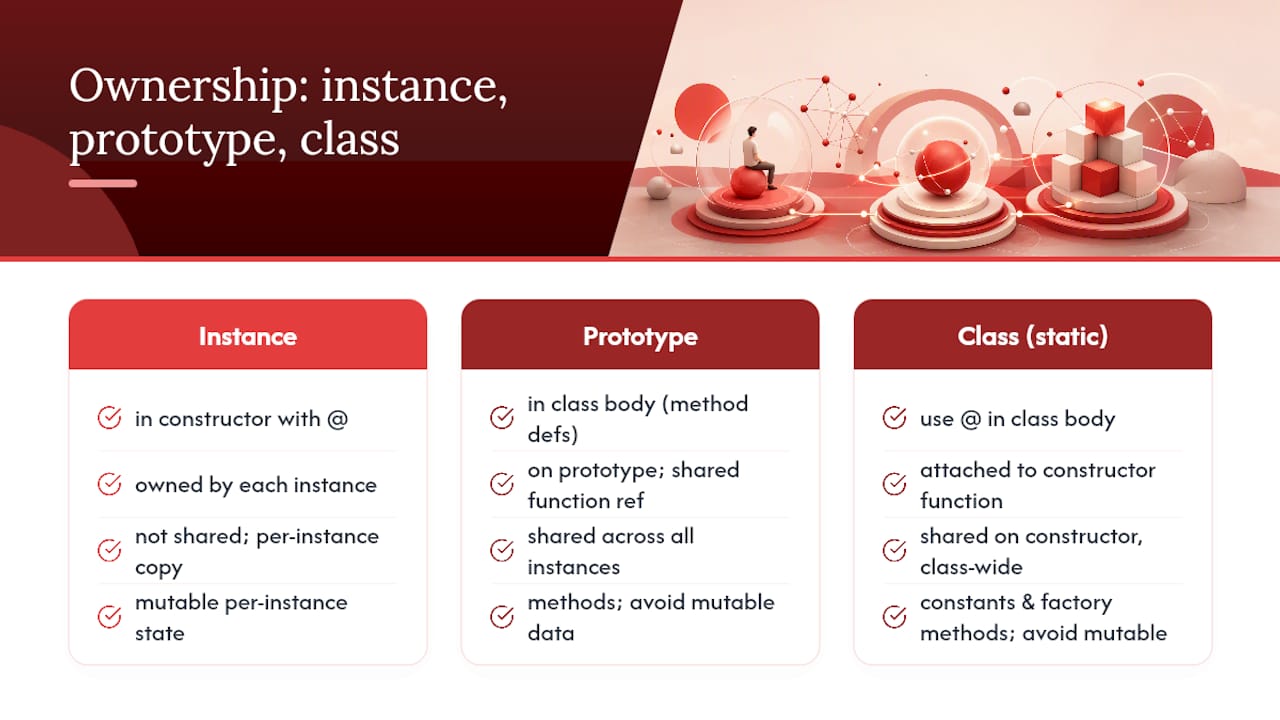
Prototype members are defined as methods in the class body. All instances share the same function reference via the prototype chain. This is correct for methods. It’s a bug for mutable data.
Class (static) members use @ inside the class body, outside any method. They attach to the constructor function itself, not to instances.
class Counter
  @instances: 0          # class/static property

  constructor: (@id) ->
    @count = 0           # instance property
    Counter.instances++

  increment: ->          # prototype method
    @count++

  @reset: ->             # class/static method
    @instances = 0
The CoffeeScript Cookbook documents the shared-prototype array pitfall clearly: declare an array at the class body level and every instance mutates the same array. This is one of the most common bugs in CoffeeScript codebases.
# WRONG — all instances share this array
class BadList
  items: []
  add: (item) -> @items.push item

# RIGHT — each instance gets its own array
class GoodList
  constructor: ->
    @items = []
  add: (item) -> @items.push item
Per the official CoffeeScript 2 docs, class definitions are executable code and this inside the class body refers to the class object. That makes metaprogramming possible at definition time:
class Config
  @defaults = {}
  @set: (key, val) -> @defaults[key] = val

Config.set("timeout", 5000)
The polarmobile style guide recommends using :: as a shorthand for prototype access when you need to patch methods outside the class definition: Animal::toString = -> @name.
Pro Tip: Keep static members to constants and factory methods. Avoid storing mutable state on the class constructor. When you need shared mutable state, a separate module-level variable is cleaner and easier to test.
How does CoffeeScript class inheritance work with extends and super?
class Animal
  constructor: (@name) ->
  speak: -> "..."

class Dog extends Animal
  constructor: (name, @breed) ->
    super(name)
  speak: -> "#{@name} barks"
The compiled JS for that Dog constructor:
class Dog extends Animal {
  constructor(name, breed) {
    super(name);
    this.breed = breed;
  }
}
super in a constructor must be called before you access this. CoffeeScript 2 enforces this the same way ES2015 does. Skip it and you get a ReferenceError.
super in an instance method calls the parent’s method of the same name:
class Dog extends Animal
  speak: ->
    parentSays = super()
    "#{parentSays} (but louder)"
The static inheritance problem. A 2014 practitioner analysis documents a real fragility: super in static methods can mis-bind this, producing incorrect behavior that’s hard to trace.
# Fragile — static super can mis-bind `this`
class Base
  @create: -> new @()

class Child extends Base
  @create: ->
    super()  # `this` may not be what you expect
Avoid
supercalls in static methods. Move instance-creation logic to prototype methods or make explicit parent-class calls (Base.create.call(@)) when static inheritance is genuinely needed.
The safe pattern: keep constructors simple, put instance logic in prototype methods, and treat static members as constants or simple factory functions. The analysis recommends avoiding static state in constructors entirely, preferring separate collection or manager objects instead.
Inheritance rules to follow:
- Always call
superbefore using@in a subclass constructor. - Override instance methods freely; they resolve through the prototype chain correctly.
- Avoid deep inheritance chains (more than two or three levels). Composition handles complexity better.
When should you use mixins instead of inheritance?
Deep inheritance gets fragile fast. A mixin merges a module of methods into a prototype without creating a parent-child relationship:
Serializable =
  toJSON: -> JSON.stringify(@)
  fromJSON: (json) -> Object.assign(@, JSON.parse(json))

class Report
  constructor: (@title, @data) ->

Object.assign(Report.prototype, Serializable)
Every Report instance now has toJSON and fromJSON without inheriting from anything. Add the same mixin to User or Product and you get reuse without coupling.
A composition alternative uses separate objects entirely:
createLogger = (prefix) ->
  log: (msg) -> console.log "#{prefix}: #{msg}"
  warn: (msg) -> console.warn "#{prefix}: #{msg}"

class DataService
  constructor: (@endpoint) ->
    @logger = createLogger("DataService")

  fetch: ->
    @logger.log "Fetching #{@endpoint}"
Duck-typing and composition tend to produce easier-to-maintain code. The CampusLabs style guide favors this approach specifically because deep inheritance can violate Liskov Substitution and increase coupling across modules.
Pro Tip: Name mixin modules as adjectives or capability nouns: Serializable, Cacheable, Trackable. It signals intent immediately and keeps them distinct from class names (which are nouns: Report, User). This matters when building analytics admin features where behavior modules get reused across many model classes.
How do you safely clone instances in CoffeeScript?
Shallow copy works for flat objects:
original = new Animal("Rex")
clone = Object.assign(Object.create(Object.getPrototypeOf(original)), original)
This preserves the prototype chain, so clone still has all the instance methods. It does not deep-copy nested objects.
The JSON trick is popular but lossy:
deepCopy = (obj) -> JSON.parse(JSON.stringify(obj))
Functions, Date objects, undefined values, and circular references all disappear or throw. The CoffeeScript Cookbook notes this limitation directly.
For production use, structuredClone (available in Node.js 17+ and modern browsers) handles most cases:
safeClone = (obj) -> structuredClone(obj)
Or use Lodash’s cloneDeep:
_ = require "lodash"
deepClone = _.cloneDeep(original)
Cloning checklist:
- Shallow copy:
Object.assignwithObject.createto preserve prototype. - Deep copy for plain data:
structuredCloneor_.cloneDeep. - Avoid JSON clone when the object has methods, Dates, or circular refs.
- Cloning an instance does not clone its prototype methods. Those are shared by reference, which is correct behavior.
How does CoffeeScript 2 compile class syntax to JavaScript?
CoffeeScript 2 outputs ES2015+ directly. No transpilation shim, no helper functions wrapping your classes. The mapping is straightforward:
| CoffeeScript | Compiled JavaScript |
|---|---|
class Foo |
class Foo {} |
class Bar extends Foo |
class Bar extends Foo {} |
constructor: (@x) -> |
constructor(x) { this.x = x; } |
method: => |
method = () => { ... } (arrow function) |
@staticProp: value |
Foo.staticProp = value |
super(args) |
super(args) |
DevDocs summarizes the key semantic differences between CoffeeScript 1.x and 2.x worth knowing:
- Default values: CoffeeScript 1 used
?to check fornullorundefined; CoffeeScript 2 default parameters follow JS semantics (only trigger onundefined, notnull). - Module output: CoffeeScript 2 supports
import/exportnatively, compiling to ES modules. thisbeforesuper: enforced in CoffeeScript 2 constructors, matching ES2015 spec.
Practical debugging tip:
- Enable source maps (
--mapflag) when compiling. Your browser’s DevTools will show CoffeeScript line numbers in stack traces instead of compiled JS lines. - Run
coffee --print yourfile.coffeeto inspect compiled output during development. - Check the CoffeeScript 2 announcement for the full list of breaking changes from 1.x before upgrading a legacy codebase.
What are the best practices for CoffeeScript classes?
Naming and structure first. The polarmobile style guide is clear: PascalCase for class names (UserAccount, DataService), camelCase for methods and properties (fetchData, userName). This keeps compiled JS readable for the whole team.
Do/don’t checklist:
- Do initialize all instance state in
constructor:. No exceptions. - Do use
=>for callbacks and event handlers. Use->for everything else. - Do use
@prefix for static members; keep them to constants and factory methods. - Do use
::for prototype patching when you need it (MyClass::helper = -> ...). - Don’t declare mutable arrays or objects at the class body level.
- Don’t call
superin static methods unless you’ve verified the binding explicitly. - Don’t build inheritance chains deeper than two levels. Reach for mixins or composition instead.
- Don’t put business logic in constructors. Keep them to assignment and setup.
Pro Tip: In large codebases, organize one class per file and name the file after the class in kebab-case (user-account.coffee). Group related classes in a directory (models/, services/). Write tests against the compiled JS output using Jest or Mocha so your test suite stays valid even if you migrate away from CoffeeScript later. This pattern works well when building analytics systems where model classes evolve frequently.
A note from Rule27design on using classes in real projects
When building admin panels and internal tools at Rule27design, the pattern that holds up best is a lightweight model class paired with a separate collection manager. The model handles a single record’s state and validation. The collection handles fetching, filtering, and pagination. Neither inherits from the other.
class MetricRecord
  constructor: (@id, @value, @timestamp) ->
    @tags = []

  addTag: (tag) -> @tags.push tag
  toJSON: -> { @id, @value, @timestamp, @tags }

class MetricCollection
  constructor: ->
    @records = []

  add: (record) -> @records.push record
  filter: (fn) -> @records.filter fn
  total: -> @records.reduce ((sum, r) -> sum + r.value), 0
This pattern shows up directly in analytics admin features where well-structured model classes reduce bugs when requirements change fast. Composition keeps each class testable in isolation.
If you’re building something like this and want a team that’s already solved the architecture, Rule27design builds exactly these kinds of custom admin systems.

What does the editorial perspective say about CoffeeScript class design?
The conventional wisdom says “use inheritance to share behavior.” In practice, that advice ages poorly. Every time a CoffeeScript codebase reaches three levels of inheritance, the next developer to touch it spends more time tracing the chain than writing features.
The more useful mental model: treat a CoffeeScript class as a named container for one unit of state and behavior. When two classes need to share something, extract it into a mixin or a standalone function. The shared thing stays testable in isolation. Neither class knows about the other.
Static members are the other trap. They feel convenient for counters, caches, and registries. But static state in a constructor creates global mutable state with a class-shaped wrapper. A module-level variable or a separate singleton object is more honest about what it is and easier to reset in tests.
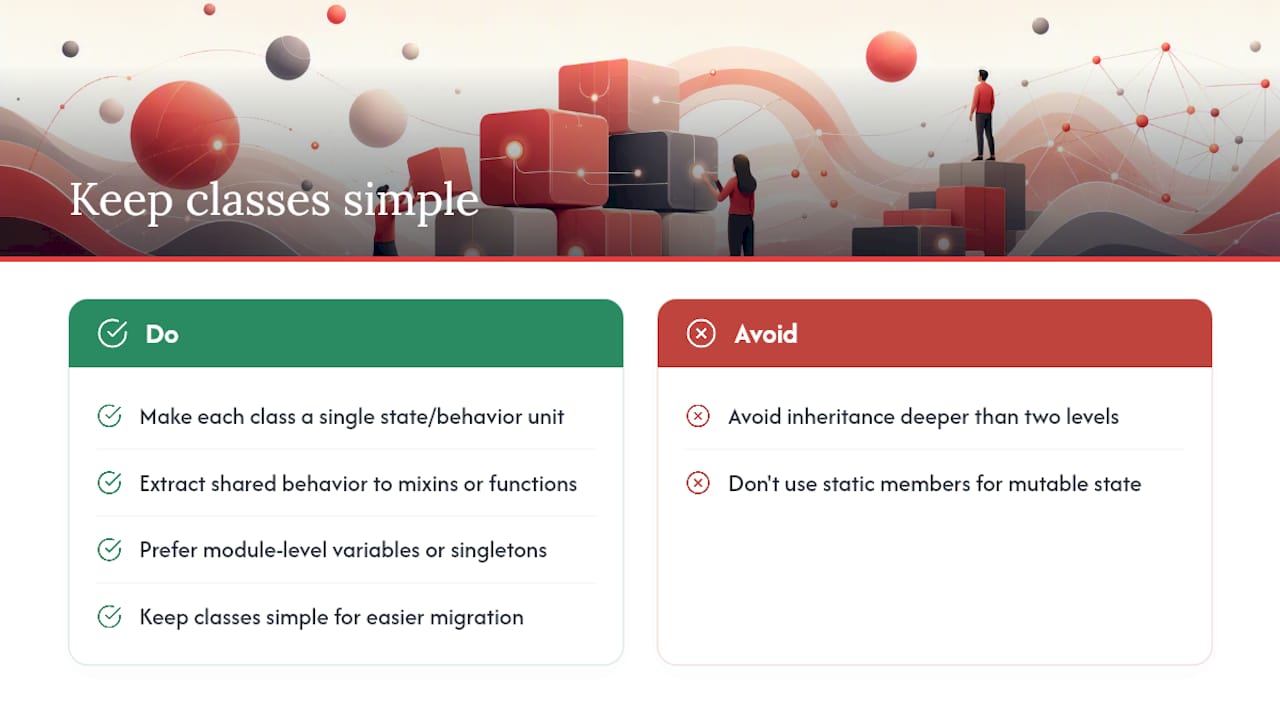
CoffeeScript 2’s clean ES2015 output is genuinely good news for teams maintaining older codebases. The compiled output is readable. Source maps work. You can migrate class by class to plain JS or TypeScript without a big-bang rewrite. That’s a real architectural advantage, and it’s worth preserving by keeping classes simple enough that the compiled output stays obvious.
Sources

About the Author
Josh AndersonCo-Founder & CEO at Rule27 Design
Operations leader and full-stack developer with 15 years of experience disrupting traditional business models. I don't just strategize, I build. From architecting operational transformations to coding the platforms that enable them, I deliver end-to-end solutions that drive real impact. My rare combination of technical expertise and strategic vision allows me to identify inefficiencies, design streamlined processes, and personally develop the technology that brings innovation to life.
View Profile

