

Discover how to effectively use ARGV in Ruby to handle command-line arguments and avoid common pitfalls in your scripts.
ARGV is the Ruby array that holds every command-line argument passed to your script. Run ruby greet.rb Alice 30 and ARGV becomes ["Alice", "30"]. The script name lives in $0, not in ARGV — that’s the first thing to get right.
Key Takeaways
Ruby’s ARGV array is the fastest path to command-line argument handling in small scripts; OptionParser takes over the moment your interface needs flags, types, or help text.
| Point | Details |
|---|---|
| ARGV holds arguments only | ARGV[0] is the first user argument; the script name lives in $0, not ARGV. |
| Use splat for clean unpacking | command, *rest = ARGV keeps ARGV intact and makes scripts easier to test. |
| Switch to OptionParser for flags | Use OptionParser.parse! when you have multiple flags, type coercion, or need --help auto-generated. |
| Clean ARGV before ARGF reads | Remove non-file strings from ARGV before ARGF reads to avoid accidental file-open errors. |
| Exit codes matter | Return 1 for bad usage and 2 for missing files so shell scripts and pipelines can react correctly. |
What does ARGV actually do in Ruby?
ARGV is a plain Ruby Array. It contains only the arguments that follow the script filename on the command line. Per the Ruby globals documentation, $0 holds the program name and $* is an alias that points directly to ARGV. They are not the same thing, and mixing them up causes real bugs.
Programming Ruby makes this explicit: unlike C, where argv[0] is the program name, Ruby’s ARGV[0] is the first argument your user typed. That’s a meaningful difference if you’re coming from C or shell scripting.
| Variable | Contains | Example value |
|---|---|---|
$0 |
Script filename | "greet.rb" |
ARGV / $* |
Arguments after filename | ["Alice", "30"] |
ARGF |
Virtual stream over ARGV files | reads file content |
ARGF is a separate object that uses ARGV entries as file paths (more on that below).
Runnable examples that show ARGV in action
Copy any of these into a file and run it. No setup needed.
Print the whole array:
# show_args.rb
p ARGV
$ ruby show_args.rb hello world 42
["hello", "world", "42"]
Index access and length checks:
# index_args.rb
puts ARGV[0]        # first argument
puts ARGV[1]        # second argument
puts ARGV.length    # total count
puts ARGV.empty?    # true if no args given
Quoted arguments with spaces:
$ ruby show_args.rb "hello world" ruby
["hello world", "ruby"]
The shell collapses "hello world" into one element. ARGV sees two items, not three. That’s shell quoting at work, not a Ruby quirk.
How to unpack ARGV with splat and shift
Two patterns dominate here: destructuring with the splat operator and consuming with shift.
Splat destructuring:
command, *rest = ARGV
puts command   # => "deploy"
puts rest      # => ["staging", "--force"]
This is non-destructive. ARGV itself stays intact, which makes the pattern great for testing. You can pass a fake array in specs without touching the real ARGV.
Shift for in-place consumption:
action = ARGV.shift   # removes and returns first element
files  = ARGV         # whatever's left
shift mutates ARGV in place. That’s fine for simple scripts, but it creates a stateful dependency that’s harder to test. Use splat when you want a clean snapshot; use shift when you’re building a consume-as-you-go loop.
Pro Tip: Prefer command, *rest = ARGV in scripts you’ll unit-test. It keeps ARGV unmodified, so you can stub the array without side effects.
Common iteration and manual parsing patterns
For small scripts, you often don’t need a parser library at all. Here are the patterns worth knowing.
- Iterate over every argument — use
ARGV.eachwhen all args are treated the same (a list of filenames, for example). - Consume one at a time — use
while ARGV.any?withARGV.shiftwhen each argument drives a different action. - Positional-only parsing — assign
ARGV[0],ARGV[1]directly when the order is fixed and documented. - Presence flags — check
ARGV.include?("--verbose")and then delete it from the array. - Key-value flags — scan for
--key=valuepatterns with a simple loop.
A minimal manual flag parser:
# manual_flags.rb
verbose = ARGV.delete("--verbose")
output  = nil

ARGV.each_with_index do |arg, i|
  if arg == "--output"
    output = ARGV[i + 1]
  end
end

puts verbose ? "Verbose mode on" : "Quiet mode"
puts "Output: #{output || 'stdout'}"
This works for one or two flags. Beyond that, reach for OptionParser.
When should you use OptionParser instead of ARGV?
The OptionParser tutorial is clear: OptionParser.parse! removes recognized switches from ARGV destructively, leaving only positional arguments. That single behavior solves the ordering problem that manual parsing struggles with.
Switch to OptionParser when your script has:
- More than two flags
- Mutually exclusive options
- Type coercion needs (integer, float, date)
- Users who expect
--helpto work out of the box
A minimal example:
require "optparse"

options = {}
OptionParser.new do |opts|
  opts.banner = "Usage: deploy.rb [options]"
  opts.on("-v", "--verbose", "Run verbosely") do
    options[:verbose] = true
  end
  opts.on("-e ENV", "--env ENV", "Target environment") do |e|
    options[:env] = e
  end
end.parse!

puts options.inspect
puts "Remaining args: #{ARGV.inspect}"
$ ruby deploy.rb --verbose --env staging file1.txt
{:verbose=>true, :env=>"staging"}
Remaining args: ["file1.txt"]
parse! ate the flags. ARGV now holds only file1.txt. Clean. For scripts exposed to teammates or end users, this is the right call.
How ARGF and ‘-’ work with ARGV
ARGF treats every entry in ARGV as an input source. Per the ARGF documentation, when it encounters '-' in ARGV, it reads from $stdin at that position instead of opening a file.
# filter.rb
ARGF.each_line do |line|
  puts line.upcase
end
$ ruby filter.rb file1.txt - file2.txt
That command reads file1.txt, then waits for piped or typed stdin, then reads file2.txt. Useful for Unix-style filters.
One gotcha: if you parse flags manually and leave non-file strings in ARGV, ARGF will try to open them as files and raise an error. Strip non-file arguments from ARGV before the first ARGF read. OptionParser.parse! does this automatically, which is another reason to prefer it when mixing flags and file inputs.
Common pitfalls and best practices with ARGV
Watch out for these:
- Assuming
ARGV[0]is the program name. It’s not. That’s$0. This trips up developers coming from C or Bash. - Not checking
ARGV.empty?before accessing indexes.ARGV[0]returnsnilsilently when no args are given. - Mutating
ARGVmid-script without tracking state. Everyshiftorparse!call changes whatARGFwill read next. - Leaving flag strings in
ARGVbefore anARGFread.ARGFwill try to open"--verbose"as a file.
Validation pattern:
if ARGV.empty? || ARGV.include?("--help")
  puts "Usage: process.rb <filename> [--verbose]"
  exit 1
end

filename = ARGV[0]
unless File.exist?(filename)
  warn "Error: file '#{filename}' not found."
  exit 2
end
Exit code 1 for bad usage, 2 for a missing file. Callers and shell scripts depend on these codes.
Pro Tip: Always print a usage line and exit with a non-zero code when required arguments are missing. Silent failures are the hardest bugs to trace in automation pipelines.
Quick reference: globals, methods, and commands
| Item | What it does |
|---|---|
$0 |
Script filename |
ARGV / $* |
Array of command-line arguments |
ARGV[0] |
First argument (not the program name) |
ARGV.length |
Argument count |
ARGV.empty? |
True when no arguments passed |
ARGV.shift |
Removes and returns the first element |
ARGV.each |
Iterates over all arguments |
ARGF |
Virtual stream over ARGV file paths |
OptionParser#parse! |
Strips flags from ARGV, leaves positionals |
Run a script with arguments:
$ ruby script.rb arg1 arg2 --flag
Pipe input using ‘-’:
$ echo "hello" | ruby filter.rb -
Official docs for deeper reading: ARGF, OptionParser, Ruby globals.
When ARGV is the right tool for your project
The split is pretty simple. ARGV with splat or shift is perfect for internal glue scripts — the kind you write in an afternoon to automate a deployment step, rename a batch of files, or feed arguments into a campaign automation workflow. Nobody else runs those scripts, so a terse positional interface is fine.
The moment a script gets a second user — a teammate, a CI pipeline, a cron job someone else maintains — switch to OptionParser. The built-in --help text alone saves more time than the extra setup costs. Document expected arguments in a comment block at the top of the file too. Future you will appreciate it.
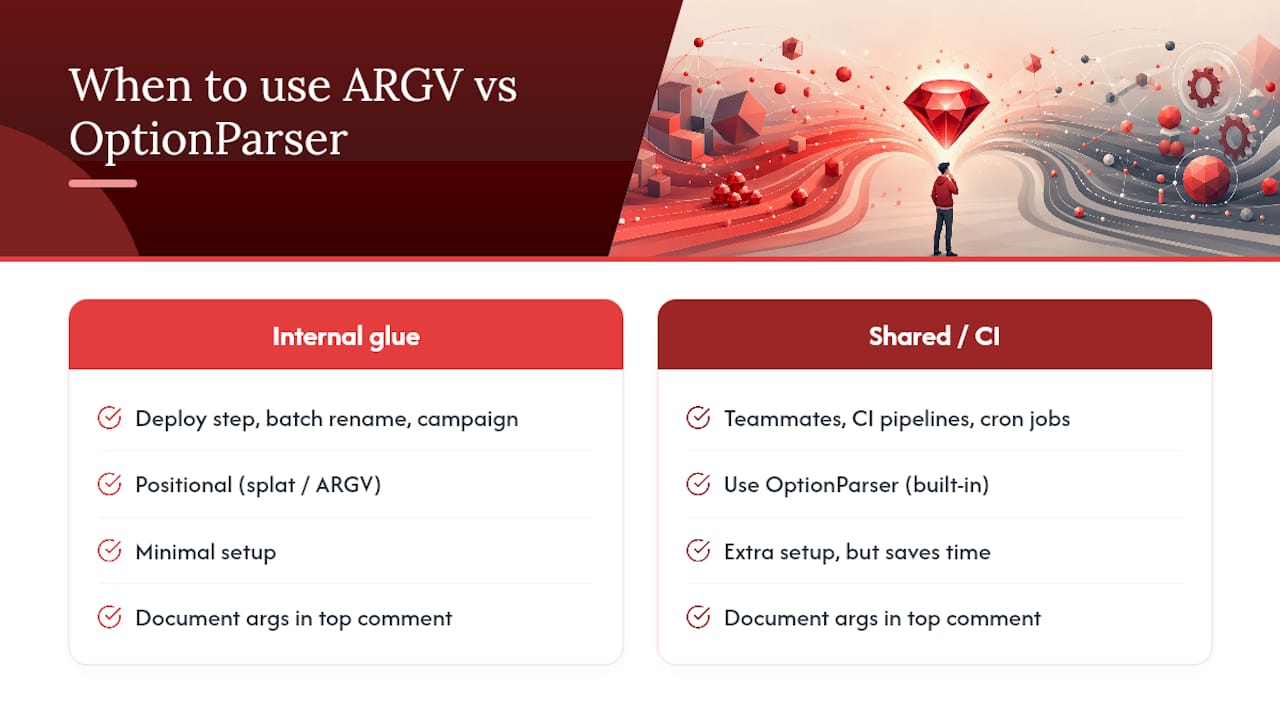
Testing is the other deciding factor. Scripts that use command, *rest = ARGV are easier to unit-test because you can pass a fake array without touching the real ARGV. Scripts that rely on repeated shift calls accumulate hidden state that’s annoying to reproduce in tests.
Sources

About the Author
Josh AndersonCo-Founder & CEO at Rule27 Design
Operations leader and full-stack developer with 15 years of experience disrupting traditional business models. I don't just strategize, I build. From architecting operational transformations to coding the platforms that enable them, I deliver end-to-end solutions that drive real impact. My rare combination of technical expertise and strategic vision allows me to identify inefficiencies, design streamlined processes, and personally develop the technology that brings innovation to life.
View Profile

