

Discover essential process documentation best practices to streamline onboarding and boost your SaaS team's efficiency. Learn more!
TL;DR:
- Effective process documentation reduces onboarding time and prevents knowledge loss when team members leave. Start by prioritizing high-impact processes based on frequency, complexity, and impact, and gather information through concise SME interviews supported by visuals. Maintaining accuracy requires assigning owners, regular reviews, and integrating updates with workflow changes to ensure documentation remains current and useful.
Your team is growing fast. New hires need answers yesterday. And the senior engineer who built your onboarding flow? They left six months ago. If any of that sounds familiar, you already know the cost of skipping process documentation best practices. Good documentation cuts onboarding time by up to 60%, letting new hires follow clear guides instead of chasing down tribal knowledge. This guide walks you through exactly how to build, maintain, and actually use process documentation that makes your SaaS team faster, not just more compliant.
Key Takeaways
| Point | Details |
|---|---|
| Prioritize critical processes | Focus on documenting processes that impact business outcomes and are performed frequently to maximize impact. |
| Gather info from SMEs | Work closely with subject matter experts to capture accurate and detailed process steps. |
| Use clear visuals | Incorporate screenshots, flowcharts, and videos to make documentation easier to follow and learn. |
| Maintain with ownership | Assign named owners and schedule regular reviews to keep documentation current and trustworthy. |
| Iterate continuously | Treat documentation as an evolving asset integrated into daily workflows, not a one-time project. |
Process documentation best practices: start with prioritization
To build effective documentation, start by figuring out what to document first and build a plan around that. Not everything needs a step-by-step guide right now. Trying to document everything at once is how documentation projects stall out.
The smart move is focusing on processes tied to real business outcomes. Think customer onboarding, billing reconciliation, deployment checklists. These are the ones where a missed step costs real money or time.
Use three filters to rank what goes first:
- Frequency: How often does this process run? Daily beats quarterly.
- Complexity: How many steps, systems, or decision points are involved?
- Impact: What breaks if this process is done wrong or inconsistently?
Only 29% of organizations have more than half their processes documented, which means most teams are flying blind on the majority of their operations. That stat should tell you this is not a solved problem, even at well-funded companies.
| Phase | What you’re doing | Output |
|---|---|---|
| Scope | Identify and rank processes | Priority list |
| Gather | Interview SMEs, observe workflows | Raw notes and recordings |
| Test | Walk through docs with a new user | Gap list |
| Finalize | Revise, publish, assign ownership | Live documentation |
Start with three to five processes, not thirty. Momentum matters. Quick wins build the habit and get buy-in from your team.
Pro Tip: Use your help desk data. Tickets that keep repeating are a direct signal of undocumented or unclear processes. Start there.
Once you have your priority list, make sure you’re also thinking about how to prioritize SaaS process improvements across your broader operations roadmap.
Gathering and structuring information effectively
Once you have a plan, gather detailed information by working directly with the people who actually perform the processes. This sounds obvious. It is not always done.
The best documentation comes from the people doing the work, not from managers imagining how things should go. There is a big difference between “how we think this works” and “how this actually runs at 3pm on a Friday when two systems are slow.”
Here is a simple process for gathering solid information:
- Schedule a working session with your SME (subject matter expert, the person who owns or runs the process day to day). Keep it under 45 minutes.
- Ask them to walk you through the process live. Screen share if it is a digital workflow. Watch what they actually click, not just what they describe.
- Record the session with permission. This protects accuracy and lets you rewatch confusing steps.
- Follow up async with specific questions about edge cases or exceptions. Those are the steps that trip up new hires.
- Draft the doc and send it back to the SME for a quick accuracy check before publishing.
Effective SME interviews depend on collaborating closely and letting them work in their preferred style. Some people explain better by talking. Others prefer to write notes. Meet them where they are.
When you structure the actual document, keep it consistent. Every process doc should include:
- Purpose: One sentence on why this process exists.
- Scope: Who runs it, when, and what systems are involved.
- Inputs: What needs to be true or ready before you start.
- Steps: Numbered, sequential, one action per line.
- Exceptions: What to do when something goes off-script.
- Owner: The named person responsible for keeping this doc accurate.
Tailor the depth to your audience. A doc for a junior contractor needs more context than one for a senior engineer who just needs a quick reference. This is one of the key process documentation tips that teams overlook.
Pro Tip: When working with SMEs in SaaS, record their screen while they narrate the process live. You will catch details they forget to mention when they are just describing it verbally.
Creating clear, accessible, and visual process documentation
With your information structured, focus on writing documentation that is easy to read and even easier to follow. Clarity is not a nice-to-have. It is the whole point.

Write in active voice. “Click the blue button” beats “The blue button should be clicked.” One action per step. No combining two things into one line. If a step requires a decision, split it into a conditional: “If X, go to step 4. If Y, go to step 7.”
Almost two-thirds of people are visual learners, which means words alone will not carry your documentation. Visuals do real work here.
Here is how different formats map to different needs:
| Format | Best for | When to use |
|---|---|---|
| Annotated screenshots | UI-based workflows | Clicking through software |
| Flowcharts | Decision-heavy processes | Branching logic and approvals |
| Screen recordings | Complex multi-step tasks | Onboarding, training |
| Written steps only | Simple, low-frequency tasks | Quick reference docs |
Text-only process docs almost always fail in practice. Screenshots with annotations, arrows pointing to the right button, a callout explaining what “success” looks like, these things cut confusion fast.
And here is a stat worth knowing: screen recording workflows with narration cuts documentation time by up to 90%. That is not a small number. If your team is spending hours writing out steps that could be captured in a five-minute video walkthrough, you are burning time.
Visual tools like automated content production tools can also help teams build documentation assets faster without starting from scratch each time.
Think about workflow visibility through visuals as a core part of your documentation strategy, not an afterthought. And when you need something more tailored, customizing workflow visuals for your team’s actual tools makes adoption much more likely.
Pro Tip: Use annotation tools to circle the exact UI element a user needs to interact with. “Click the dropdown in the top right” works. A screenshot with a red arrow on the dropdown works better.
Maintaining and verifying process documentation quality
Creating great documentation is only half the battle. Keeping it accurate is where most teams fall down. A process doc that is six months out of date is not just unhelpful. It is actively harmful.
Here is a governance model that actually works:
- Assign a named owner to every doc. Not a team. A person.
- Set a review cadence based on process type. Stable processes get a quarterly review. Fast-moving ones get monthly.
- Add a “last reviewed” date to the top of every document. Visible, not buried in metadata.
- Tie doc updates to code or workflow changes. The person merging the PR that changes behavior owns the doc update.
- Test every new doc by having someone unfamiliar with the process try to follow it. Their confusion is your feedback.
Review cycles should be scheduled in advance, with calendar invites and reminders going to the named owner. This removes the “I meant to update it” problem.
Every doc needs a named human owner with a last-reviewed date displayed prominently. This single change prevents most documentation drift. When no one is accountable, no one acts.
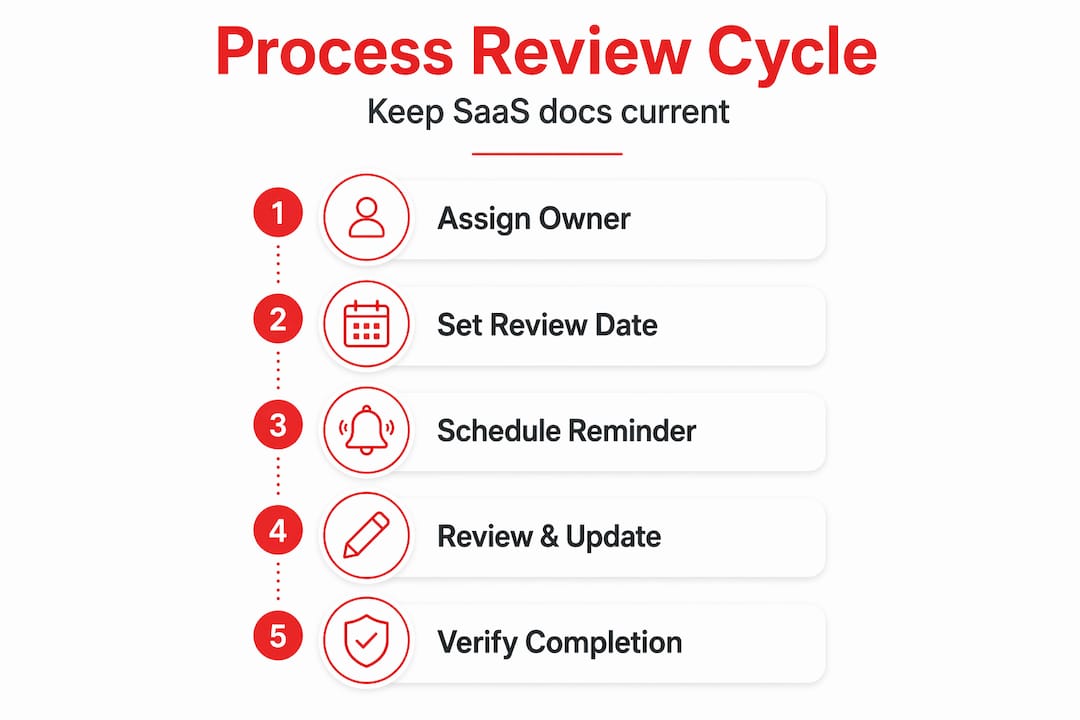
The version control piece is especially critical for SaaS teams where product and process change constantly. Tie doc updates to code or PR changes, and the person changing behavior owns the documentation update. This is improving documentation quality through behavioral accountability, not just process.
Additional habits that keep documentation healthy:
- Flag docs as “needs review” when a related ticket is resolved.
- Create a lightweight audit every quarter, just a list of docs and their last-reviewed dates.
- Archive rather than delete outdated docs so historical context is not lost.
- Use a single source of truth. Two docs describing the same process will always diverge.
Pro Tip: When testing a new doc, don’t just ask “does this make sense?” Ask the tester to complete the task using only the document. Watch where they pause. That pause is a gap.
For a practical framework on process governance in SaaS, building accountability into your documentation rhythm is the move.
Rethinking process documentation: beyond just writing steps
Here is the uncomfortable truth. Most documentation fails not because it is written badly. It fails because teams treat it like a project with a finish line instead of a habit with no end date.
Documentation is part of the work, not a tax on it. Start small with high-impact docs, assign owners, and use visuals where words are not enough. That is the framework. But the mindset shift underneath it is what actually determines whether your docs stay useful six months from now.
Minor regular updates beat documenting everything at once. This sounds simple. It goes against how most ops teams actually behave. The instinct is to do a big documentation sprint, feel good about it, and then let it sit untouched for a year.
What works instead is treating documentation the same way you treat your backlog. Small, continuous, owned. A five-minute update after a process change beats a two-hour overhaul every quarter.
There is also a format problem worth calling out. Exhaustive, hundred-step manuals feel thorough. They are rarely read. A focused, two-page doc that covers the ten steps a new hire actually needs in week one is worth five times more. Shorter docs get used. Long docs get ignored.
The other shift that matters is visual-first thinking. If your team learns better by watching than by reading, and most do, then a screen recording with narration is not just a nice addition. It is the primary format. The written steps are the backup.
Effective process documentation is not about having everything written down. It is about having the right things documented, owned, kept current, and built for how your actual team learns and works.
Drive SaaS efficiency with expert process documentation support
You have the framework. Now the question is execution speed. Most growth-stage SaaS teams know what good documentation looks like but do not have the systems in place to build and maintain it consistently.
That is where Rule27’s Innovation Lab comes in. We partner with ops managers and project leads to design the exact infrastructure your documentation needs to actually stick. From prioritization strategy and visual doc systems to version control integration and ownership frameworks, we build it around how your team works. Check out our workflow automation tips for SaaS for a preview of what that looks like in practice. And if you are thinking about the tooling side, our work on custom workflow benefits for growth-stage SaaS shows what is possible when your systems are built for your team, not the average team.
Frequently asked questions
What is process documentation and why is it important for SaaS teams?
Process documentation is a step-by-step record of how tasks are performed, designed to ensure consistency and repeatability. It helps SaaS teams cut onboarding time by up to 60% and keeps quality high as teams scale.
How often should process documentation be reviewed and updated?
Stable processes need quarterly review while fast-moving ones require monthly review cycles, each with a calendar invite and a named owner responsible for keeping the doc current.
Who should own process documentation within a SaaS company?
Each document should have a single named individual as the owner, not a team or a role. Every doc needs a named human owner with a visible last-reviewed date to prevent drift and ensure accountability.
What types of visuals are effective in process documentation?
Flowcharts, annotated screenshots, and screen recordings with narration are the most effective. Two-thirds of people are visual learners, and screen recordings with narration cut documentation time by up to 90%, making them worth the upfront effort.
Topics

About the Author
Josh AndersonCo-Founder & CEO at Rule27 Design
Operations leader and full-stack developer with 15 years of experience disrupting traditional business models. I don't just strategize, I build. From architecting operational transformations to coding the platforms that enable them, I deliver end-to-end solutions that drive real impact. My rare combination of technical expertise and strategic vision allows me to identify inefficiencies, design streamlined processes, and personally develop the technology that brings innovation to life.
View Profile

