

Unlock growth with internal tools for scaling brands. Discover how custom systems boost productivity and streamline processes. Read more!
TL;DR:
- Most growth-stage brands struggle with inefficient processes and disjointed tools as they scale beyond 15 to 50 employees.
- Internal, purpose-built tools tailored to team workflows significantly boost productivity and streamline operations, unlike generic SaaS solutions.
Most growth-stage brands hit a wall somewhere between 15 and 50 people. The SaaS stack that worked at ten employees starts leaking. Data lives in five places. Campaigns get approved over Slack threads. Nobody owns the process. The real answer to this problem is not another subscription. It is internal tools for scaling brands, purpose-built systems that match exactly how your team works. This guide covers what those tools look like, how to govern them, how to connect them to your marketing stack, and how to avoid the most expensive mistakes teams make when building them out.
Key takeaways
| Point | Details |
|---|---|
| Custom tools beat generic SaaS | Internal software for scaling delivers 20 to 30% productivity gains that off-the-shelf tools rarely match for growth-stage teams. |
| Governance means ownership | Assigning named owners to every tool component turns policy into real team behavior, not just documentation. |
| Integration beats addition | A coherent five-tool stack with clean data flows outperforms a disconnected twenty-tool stack every time. |
| Start small, then scale | Introduce dedicated ops roles at the three to five person threshold and iterate before committing to larger builds. |
| DAM is not optional at scale | Digital asset management systems reduce legal exposure and keep brand messaging consistent across every channel. |
Internal tools for scaling brands: what they are and why they matter
The term “internal tool” covers a wide range. At one end, you have a simple admin panel that lets your ops team update product data without asking a developer. At the other end, you have a full marketing command center that unifies your CRM, campaign analytics, content calendar, and asset library into one interface your whole team actually uses.
There are three broad categories worth knowing:
- Custom-built tools. These are coded from scratch to fit your exact workflow. High flexibility, higher upfront cost, but the most competitive advantage when done right.
- Low-code and no-code platforms. Tools like internal app builders that let non-developers create dashboards, approval flows, and data views. Fast to build and easy to iterate.
- Enterprise-grade platforms. Full-featured systems with heavy configuration options. Usually overkill for a brand under 200 people, but worth knowing when you are approaching that threshold.
For most growth-stage brands, the sweet spot is low-code with custom extensions where needed. Custom internal tools typically deliver 20 to 30% productivity gains for marketing teams. That same research shows low-code platforms cut development time by 67%, which is a serious advantage when your roadmap is six months behind and your team is already stretched.
What separates internal tools from off-the-shelf SaaS is that they bend to your process, not the other way around. When you use a generic tool, your team adapts to its logic. When you build or configure an internal tool correctly, the tool adapts to your team. That difference compounded over 18 months is the difference between a team that feels fast and one that feels stuck.
Pro Tip: Before you build anything, map your team’s most painful manual process. The one where someone copies data between tools or sends the same Slack message twelve times a week. That process is your first internal tool candidate.
Governance and security for scalable internal tools
Here is where most growing brands skip ahead too fast. They build the tool, ship it, and ignore governance until something breaks or a compliance audit shows up. That is a mistake you can avoid.
Governance creates accountability, not bureaucracy. The moment you assign a named owner to a system, the behavior of that system changes. Someone is responsible. Someone cares if it breaks. That single shift does more for your internal tool reliability than any technical control.
The technical controls still matter, though. The core four to implement as early as possible:
- Role-Based Access Control (RBAC). Not everyone needs access to everything. Segment by role, not by trust.
- Single Sign-On (SSO). One login, full audit trail. Reduces password sprawl and offboarding risk significantly.
- Audit logs. Every action recorded. When something goes wrong, you need to know what happened and when.
- Environment separation. Keep production data away from development and staging environments. This one saves you from catastrophic accidents.
Together, these four controls address 80% of SOC 2 and GDPR requirements for internal tools. You are not fully compliant with just these four, but you are most of the way there without a dedicated security team.
For teams building citizen-developed micro-apps, risk-based automation is the answer to the speed versus security tradeoff. Low-risk apps get auto-approved. High-risk apps go to human review. This keeps innovation moving without creating a bottleneck at every approval gate.
One more architectural note worth knowing: separating your control plane from your data plane means your policies, RBAC rules, and workflow catalogs live independently from where data actually executes. This lets you scale governance without touching sensitive data directly.
Pro Tip: Set up your audit logging before you launch, not after. Retrofitting audit infrastructure into a live internal tool is significantly harder and more expensive than building it in from day one.
Integrating internal tools into marketing operations
Most marketing teams are not suffering from a lack of tools. They are suffering from tools that do not talk to each other. Your CRM holds one version of a lead. Your email platform holds another. Your analytics dashboard shows a third. Nobody trusts any of the numbers, so decisions get made on gut feeling.
The fix is not more tools. It is building a marketing operating system: a single layer where your core systems connect, data flows cleanly, and your team has one place to see what is actually happening.
Here is how to build toward that:
- Identify your source of truth for each data type. Leads live in the CRM. Content lives in the CMS. Assets live in the DAM. Pick one and enforce it.
- Build connectors, not workarounds. If your CRM and your email platform are not natively integrated, build or buy a connector. Stop exporting CSVs.
- Assign explicit ownership of every integration. Not “the marketing team.” One named person who is responsible when it breaks.
- Document the data flow. A simple diagram showing how data moves between systems catches problems before they become incidents.
- Audit the stack quarterly. Cut tools that duplicate function. A well-integrated five-tool stack outperforms a bloated twenty-tool stack with overlapping functions and no clear ownership.
| Approach | Result |
|---|---|
| Disconnected SaaS stack | Duplicate data, manual handoffs, no single source of truth |
| Integrated internal command center | Clean data flows, faster decisions, clear ownership |
| Generic enterprise suite | High cost, forced workflow adaptation, slow to customize |
| Custom internal tools with connectors | Fits your process, scales with your team, lower long-term cost |
For teams that want to move fast on content and campaign automation, a structured approach to marketing automation gives you a framework to build the integrations in the right order without missing critical steps. Pairing that with workflow automation ideas built for growth-stage teams gets you from concept to working system faster than most brands expect.
Scaling internal tools: strategies that actually work
Scaling brand growth management tools is less about finding the perfect platform and more about building the right habits early. The brands that do this well share a few patterns.
They introduce dedicated ops support at the right time. At the three to five person team threshold, you need at least one person whose primary job is owning your internal systems and process. Waiting until you have ten people managing twenty tools without coordination is how you get chaos.
They start small and iterate. The first version of any internal tool should solve one specific problem, not ten. Ship it, watch how the team uses it, and improve from there. The instinct to build everything at once is where most internal tool projects stall.
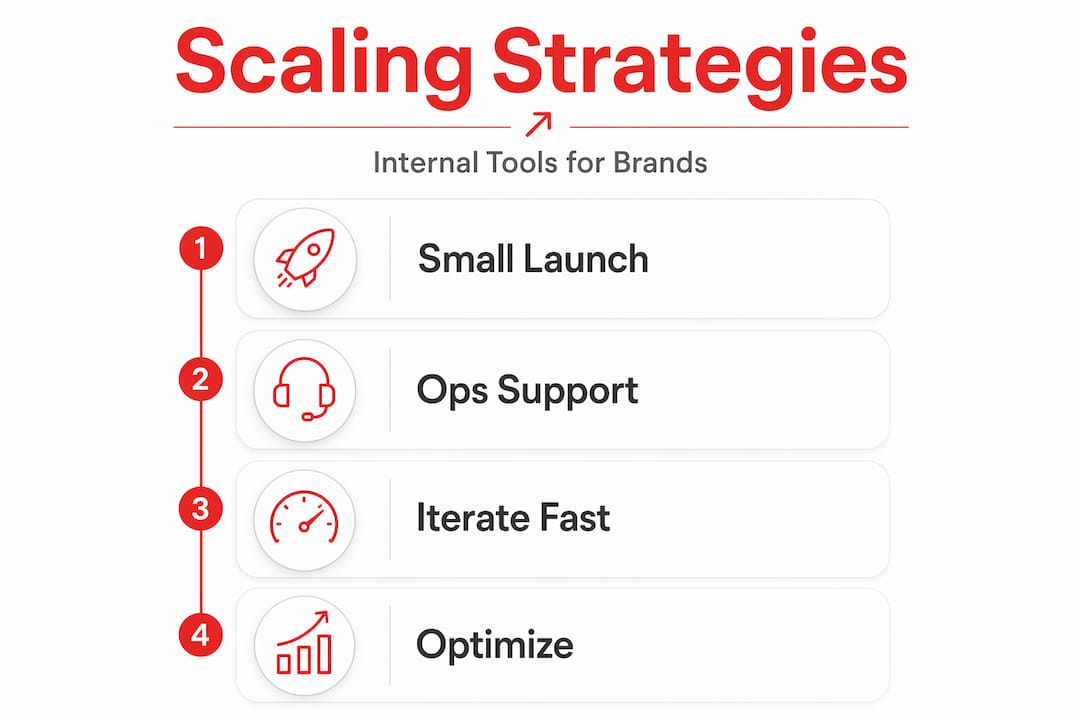
They automate the boring parts of governance. Continuous automated audit engines that transform raw logs into normalized health scores are not a luxury for mature teams. They are how you avoid discovering a compliance gap during an audit instead of catching it in real time.
A few things to watch out for as you scale:
- Vendor lock-in. Build on platforms that export data cleanly. If you cannot get your data out, you are renting your own infrastructure.
- Stale documentation. A process doc from eighteen months ago is not governance. It is a history lesson. Keep docs tied to tool updates.
- Version control gaps. Every internal tool should have a change history. Who changed what and when is not optional if you want to debug problems quickly.
- Usability blind spots. A tool your team works around is not a tool. It is technical debt. Watch adoption metrics, not just build completion.
For teams ready to go deeper on optimizing what they have already built, internal tool optimization strategies for SaaS efficiency covers the next layer of improvements worth making once the foundation is solid.
Managing brand assets at scale with DAM tools
Brand consistency breaks down at scale. Not because people stop caring, but because assets multiply, approval chains get longer, and nobody knows which version of the logo is current. Digital asset management tools fix this at the infrastructure level.

A good DAM system is not a shared Google Drive folder with better search. It is the system of record for your brand’s visual and content assets. Leading DAM platforms integrate usage rights tracking, consent management, and automated approval workflows directly into the asset lifecycle. That means when a photo’s usage license expires, the system flags it. When a new asset needs legal review, the workflow triggers automatically.
The operational impact is real:
- Teams spend less time hunting for approved assets
- Legal exposure from expired or unauthorized asset use drops significantly
- Multi-channel campaigns launch faster when assets are pre-approved and centrally stored
- Brand consistency improves because outdated assets get automatically retired
For marketing ops teams managing freelancers, agencies, and internal designers simultaneously, a DAM with role-based access solves the “which file is final?” problem that wastes hours every week. You can explore efficient media asset management approaches built specifically for SaaS teams to see how this plays out in practice.
My take on internal tools after working with growth-stage brands
I have worked with enough growth-stage brands to recognize the pattern almost immediately. The team is talented. The marketing is working. And the operations are quietly falling apart in the background.
The misconception I see most often is that internal tooling is a technical problem. It is not. It is a clarity problem. Teams that struggle with their tools usually struggle because nobody has decided what each tool is supposed to own, who is responsible for it, and what “working correctly” actually means.
The brands I have seen break through operationally all did one thing differently: they treated their internal systems as a product, not an afterthought. They assigned owners. They iterated based on team feedback. They built governance in from the start instead of bolting it on after the first audit.
The hardest conversation I have with clients is telling them their tool is not the problem. Their process is. A custom admin panel will not fix unclear ownership. A new analytics dashboard will not fix the fact that nobody agrees on what metric matters. Get the people and process clarity right first. Then build the tool to support it.
What I have also learned: the brands that wait too long to invest in internal software for scaling pay for it in two ways. Lost time from manual work, and lost talent from people who are tired of fighting the tools they use every day.
— Josh
Ready to build internal tools that actually scale?
Rule27design builds the kind of internal tools that make your team faster without making them figure out a new system every quarter. Whether you need a custom admin panel, a marketing command center, or a DAM integration that actually fits your approval workflow, the team at Rule27design has built it before.
If you are at the point where your current stack is slowing you down more than it is helping, the Rule27design Innovation Lab is where the work starts. It is where brands that have outgrown their basic tools come to build what they actually need. No generic templates. No enterprise bloat. Just systems designed for how your team works right now, with room to grow. Check it out and see what a purpose-built internal tool roadmap looks like for a brand at your stage.
FAQ
What are internal tools for scaling brands?
Internal tools for scaling brands are custom or low-code systems built to match how a specific team works. They include admin panels, dashboards, workflow automation, and data integrations that replace manual processes as a brand grows.
When should a growth-stage brand invest in internal tooling?
Most teams benefit from dedicated internal tooling at the three to five person threshold for ops support. If your team is copying data between tools or approving things over chat, that is the signal.
How do internal tools differ from off-the-shelf SaaS?
Off-the-shelf SaaS tools require your team to adapt to their logic. Internal tools are built or configured to match your actual process, which is why they deliver higher productivity gains over time.
What governance controls do internal tools need?
At minimum: RBAC, SSO, audit logs, and environment separation. These four controls cover 80% of common compliance requirements and give you a solid foundation before you need a dedicated security team.
Do growing brands really need a digital asset management system?
Yes. Once you have multiple campaigns running across channels with assets from different sources, a DAM becomes the system that keeps your brand consistent and your legal team calm. DAM platforms with governance integrations reduce both legal risk and time spent tracking down approved files.

About the Author
Josh AndersonCo-Founder & CEO at Rule27 Design
Operations leader and full-stack developer with 15 years of experience disrupting traditional business models. I don't just strategize, I build. From architecting operational transformations to coding the platforms that enable them, I deliver end-to-end solutions that drive real impact. My rare combination of technical expertise and strategic vision allows me to identify inefficiencies, design streamlined processes, and personally develop the technology that brings innovation to life.
View Profile

