

Discover what is digital asset lifecycle and learn how to optimize each stage. Turn lifecycle management into an operational advantage by 2026!
TL;DR:
- Proper digital asset lifecycle management streamlines content creation, organization, distribution, retrieval, and archiving. It reduces errors, speeds up workflows, and prevents legal issues by enforcing clear governance and metadata standards. Automated DAM systems support these goals by centralizing storage and continuously monitoring asset usage.
The digital asset lifecycle is defined as the structured progression a digital file takes through an organization, from creation through archival or deletion. Every image, video, document, and brand file your team produces follows this path, whether you manage it deliberately or not. Platforms like Cloudinary and Acquia have built entire product lines around governing this lifecycle because the cost of ignoring it is real: wasted hours, compliance failures, and brand inconsistency. This guide breaks down each stage, the technology behind it, and how to turn lifecycle management into a genuine operational advantage.
What is the digital asset lifecycle and why does it matter?
The digital asset lifecycle is the complete journey of a digital file through five to six defined phases: Creation, Organization and Management, Distribution, Retrieval, and Archiving or Retirement. Each phase carries specific responsibilities around metadata, rights management, and access control. Skip any phase and you create gaps that compound over time.

The importance of digital assets to your business is not abstract. Without a formal lifecycle strategy, teams lose hours searching for files and risk distributing assets that have expired usage rights. Acquia frames effective DAM as ongoing governance, not a one-time IT setup. That distinction matters because it shifts responsibility from a single department to the entire content operation.
Think of the lifecycle as the operating system beneath your content strategy. When it runs well, content moves fast, brand standards hold, and your team spends time creating rather than hunting. When it breaks down, you get duplicated files, outdated logos in live campaigns, and legal exposure from expired licenses.
What are the core stages of the digital asset lifecycle?
The five core digital asset lifecycle stages each carry distinct activities and governance requirements. Here is how they break down in practice:
| Stage | Key Activities |
|---|---|
| Creation | Brief development, file naming conventions, initial metadata tagging, rights clearance |
| Organization and Management | Centralized storage, taxonomy setup, version control, access permissions |
| Distribution | Channel delivery, rights enforcement, format conversion, expiration scheduling |
| Retrieval | Search and discovery, usage tracking, re-purposing workflows |
| Archiving and Retirement | Low-cost storage migration, controlled deletion, compliance documentation |
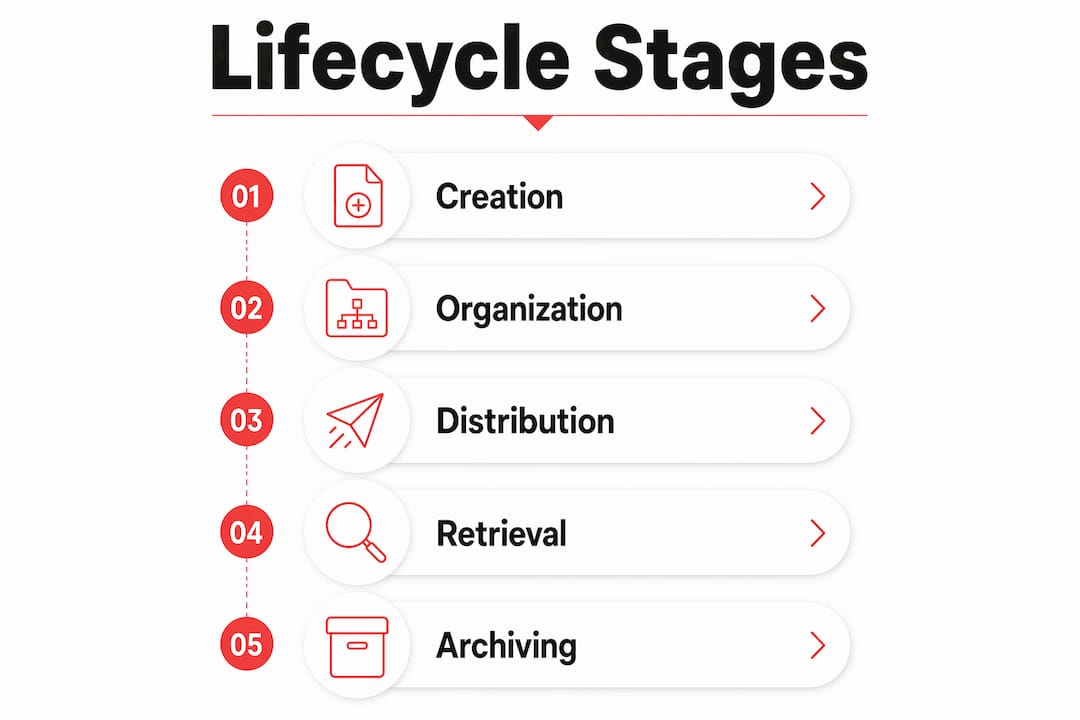
Creation is where governance either starts strong or falls apart. Files named “final_v3_REAL.jpg” with no metadata are a liability from day one. The Organization and Management stage is where digital asset management software earns its keep. Tools like Cloudinary and Bynder centralize storage and apply taxonomy that makes every subsequent stage faster.
Distribution is the most visible stage and the riskiest if rights management is weak. Automated workflows in platforms like Cloudinary prevent expired asset use and enforce brand compliance at the point of delivery. Retrieval depends entirely on how well the earlier stages were executed. If metadata is thin, search fails and teams revert to email chains asking “does anyone have the latest version?”
Archiving is the most neglected stage in most organizations. Moving assets to low-cost storage after active use improves system speed and reduces the risk of obsolete content being reused in new campaigns.
Pro Tip: Set your file naming convention and required metadata fields before you ingest a single asset into your DAM. Retroactive tagging is error-prone and costs far more time than upfront governance.
How does DAM technology support the digital asset lifecycle?
Digital asset management software is the infrastructure that makes lifecycle governance possible at scale. Without it, the lifecycle exists only in theory. With it, each stage becomes automated, auditable, and connected to the rest of your content stack.
Here is what a well-configured DAM handles across the lifecycle:
- Centralized storage: One master repository replaces scattered drives, inboxes, and shared folders. Cloudinary describes this as a metadata-driven single source of truth that moves assets across stages without manual steps.
- AI-powered tagging: Platforms like Cloudinary now deploy AI agents that auto-tag assets at ingestion, reducing the manual metadata burden that kills most governance programs.
- Rights enforcement: Automated expiration rules pull assets from active distribution channels the moment a license expires, removing human error from a high-risk process.
- Version control: Every edit creates a tracked version. Teams always know which file is current and who changed it.
- CMS and PIM integration: Effective DAM integrates with content management systems and product information management tools, so assets flow to the right channels without manual handoffs. Confusing a CMS with a DAM is a common mistake. The DAM is the master repository for source-of-truth files. The CMS is the publication endpoint. Mixing them causes file fragmentation and version chaos.
Pro Tip: Apply metadata standards at ingestion, not after the fact. Retroactive tagging is error-prone and resource-intensive. Build your taxonomy before your first upload.
For teams exploring how CMS features connect with DAM workflows, the Rule27design guide on CMS and content workflows covers the integration points in practical detail.
What are the common challenges in digital asset lifecycle management?
The lifecycle looks clean on a diagram. In practice, it is messier. Lifecycle stages are not strictly linear. Assets wander across teams, get renamed, duplicated, and redistributed without anyone updating the metadata. Here are the challenges that show up most often:
- Zombie assets: Files that have no clear lifecycle endpoint persist indefinitely. They clutter systems, confuse teams, and create legal risk from expired licenses. Cloudinary calls this the invisible lifecycle problem. It is more common than most organizations admit.
- Version control failures: When assets live in multiple locations, teams work from different versions. A campaign goes live with last year’s logo. A product image shows a discontinued color. These are not edge cases. They happen regularly in organizations without centralized DAM governance.
- Under-resourced archival: Most teams invest in creation and distribution tools and ignore archival entirely. Assets pile up in active systems, slowing search performance and increasing the odds of outdated content reuse.
- Overlapping lifecycle phases: An asset can be in distribution for one team while another team is already creating a replacement. Without clear governance, both versions circulate simultaneously.
- Compliance exposure: Expired rights, missing attribution, and undocumented deletion create legal risk. A controlled deletion workflow is not optional for organizations operating at scale.
The fix for most of these challenges is the same: centralized DAM governance with metadata automation and clear lifecycle policies. That means defining who owns each stage, what triggers a transition to the next stage, and what “retired” actually means for your organization.
How does lifecycle optimization improve content strategy and team operations?
Mastering the digital asset lifecycle pays off in ways that show up directly in content performance and team efficiency. Here are the operational gains organizations see when lifecycle management is working:
- Faster content delivery. When assets are tagged, organized, and rights-cleared at ingestion, distribution takes minutes instead of hours. Teams stop waiting for approvals on files that should already be ready.
- Stronger brand alignment. Centralized governance means every team pulls from the same approved asset library. Outdated logos and off-brand imagery disappear from campaigns because the lifecycle controls what is available.
- Less time searching. Lifecycle governance reduces asset search time and improves cross-team collaboration. The average knowledge worker spends a significant portion of their week looking for files. A well-governed DAM cuts that time sharply.
- Lower risk of outdated content reuse. Automated expiration and archival workflows remove retired assets from active circulation. Teams cannot accidentally use what is no longer available.
- Better cross-system integration. When your DAM connects to your CMS, PIM, and content marketing automation tools, assets flow through your entire stack without manual intervention. That connection is where lifecycle management becomes a genuine content strategy advantage.
For teams managing content across multiple channels, the Rule27design guide on multichannel content management covers how lifecycle governance supports distribution at scale.
Key Takeaways
The digital asset lifecycle is the operational foundation that determines whether your content strategy scales or stalls, and governance at every stage is what separates high-performing teams from those constantly fighting fires.
| Point | Details |
|---|---|
| Five core lifecycle stages | Creation, Organization, Distribution, Retrieval, and Archival each require distinct governance. |
| DAM is not static storage | Treat your DAM as an active, metadata-driven system that automates stage transitions. |
| Metadata governance starts at ingestion | Setting taxonomy and tagging rules upfront prevents costly retroactive cleanup. |
| Zombie assets are a real risk | Files without lifecycle endpoints create clutter, version confusion, and legal exposure. |
| Lifecycle optimization speeds delivery | Governed assets move faster through your content stack and reduce brand inconsistency. |
Why most teams get the lifecycle backwards
Here is what I see consistently when working with growth-stage companies: they invest heavily in creation tools and almost nothing in governance. The DAM gets set up once, nobody defines a taxonomy, and within six months the system is a digital junk drawer. Everyone blames the tool. The tool is not the problem.
The real issue is treating the lifecycle as an IT project instead of a content operations discipline. Metadata is not a technical detail. It is the connective tissue that makes every downstream stage work. When you skip metadata governance at ingestion, you are not saving time. You are borrowing it at a very high interest rate.
I also think the archival phase gets dismissed because it feels like housekeeping. It is not. Controlled archival is what keeps your active library clean, your search results relevant, and your legal exposure low. Organizations that neglect it end up with zombie assets circulating in campaigns years after their rights expired.
The shift I am most excited about in 2026 is the move toward agentic DAM systems. Platforms like Cloudinary are deploying AI agents that monitor asset usage, flag lifecycle transitions, and trigger automated workflows without human input. That is not a feature. That is a fundamentally different way of thinking about what a DAM does. It stops being a place you put files and starts being a system that manages them for you.
If you take one thing from this: build your metadata standards before you upload your first asset. Everything else in the lifecycle depends on it.
— Josh
How Rule27design builds systems that manage the full asset lifecycle
Rule27design builds the kind of digital infrastructure that makes lifecycle governance practical for growth-stage teams. The Innovation Lab is where we develop and test next-generation asset management workflows, including AI-powered tagging systems, automated rights enforcement, and DAM integrations that connect directly to your CMS and marketing stack. If your team has outgrown basic file storage but is not ready for enterprise DAM complexity, that is exactly the gap we work in. Our clients typically see a 40% improvement in operational efficiency after implementing systems designed around how their teams actually work.
FAQ
What is the digital asset lifecycle in simple terms?
The digital asset lifecycle is the defined path a digital file takes from creation through archival or deletion. It covers five core stages: Creation, Organization, Distribution, Retrieval, and Archiving.
How many stages does the digital asset lifecycle have?
The lifecycle generally comprises five to six phases: Creation, Storage and Organization, Management, Distribution, Retrieval, and Archiving or Retirement. Some frameworks combine Organization and Management into a single stage.
What is the difference between a DAM and a CMS?
A DAM is the master repository for source-of-truth files, while a CMS is the publication endpoint. Mixing the two causes file fragmentation and version control failures.
Why is metadata so important in digital asset lifecycle management?
Metadata drives every automated workflow in a DAM system. Applying metadata rules at ingestion is critical because retroactive tagging is error-prone and resource-intensive, creating bottlenecks across every downstream lifecycle stage.
What are zombie assets and why are they a problem?
Zombie assets are files that have no clear lifecycle endpoint and persist in active systems indefinitely. They create storage clutter, confuse teams with outdated versions, and generate legal risk from expired usage rights.

About the Author
Josh AndersonCo-Founder & CEO at Rule27 Design
Operations leader and full-stack developer with 15 years of experience disrupting traditional business models. I don't just strategize, I build. From architecting operational transformations to coding the platforms that enable them, I deliver end-to-end solutions that drive real impact. My rare combination of technical expertise and strategic vision allows me to identify inefficiencies, design streamlined processes, and personally develop the technology that brings innovation to life.
View Profile

