

Learn why 70% of SaaS startups switch CRMs by Series A. Discover the strategy behind successful customer relationship management for growth-stage companies.
Many business leaders believe CRM is simply a software platform you purchase and deploy. That’s a costly misconception. CRM is fundamentally a strategic approach to managing customer relationships, with software serving as the enabling tool. For growth-stage SaaS companies, understanding this distinction becomes critical as you scale beyond founder-led sales and navigate complex subscription lifecycles. This guide breaks down what CRM truly means, why SaaS companies face unique challenges, and how to implement systems that actually drive retention and revenue growth.
Key Takeaways
| Point | Details |
|---|---|
| CRM is strategy | CRM is a strategic approach to managing customer relationships, with software serving as the enabling tool. |
| SaaS lifecycle tracking | For SaaS, CRM must track ongoing subscription lifecycles including monthly recurring revenue MRR, annual recurring revenue ARR, customer lifetime value, and churn risk signals. |
| Billing integrations required | Billing platform integrations with Stripe, Chargebee, or Recurly are non negotiable to automate revenue data and reduce manual entry. |
| Single source of truth | A unified data layer enables cross functional teams to coordinate actions and reduce misalignment. |
What is CRM and why it matters for SaaS growth
CRM stands for Customer Relationship Management, a strategy that places customer needs at the center of business processes for acquisition and retention, supported by software systems. The distinction between strategy and tool matters enormously. You can implement sophisticated CRM software and still fail if your organization lacks a customer-first approach across sales, support, and product teams.
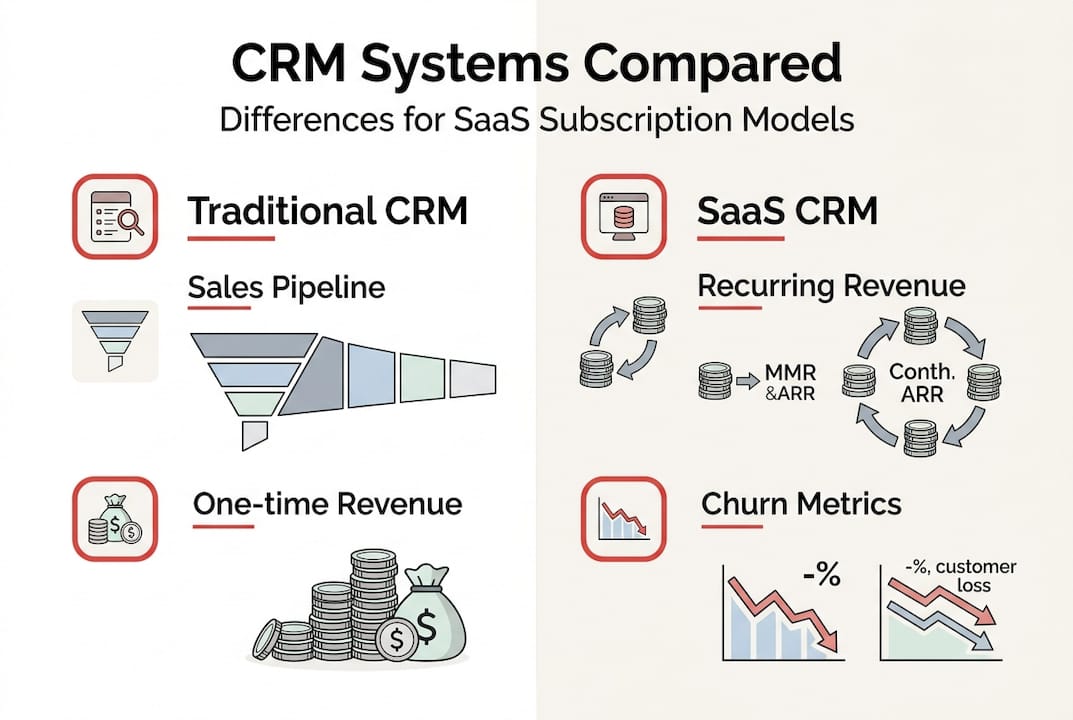
For SaaS companies specifically, CRM takes on additional complexity. You’re not managing one-time transactions. You’re orchestrating ongoing relationships through trial conversions, subscription renewals, expansion revenue, and churn prevention. Your CRM needs to track monthly recurring revenue (MRR), annual recurring revenue (ARR), customer lifetime value, and engagement metrics that predict renewal likelihood.
This fundamental difference explains why 70% of SaaS startups switch CRMs by Series A funding. Generic CRM platforms built for traditional sales cycles simply don’t handle subscription economics well. You need systems that integrate with billing platforms, automate trial-to-paid workflows, and surface churn risk signals before customers cancel.
The strategic value becomes clear when you consider team alignment. Without centralized customer data, your sales team operates with different information than support, while product teams make decisions in isolation. CRM creates a single source of truth that enables coordinated action across your entire organization.
Key strategic benefits for growth-stage SaaS companies include:
- Unified visibility into customer health scores and engagement patterns
- Automated workflows that reduce manual handoffs between teams
- Data-driven insights for predicting churn and identifying expansion opportunities
- Scalable processes that maintain personalization as you grow
The software component enables this strategy by capturing interactions, automating repetitive tasks, and providing analytics. But the software alone won’t transform your customer relationships. You need organizational commitment to customer-centricity, clean data practices, and cross-functional collaboration. That’s why understanding effective CMS features for SaaS content teams matters equally for operational success.
Core components and mechanics of SaaS CRM systems
At the foundation sits a centralized customer database. This single repository stores every interaction, transaction, support ticket, and engagement signal across your entire customer lifecycle. Without this unified data layer, you’re essentially running blind, with teams making decisions based on incomplete information.
Key mechanics include central database for customer data, cloud/SaaS vs on-premise deployment, integrations with billing like Stripe, and workflows for automation. The deployment model you choose significantly impacts implementation speed and cost structure. Cloud-based SaaS CRMs offer faster deployment with lower upfront investment compared to on-premise solutions that require dedicated infrastructure and IT resources.
For subscription businesses, billing integration becomes non-negotiable. Your CRM must connect directly with payment processors like Stripe, Chargebee, or Recurly to automatically sync subscription status, payment history, and revenue data. This integration eliminates manual data entry errors and ensures your sales and customer success teams always see accurate subscription information.

Automated workflows transform how your team operates. Instead of manually assigning leads, sending follow-up emails, or escalating at-risk accounts, you build rules-based automation that handles routine tasks consistently. A trial user who hasn’t logged in for five days automatically triggers an engagement email and creates a task for your customer success team.
Core technical components breakdown:
- Contact and account management with hierarchical organization structures
- Deal pipeline tracking with customizable stages matching your sales process
- Activity logging that captures emails, calls, meetings, and support interactions
- Reporting dashboards showing pipeline health, conversion rates, and revenue metrics
- Mobile access enabling field sales and remote teams to update records in real time
| Component | Traditional CRM | SaaS-Optimized CRM |
|---|---|---|
| Revenue tracking | One-time deal value | MRR, ARR, expansion revenue |
| Customer stages | Lead to closed-won | Trial, freemium, paid tiers, churned |
| Key metrics | Win rate, deal size | Churn rate, LTV, CAC payback |
| Integration priority | Email, calendar | Billing, product analytics, support |
The difference in metric focus reveals why generic CRMs struggle with subscription models. You need systems built specifically for recurring revenue businesses that understand the nuances of workflow efficiency in SaaS operations.
Pro Tip: Start with billing integration before building complex workflows. Accurate revenue data forms the foundation for every other automation and insight your CRM will provide. Without clean financial data flowing automatically, you’ll spend endless hours reconciling discrepancies instead of optimizing customer relationships.
Modern SaaS CRMs also incorporate product usage data through reverse ETL pipelines or direct integrations with analytics platforms. This connection lets you see which features customers actually use, correlate usage patterns with renewal likelihood, and trigger interventions when engagement drops. The technical architecture supporting these integrations requires careful planning but delivers transformative visibility into customer health. Understanding SaaS CMS features helps you appreciate how integrated systems create compound value.
Challenges and pitfalls in CRM implementation for SaaS companies
The statistics are sobering. More than 55% of CRM deployments fail to meet their stated objectives, with poor data quality and organizational misalignment driving most failures. The technology itself rarely causes problems. The human and process factors surrounding implementation determine success or failure.
Data migration represents the first major hurdle. You’re moving years of customer information from spreadsheets, old systems, and siloed databases into your new CRM. Every inconsistency, duplicate record, and formatting error gets amplified. A customer listed as “ABC Corp” in one system and “ABC Corporation” in another becomes two separate accounts, fragmenting your view of that relationship.
Complex workflows need thorough testing before rollout, yet many companies skip this step in their rush to launch. An automation that looked perfect in theory breaks in production because it didn’t account for edge cases. A lead assignment rule accidentally routes enterprise deals to junior reps. An email workflow sends duplicate messages because multiple triggers fire simultaneously.
The artificial intelligence and machine learning features many modern CRMs promote create their own challenges. ML projects fail 55% to 85% of the time due to data quality issues and organizational readiness gaps. Predictive lead scoring sounds powerful until you realize your historical data contains biases that the algorithm amplifies. Churn prediction models trained on incomplete data generate false positives that waste your team’s time.
Common implementation pitfalls include:
- Customizing too heavily upfront before understanding actual workflow needs
- Failing to establish data governance policies and ownership
- Underestimating change management and user training requirements
- Choosing features based on demos rather than actual business processes
- Neglecting integration testing between CRM and billing, support, product systems
Organizational factors predict success more reliably than technology choices. A company with strong cross-functional collaboration and executive sponsorship will succeed with a basic CRM. A siloed organization with competing priorities will struggle even with the most sophisticated platform.
“The paradox of ML in CRM is that the companies who need it most, those with messy data and unclear processes, are least prepared to implement it successfully. Meanwhile, companies with clean data and solid processes often don’t need ML to achieve their goals.”
Integration complexity grows exponentially with each connected system. Your CRM needs to talk to billing, support ticketing, marketing automation, product analytics, and data warehouses. Each integration point introduces potential failure modes. An API rate limit causes data sync delays. A schema change in your billing system breaks the revenue import. Troubleshooting these issues requires technical expertise many teams lack.
The CRM testing guide emphasizes end-to-end validation before launch, yet time pressure pushes companies to skip comprehensive testing. You discover workflow bugs only after sales reps complain about missing leads or customers receive inappropriate automated emails. By then, you’ve damaged both internal adoption and customer relationships.
Understanding these challenges helps you plan more realistic implementations. The companies that succeed treat CRM adoption as an organizational change initiative, not a technology project. They invest in data cleanup, process documentation, user training, and iterative rollout. They also leverage insights from AI-powered content checklists to ensure systematic validation of each implementation phase.
Best practices and strategies for successful CRM adoption in SaaS
Successful implementations follow a structured approach. The recommended playbook spans 8 to 16 weeks with phased rollout, cross-functional planning teams, and clear success metrics established upfront. Rushing this timeline almost guarantees problems. Taking too long causes momentum loss and scope creep.
Your first priority is achieving high user adoption quickly. Target 80% of users actively engaging with the CRM within 30 days of launch. This metric matters more than feature completeness or customization depth. A simple CRM that everyone uses beats a sophisticated system that sits empty because reps find it too complex or time-consuming.
For growth-stage SaaS specifically, prioritize SaaS-native CRMs like HubSpot or Attio with built-in MRR tracking, subscription lifecycle management, and billing integrations. These platforms understand recurring revenue models from the ground up. Generic CRMs require extensive customization to handle subscription economics, which increases implementation cost and ongoing maintenance burden.
Data quality deserves obsessive attention from day one. Establish clear data governance policies covering:
- Required fields and validation rules for each record type
- Naming conventions for accounts, contacts, and deals
- Duplicate detection and merge procedures
- Data ownership and update responsibilities by team
- Regular audit schedules to catch and correct errors
Integrate your billing system before building complex workflows. Accurate revenue data flowing automatically into your CRM enables every other insight and automation. Without this foundation, you’ll constantly reconcile discrepancies between systems instead of optimizing customer relationships.
Pro Tip: Start with operational CRM capabilities like contact management and basic workflows before layering in analytical features. Get your team comfortable with daily usage patterns first. Once adoption solidifies, add advanced analytics, forecasting, and AI features that require clean historical data to function properly.
Phased rollout reduces risk and enables learning. Begin with a pilot group of power users who can provide detailed feedback and become internal champions. Use their input to refine workflows and training before expanding to the full organization. This approach also lets you validate integrations with real data at manageable scale.
Focus areas for operational versus analytical CRM:
| Operational CRM | Analytical CRM |
|---|---|
| Lead capture and assignment | Churn prediction models |
| Email and calling workflows | Revenue forecasting |
| Task and activity management | Cohort analysis |
| Quote and proposal generation | Customer segmentation |
| Support ticket integration | Pipeline health metrics |
The operational capabilities drive daily usage and adoption. The analytical features provide strategic insights for leadership. You need both, but operational comes first because it creates the data analytical features require.
Cross-functional planning teams prevent siloed implementations. Include representatives from sales, customer success, support, finance, and product in your CRM planning process. Each team has unique workflow requirements and data needs. Designing in isolation leads to systems that work for one group but create friction for others. Understanding workflow visibility and efficiency gains helps teams appreciate how integrated planning benefits everyone.
Test extensively before launch. The CRM implementation playbook emphasizes end-to-end validation of every workflow, integration, and automation. Create test scenarios covering common cases and edge cases. Verify data flows correctly between systems. Confirm automated emails trigger appropriately and contain accurate information. This upfront investment prevents embarrassing failures after launch.
Measure adoption and impact continuously. Track daily active users, data completeness, workflow utilization, and business outcomes like sales cycle length or customer retention rates. These metrics reveal whether your CRM delivers promised value or needs adjustment. Regular measurement also maintains executive sponsorship by demonstrating ROI.
The companies achieving 40% operational efficiency improvements through CRM adoption follow these practices religiously. They treat implementation as organizational transformation, not software installation. They invest in change management, training, and continuous optimization. Most importantly, they maintain focus on user adoption and data quality as the twin foundations of CRM success.
Explore tailored CRM solutions with Rule27 Design
Implementing CRM strategy successfully requires more than choosing the right software. You need systems designed specifically for your workflows, integrated seamlessly with your existing tools, and built to scale as your company grows. That’s where specialized expertise makes the difference between transformative success and expensive failure.
Rule27 Design creates custom SaaS CRM solutions for growth-stage companies who’ve outgrown basic tools but aren’t ready for complex enterprise platforms. We design systems that match how your teams actually work, with clean interfaces your people want to use and robust architecture that handles your subscription complexity. Our clients typically see 40% operational efficiency improvements and significant gains in customer retention after implementation. We can help you avoid the common pitfalls that sink CRM projects and build infrastructure that drives genuine business value. Explore our custom CRM solutions comparison to understand your options and find the right approach for your specific needs.
Frequently asked questions
What is the difference between CRM software and CRM strategy?
CRM software provides the tools to manage customer information, track interactions, and automate workflows. CRM strategy defines your overall approach to customer relationships, including how you acquire, retain, and grow accounts across your organization. The software enables the strategy, but technology alone won’t transform your customer relationships without organizational commitment to customer-centric processes and cross-functional collaboration.
How do SaaS CRMs handle subscription lifecycles differently from traditional CRMs?
SaaS CRMs track trials, monthly recurring revenue (MRR), annual recurring revenue (ARR), and churn metrics that don’t exist in traditional one-time sales models. They integrate directly with billing platforms to automatically sync subscription status, payment history, and revenue data. This fundamental difference in revenue model requires different metrics, workflows, and reporting compared to CRMs built for transactional sales.
What are common reasons CRM projects fail and how can they be avoided?
Failures typically stem from poor data quality during migration, untested workflows that break in production, and inadequate change management that prevents user adoption. Organizations can significantly improve success rates through phased rollouts spanning 8 to 16 weeks, cross-functional planning teams that include all stakeholders, strong data governance policies established upfront, and comprehensive testing before launch. Treating CRM as an organizational change initiative rather than a technology project makes the critical difference.
Which SaaS-native CRMs are recommended for growth-stage companies?
HubSpot and Attio stand out for their built-in MRR tracking, subscription lifecycle management, and extensive integration capabilities with billing and product analytics platforms. These platforms understand recurring revenue models from the ground up and scale effectively as companies grow. They offer the workflow automation and analytical capabilities growth-stage SaaS companies need without the complexity and cost of enterprise solutions designed for much larger organizations.

About the Author
Josh AndersonCo-Founder & CEO at Rule27 Design
Operations leader and full-stack developer with 15 years of experience disrupting traditional business models. I don't just strategize, I build. From architecting operational transformations to coding the platforms that enable them, I deliver end-to-end solutions that drive real impact. My rare combination of technical expertise and strategic vision allows me to identify inefficiencies, design streamlined processes, and personally develop the technology that brings innovation to life.
View Profile

