

Unlock powerful CMS capabilities to supercharge your SaaS content workflows. Discover how to enhance speed and scalability today!
TL;DR:
- Most SaaS content teams underestimate how outdated their CMS is, which hampers scaling efficiency. Implementing features like agentic routing and tenant-aware governance significantly accelerates content production and enhances security. A strategic, process-driven CMS approach tailored to organizational needs ensures sustained growth and operational excellence.
Most SaaS content teams don’t realize how far behind their CMS is holding them. Content ops benchmarks for 2026 show that agentic-routing teams ship content 2.6 times faster than those using manual workflows. That gap is enormous when you’re trying to scale from 5 pieces a month to 50. This guide breaks down the CMS capabilities that actually move the needle, from foundational workflow features to advanced governance, so you can build a system that matches the pace your growth demands.
Key Takeaways
| Point | Details |
|---|---|
| Speed drives value | Agentic routing and automation enable SaaS teams to ship content over twice as fast as manual processes. |
| Governance is critical | Granular, scalable permissions like tenant-aware enforcement protect teams from data leaks and role chaos. |
| Features must fit needs | Overloading your CMS with unnecessary features hinders adoption more than it helps. |
| Operationalize your roadmap | Link feature choices to measured workflow bottlenecks instead of blindly checking feature lists. |
Why CMS capabilities matter for scaling SaaS
Your CMS isn’t just a place to store blog posts. For a scaling SaaS company, it’s the operational backbone that either speeds everything up or quietly chokes your content output. Most teams only realize this when they’re already stuck.
Here’s what that looks like in practice. A growth-stage SaaS company hitting $10M ARR typically runs a content team of around 3.2 full-time employees. By $50M ARR, that same team is expected to ship 14 or more long-form pieces per month. Without the right CMS capabilities, you’re asking a small team to work dramatically harder instead of smarter. The bottlenecks that kill velocity tend to be very predictable.
Common friction points teams run into:
- Siloed workflows where writers, editors, and SEO leads work in disconnected tools
- Manual content routing that eats hours every week on assignments and approvals
- Inconsistent governance creating duplicate content, broken taxonomy, and compliance gaps
- Poor visibility into what content exists, what’s performing, and what’s next in the queue
“The right CMS doesn’t just store content. It routes work, enforces standards, and surfaces the right piece to the right person at exactly the right time.”
The CMS features built for SaaS teams aren’t optional upgrades. They’re the difference between shipping consistently and scrambling to catch up. Invest early in capabilities that automate routing, enforce structure, and keep your content visibility checklist updated, and you protect both your output quality and your team’s focus.
The business consequences of ignoring this are real. Poor governance leads to content leaks in multi-tenant environments. Manual routing causes missed deadlines. Weak taxonomy makes search and discovery a mess. Each of these directly hits pipeline, not just productivity.
Core CMS capabilities: The essential feature set
With the case for a robust CMS clear, let’s break down the features your system must deliver to handle SaaS content at scale. These aren’t nice-to-haves. They’re the minimum viable foundation.
Editorial workflow and agentic routing
Agentic routing is where the biggest gains hide. When your CMS automatically assigns tasks, triggers approvals, and escalates blockers without human intervention, your team stops being a coordination machine and starts being a creation machine. Teams using agentic routing report shipping content 2.6 times faster than teams still relying on manual handoffs.

Granular role-based access control
Access control isn’t just a security feature. It’s a workflow feature. When the right people can see and edit only what they’re supposed to, you eliminate accidental overwrites, approval chaos, and permission bottlenecks. A well-designed web CMS treats RBAC as a first-class feature, not an afterthought.
Search, taxonomy, and automated surfacing
If your team can’t find what already exists, they’ll recreate it. Strong taxonomy and search capabilities prevent duplicated effort, surface relevant assets during creation, and keep your content catalog organized as you scale into hundreds of pieces.
Integrated media asset management
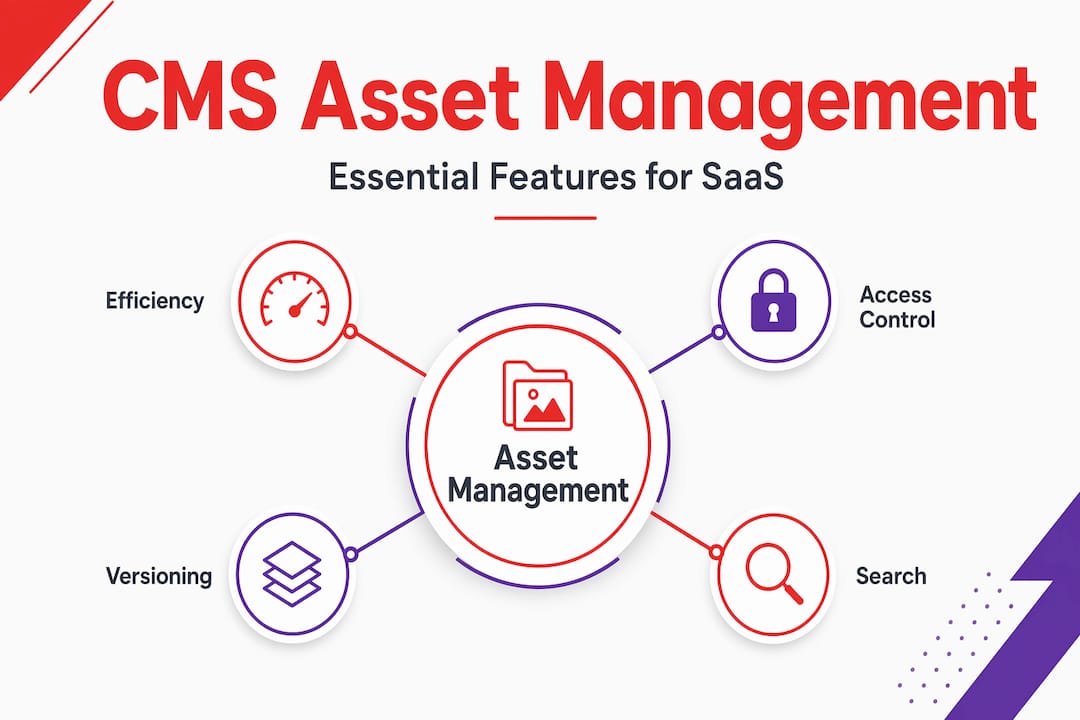
Disconnected media libraries create friction every time someone needs an image, video, or design file. Efficient media asset management keeps files tagged, versioned, and accessible without leaving the CMS. That’s hours saved per week at scale.
Scalable content delivery via APIs
Multi-channel publishing is standard now. Your CMS needs to push content to your blog, in-app product hub, help center, and partner portals without manual re-entry. API-first delivery makes this seamless. It also future-proofs your stack as new channels emerge.
Here’s a quick feature priority matrix to guide your planning:
| CMS capability | Impact on velocity | Complexity to implement | Priority level |
|---|---|---|---|
| Agentic routing | Very high | Medium | Immediate |
| Granular RBAC | High | Medium | Immediate |
| API-first delivery | High | Low to medium | Short-term |
| Integrated media management | Medium | Low | Short-term |
| Automated taxonomy/search | Medium | Medium | Mid-term |
| Tenant-aware enforcement | High (for multi-product) | High | Mid-term |
For CMS collaboration features, prioritize based on where your team is losing the most time today. Don’t build everything at once.
Pro Tip: Map your three biggest workflow bottlenecks before evaluating any CMS feature. Every tool claims to solve everything. Your job is to find the one that solves your specific friction points first. And make sure you’re looking at AI content safety if you’re integrating any AI-assisted creation into your workflow.
Edge cases: Advanced governance and SaaS multi-tenancy
Beyond the essentials, advanced content ops demand special consideration for governance and multi-tenancy. This is where many teams stumble, often without realizing it until something breaks.
Multi-tenancy is a SaaS-specific complexity. If your platform serves multiple customers or internal business units, each with their own content needs, your CMS needs to enforce strict separation at the data and permission level. Without it, you risk content leaks between tenants, which is a serious security and trust problem.
Granular RBAC prevents role explosion by separating roles from specific resource permissions. This distinction matters a lot. In a typical growing SaaS team, roles multiply fast as new departments, contractors, and product lines get added. If every new role means a new set of global permissions, governance becomes a nightmare within months.
Here’s how the three main permission approaches compare:
| Approach | How it works | Best for | Risk level |
|---|---|---|---|
| Manual RBAC | Admins assign fixed roles with preset permissions | Small teams, simple content | High at scale |
| Agentic RBAC | Permissions adjust dynamically based on workflow context | Mid-size fast-moving teams | Medium |
| Tenant-aware RBAC | Permissions scoped to tenant, resource, and role | Multi-product SaaS platforms | Low with proper setup |
Avoid the common CMS mistakes in SaaS by setting up your permission architecture before you scale, not after.
Steps to implement effective multi-tenant governance:
- Audit your current permission structure. List every role and what it can access. This alone usually reveals problems.
- Separate roles from resource permissions. Roles define what someone does. Resource permissions define what they can touch. Keep these distinct.
- Create tenant namespaces. Each customer or business unit gets a permission boundary. Content inside one namespace stays there.
- Document escalation paths. Who can override? Who approves cross-tenant access requests? Write it down before someone guesses.
- Test with simulated edge cases. Try logging in as a low-permission user and accessing content from another tenant. If you can see anything you shouldn’t, the architecture needs work.
And for ongoing iteration, CMS for iteration frameworks are worth reviewing as you refine your governance model over time.
Pro Tip: Always review permission boundaries before onboarding any new team, department, or customer tier. What seems like a minor addition can create unexpected access overlaps that are hard to untangle later.
From theory to practice: Building your CMS capability roadmap
With advanced requirements mapped out, here’s how to build a practical CMS implementation plan that fits your growth trajectory. A roadmap without prioritization just becomes a wish list.
Start by benchmarking where you are now. Most teams skip this step and end up implementing features they don’t actually need while ignoring the ones that would help most. Pull real numbers. How many pieces does your team ship per month? How long does the average approval cycle take? Where do drafts get stuck the longest?
Steps to build your CMS capability roadmap:
- Map your current workflow end to end. Include every handoff, tool, and manual decision point. Visualizing this usually makes bottlenecks obvious immediately.
- Rank friction points by impact and frequency. A bottleneck that affects every piece every day ranks higher than one that shows up monthly.
- Identify the CMS capabilities that directly address your top three friction points. Don’t go beyond three in your first rollout. Scope creep kills momentum.
- Run a pilot with a subset of your content operation. Test the new capability with one content type or one team before rolling out broadly.
- Measure workflow cycle time before and after. Cycle time, the number of days from brief to publish, is the cleanest metric for CMS impact. Also track FTE hours spent on coordination vs. creation.
- Iterate based on what you learn. Your first rollout will surface new friction points you didn’t anticipate. That’s fine. Build in a review cycle every 60 days.
To measure content performance effectively, connect your CMS data to your analytics pipeline early. Teams that wait to set this up regret it. And if you’re building custom infrastructure to support this, a solid SaaS backend architecture review is worth doing in parallel.
Teams with agentic routing don’t get there overnight. They pick one workflow improvement, prove the gain, and then expand. That’s the pattern worth copying.
Pro Tip: Start your roadmap with content visibility gaps, not just workflow speed. A team that ships fast but publishes content nobody can find has solved the wrong problem.
Beyond features: Why your CMS is a strategy lever, not just a tool
Here’s a take worth sitting with. Most CMS conversations stay at the feature level. Workflow automation. Permissions. APIs. These matter, but the teams that get the most out of their CMS investment aren’t the ones with the longest feature list. They’re the ones who designed their system around how their team actually thinks and works.
The “more features” trap is real. We’ve seen growth-stage SaaS companies invest in sophisticated CMS platforms and see almost no efficiency gain, because the platform wasn’t shaped around their specific content motion. A complex tool that nobody uses consistently is worse than a simple one that everyone trusts.
What actually drives competitive content velocity isn’t the feature count. It’s the fit between your process and your system. Teams that invest early in mapping their editorial process, then selecting and customizing their CMS accordingly, consistently outperform teams that do it the other way around.
The early adopters of agentic routing and tenant governance aren’t just moving faster. They’re building institutional process knowledge. Every iteration on their CMS teaches them something about how content flows through their organization. That knowledge compounds. A year in, they’re not just faster. They’re fundamentally more capable.
The AI-powered marketing ROI story is similar. The returns don’t come from plugging in AI features. They come from rethinking the workflow that AI sits inside.
Treat your CMS evolution as a strategic process. Not a checklist you complete once. Not a platform you buy and deploy. A living system you design, test, and refine as your team and your content operation grow. The teams winning on content velocity in 2026 started making intentional CMS decisions two years ago. The best time to start is now.
Accelerate your SaaS content with Rule27’s innovation lab
If this guide has you rethinking what your content stack should actually look like, you’re not alone. Most growth-stage SaaS teams we talk to are somewhere between outgrowing their basic tools and not quite ready for heavyweight enterprise software.
That’s exactly the gap Rule27 Design was built for. Our Innovation Lab exists to design and build custom CMS solutions that match how your team actually works, not how a generic platform assumes you work. From agentic routing to tenant-aware governance to AI-optimized content systems, we build infrastructure that scales with you. Check out our full CMS capabilities to see what a tailored build could look like for your operation. Or reach out directly for a capability assessment. No pitch, just a real conversation about your content workflow.
Frequently asked questions
What are the most important CMS capabilities for SaaS teams?
Granular permissions, workflow automation, tenant-aware enforcement, and solid integration options top the list. RBAC and tenant enforcement are especially critical for SaaS environments with multiple product lines or customer segments.
How do agentic-routing teams achieve faster content delivery?
By automating content assignment and decision trees, teams cut manual coordination and reduce handoff delays. Agentic routing enables output up to 2.6 times faster than traditional manual workflows.
What is tenant-aware enforcement in a CMS?
Tenant-aware enforcement means each customer’s or business unit’s content and permissions are strictly isolated. Tenant separation prevents data leaks between accounts and is critical for SaaS platforms serving multiple customers.
How can teams avoid CMS role explosion?
Separate roles from resource-level permissions and use layered permission structures to stay scalable. Granular RBAC frameworks keep governance clean as team size and content complexity grow.
What operational benchmarks should SaaS teams track for CMS efficiency?
Track FTE allocation to coordination versus creation, long-form output per month, and average workflow cycle time. Baseline content ops metrics help you see whether CMS improvements are actually moving the needle.

About the Author
Josh AndersonCo-Founder & CEO at Rule27 Design
Operations leader and full-stack developer with 15 years of experience disrupting traditional business models. I don't just strategize, I build. From architecting operational transformations to coding the platforms that enable them, I deliver end-to-end solutions that drive real impact. My rare combination of technical expertise and strategic vision allows me to identify inefficiencies, design streamlined processes, and personally develop the technology that brings innovation to life.
View Profile

