

Discover what is web CMS and how it transforms content management. Boost your team's efficiency and analytics with our comprehensive guide.
TL;DR:
- A web CMS is a central control system that helps marketing teams manage content creation, approval, publication, and performance measurement at scale.
- Choosing the right CMS type and implementing strategic workflows are essential for optimizing content processes, analytics, and automation, leading to measurable growth.
A web CMS is not just a fancy page editor. It’s the command center for how your marketing team creates, approves, publishes, and measures content at scale. Most growth-stage marketing teams realize this too late, after they’ve already outgrown their basic tools and started losing time to messy workflows. A web content management system separates the work of managing content from the work of delivering it, which changes everything about how your team operates. This guide breaks down exactly what a web CMS is, how to pick the right type, and how to actually use it to improve workflow, analytics, and marketing results.
Key Takeaways
| Point | Details |
|---|---|
| Web CMS is critical | A web CMS powers efficient content management, enabling teams to control, plan, and scale web content for better marketing outcomes. |
| Choose the right type | Select a CMS solution that matches your team’s process and future needs, not just the latest trend. |
| Workflow and analytics boost | The best CMS platforms enhance both workflow efficiency and marketing analytics, supporting data-driven decisions. |
| Strategy drives results | Even the best CMS platform needs a clear digital strategy and team alignment to deliver measurable growth. |
Defining web CMS: What it is and how it works
A web CMS is not just a tool for editing pages. It’s a full system for managing how content moves through your organization, from first draft to live publication to performance tracking.
At its core, a web CMS has two layers. The content management application, often called the CMA, is where your team actually writes, edits, organizes, and manages content. The content delivery application, the CDA, handles how that content gets published and presented to your audience. This split matters because it means your marketing team can work on content without touching the technical delivery side. Less bottleneck. Less back and forth with developers.
The platform becomes your team’s central control center for creating and publishing web pages and media, complete with versioning, permissions, and scheduling. That means every piece of content has a history, every team member has defined access, and nothing goes live before it’s supposed to.
Here’s what that looks like in practice for a typical marketing team:
- Versioning: Writers and editors can see every change made to a piece of content and roll back when needed.
- Permissions: You control who can write, edit, approve, or publish. No more accidental live edits from junior team members.
- Scheduling: Set content to publish at peak times automatically. No one needs to be online at midnight.
- Media management: All your images, videos, and assets live in one organized library, reusable across campaigns.
- Workflow stages: Content moves from draft to review to approval to live with clear accountability at each step.
These aren’t bonus features. They’re the essential CMS features that separate a professional content operation from a chaotic one.
| CMS feature | Workflow impact | Analytics impact |
|---|---|---|
| Versioning | Faster revisions, reduced errors | Track changes tied to performance shifts |
| Role-based permissions | Cleaner approval process | Attribute content output by team member |
| Scheduling | Consistent publishing cadence | Correlate publish timing to traffic spikes |
| Media management | Faster asset reuse | Identify top-performing visual assets |
| SEO metadata controls | On-page optimization built in | Monitor keyword and ranking performance |
| Content tagging | Better content organization | Filter analytics by topic or campaign |
A web CMS done right doesn’t just store your content. It structures how your team thinks about and executes content strategy.
Common CMS types and how they compare
Understanding CMS architecture is important because the type of CMS separates content creation and delivery in very different ways. Choosing the wrong type early on creates expensive problems later.
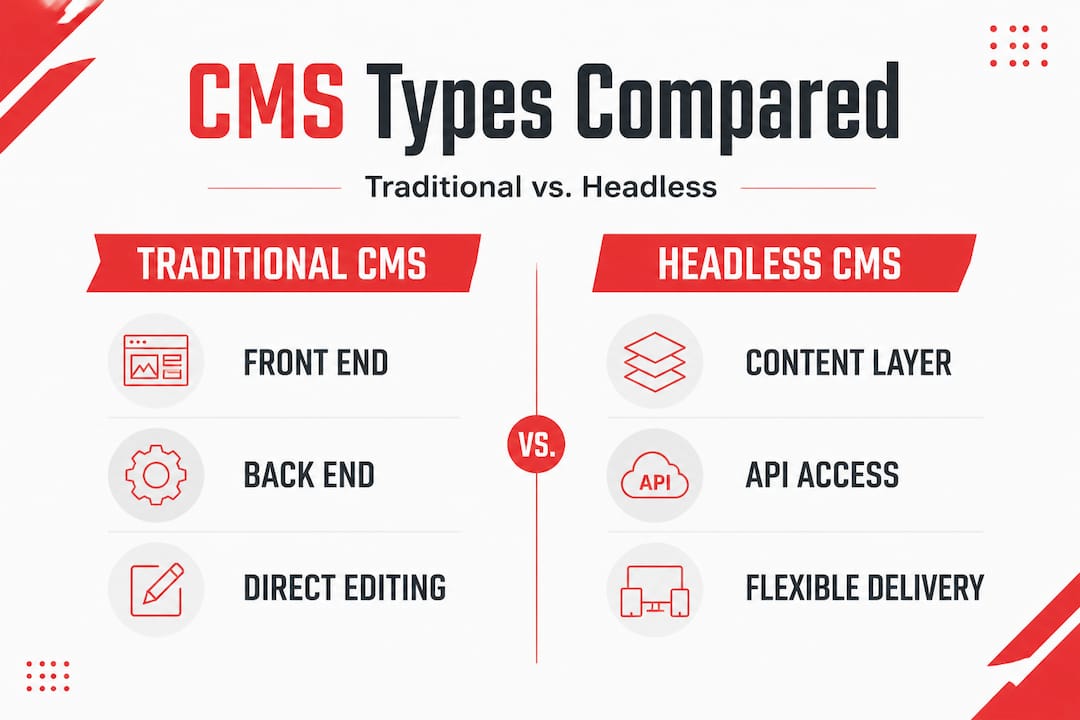
Traditional CMS platforms like WordPress or Drupal give you a connected front end and back end. What you manage in the editor is what visitors see on the site. These are fast to set up and easy for non-technical teams to use. But they can get slow, hard to customize, and difficult to scale if your tech stack grows.

Headless CMS platforms separate the content layer completely from the presentation layer. Your content is stored and managed in the CMS, then delivered via an API to whatever front end you choose: a website, a mobile app, a chatbot, an email template. This gives developers maximum flexibility, but it adds complexity and usually requires more technical resources.
Hybrid CMS platforms try to give you both options. You get the simplicity of traditional editing along with API access for custom delivery. These are often the best fit for growth-stage teams who need ease of use today and flexibility tomorrow.
| CMS type | Pros | Cons | Best fit |
|---|---|---|---|
| Traditional | Fast setup, easy editing, large plugin ecosystems | Limited multi-channel delivery, can get bloated | Small to mid-size marketing teams, content-focused sites |
| Headless | Maximum flexibility, multi-channel delivery, future-proof | Needs developer resources, higher upfront cost | Tech-forward teams with custom front-end needs |
| Hybrid | Balances usability and flexibility, API-ready | Can be more expensive, requires more configuration | Growth-stage companies scaling content operations |
Before picking a CMS type, ask yourself these questions:
- Does your team have in-house developers, or do you rely on no-code tools?
- Are you publishing content to more than one channel (web, app, email, social)?
- How often does your content structure change? Weekly? Annually?
- What integrations do you need? CRM, analytics, marketing automation?
- How much is content output expected to grow in the next 12 months?
Skipping these questions leads to costly CMS mistakes that can stall your entire content program for months. Picking a platform based on hype or a competitor’s recommendation, rather than your own workflow, is the most common trap we see.
Pro Tip: Even if you start with a traditional CMS, choose one that offers API access or headless mode. You probably won’t need it on day one. But when your team scales or your product expands to new channels, you’ll be very glad it’s there.
The marketer’s advantage: Workflow, analytics, and automation with CMS
Choosing the right CMS type is just the start. The real gains come from how you use it. A CMS sits at the heart of campaign workflow, asset management, and reporting for modern marketing teams, and the right setup amplifies every part of your strategy.
Workflow wins are immediate. When your CMS has proper approval stages, your team stops chasing people on Slack for sign-off. Content moves through a defined path. Writers know what’s assigned to them. Editors know what’s waiting for review. Managers can see what’s queued for the week ahead. That kind of visibility alone saves hours every week.
Analytics integration is where it gets powerful. A well-configured CMS connects directly to your analytics stack. You can see which content formats drive the most engagement, which topics generate the most pipeline, and how content performance changes over time. This is not just vanity data. It’s the information your team needs to make smarter content decisions. When you pair this with good media asset management, you can track which visual assets drive better results and reuse them strategically.
Solid CMS-driven analytics also helps with improving content visibility across search and AI-powered discovery tools. Structured content with proper metadata, tagging, and schema is far more likely to surface in Google, ChatGPT, and Perplexity than content that’s just published and forgotten.
Automation is the multiplier. When your CMS connects to marketing automation workflows, your content operation shifts from manual to self-driving. Publishing a new case study automatically triggers an email nurture sequence. A product update post syncs to your social channels. A landing page goes live and kicks off a paid campaign. These are real, practical automations that most growth-stage teams aren’t using yet, but should be.
Here’s a quick list of practical CMS-enabled wins your team can start driving this quarter:
- Automated content distribution across email, social, and syndication platforms
- Triggered lead nurture sequences based on content a visitor reads
- Scheduled A/B testing of headlines and meta descriptions
- Automatic content audits that flag outdated posts for refresh
- Campaign-level content performance reports generated on a set schedule
- Multi-region content scheduling for global campaigns
Pro Tip: Connect your CMS to your CRM and marketing automation platform early. Even basic integrations, like tagging a lead by the content they first engaged with, create a feedback loop that improves both your content strategy and your sales process over time.
Real-world web CMS impact: Case studies and examples
Feature lists are useful. Real results are more convincing. A web CMS directly boosts content visibility and organic growth when marketing teams use it intentionally rather than just as a publishing tool.
Here are three patterns we see consistently with growth-stage marketing teams that upgrade their CMS setup:
Organic lead growth through structured content. A SaaS company with a blog-heavy content strategy migrated from a disorganized WordPress setup to a structured CMS with proper tagging, metadata control, and content scheduling. Within six months, organic traffic increased by over 60% due to better on-page SEO, consistent publishing cadence, and improved content interlinking. The team didn’t create more content. They managed what they had, better. See a detailed breakdown in this marketing CMS case study.
Workflow efficiency that cut production time in half. A B2B marketing team running a 10-person content operation had no formal approval process. Content sat in email threads. Errors made it to live pages. After implementing a CMS with structured workflow stages, approval times dropped from five days to one. Writers knew their assignments. Editors had a clear queue. Publishing moved from reactive to planned. The result was more content, less stress, and fewer errors.
Analytics clarity that changed budget decisions. A growth company was investing heavily in long-form content but had no clear data on which topics were actually converting. After integrating their CMS with their analytics and CRM, they discovered that mid-funnel comparison content drove three times more pipeline than top-of-funnel awareness posts. They shifted their content mix, reduced time spent on underperforming topics, and saw a meaningful jump in qualified leads within one quarter.
What made these results happen:
- Clear ownership of each content type within the CMS
- Consistent metadata and tagging practices from day one
- Analytics dashboards built into the CMS workflow, not bolted on after the fact
- Regular content audits scheduled directly inside the platform
For teams focused on boosting website results, the CMS setup is often the single biggest lever available. It’s not about adding more content. It’s about managing content with intention.
The biggest gains we see don’t come from switching platforms. They come from finally using the platform you already have, correctly.
What most web CMS guides miss: Why strategy matters more than features
Here’s the part most CMS guides skip. Features don’t drive results. Strategy does.
We’ve worked with marketing teams who had access to best-in-class CMS platforms and were still struggling. Slow content production. Poor analytics. No clear ownership. The tools were great. The strategy wasn’t there.
The most common trap is buying for features, not fit. Teams see a demo, get excited about automation and API integrations, and sign a contract. Three months later, half the features are unused. The team defaulted back to their old workflow. The CMS became an expensive publishing tool.
Real CMS success comes from mapping the platform to how your team actually works, not how you wish they worked. That means defining workflow stages before you configure anything. It means deciding who owns what, before you set permissions. It means knowing which metrics matter, before you integrate analytics.
A tailored digital strategy is what turns a good CMS into a growth engine. Without it, you’re just paying for a tool your team uses at 20% capacity.
The teams that win with CMS aren’t necessarily using the most advanced platform. They’re using whatever platform they have in a way that matches their goals, their team structure, and their content priorities. Strategy beats software every single time.
Turn CMS insights into growth results with Rule27
You’ve got a clear picture of what a web CMS can do. Now comes the part where it actually helps your business.

At Rule27 Design, we build content management systems and admin tools that match how your team actually works. Not off-the-shelf tools you’ll outgrow. Not enterprise platforms that need a 6-month implementation. We bridge that gap for growth-stage companies who need systems that are smart, scalable, and actually usable. Our clients typically see 40% gains in operational efficiency after implementation. You can explore the Innovation Lab to see what’s possible, or check out our full range of digital marketing solutions to find the right starting point for your team.
Frequently asked questions
How is a web CMS different from a website builder?
A web CMS offers advanced versioning, permissions, and scheduling beyond simple site editing, making it a full control center for content operations rather than just a design tool.
What are the main benefits of using a web CMS for marketers?
A web CMS streamlines content workflows, enables better asset and media management, improves analytics integration, and connects with automation platforms to drive stronger, more consistent campaigns.
Can a CMS improve SEO and content visibility?
Yes. A well-configured CMS improves content structure, metadata, and publishing consistency, which directly boosts content visibility and organic growth across search and AI-powered results.
Is a headless CMS always better for modern marketing?
Not always. Headless offers flexibility but adds technical complexity, and how a CMS separates content creation and delivery should match your team’s actual capabilities and integration requirements.
How does CMS integration with automation tools work?
When connected to your automation stack, a CMS can trigger campaigns and distribute content based on publish events, creating efficient marketing automation workflows that scale without adding manual effort.

About the Author
Josh AndersonCo-Founder & CEO at Rule27 Design
Operations leader and full-stack developer with 15 years of experience disrupting traditional business models. I don't just strategize, I build. From architecting operational transformations to coding the platforms that enable them, I deliver end-to-end solutions that drive real impact. My rare combination of technical expertise and strategic vision allows me to identify inefficiencies, design streamlined processes, and personally develop the technology that brings innovation to life.
View Profile

